
igdjlakahlpaifjlfbhocmajhpmieomi

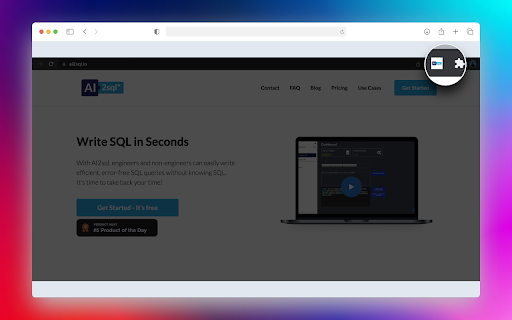
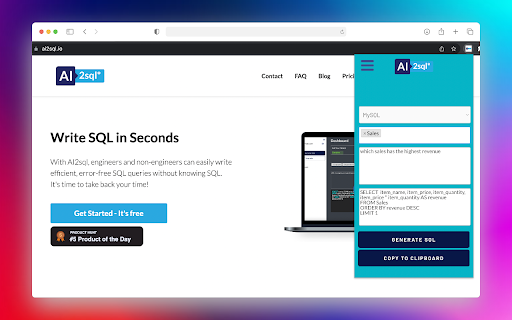
AI2sql is an AI-powered SQL generator that lets you write your SQL in seconds. Build SQL queries easily in your browser: AI2sql Chrome Extension generates an SQL query based on your input. With this simple and useful tool you'll be able to generate the query quickly from your web browser.

SQL Formatter
Want to format your SQL files so they are more readable? Use this free SQL formatter software today and you can format your SQL files for free. To get started using this SQL formatter, here is what you need to do. Copy and paste some SQL code in or load the SQL file from your local computer. Then change the output options as you wish. Choose the options you want for formatting the SQL code. Click on "Format SQL" button, you will see Formatted SQL output below. Its very simple to use this software to format your SQL files.

GA4BQ™ - GA4 BigQuery SQL Generator
GA4BQ™ - SQL generator for Google Analytics 4 on Google BigQuery, without SQL knowledge using simple visual query builder. Introducing GA4BQ™ (BETA): The Google Analytics 4 BigQuery SQL Generator Extension for Chrome. This easy-to-use extension allows you to quickly and easily generate SQL queries for Google Analytics 4 on BigQuery without the need for any prior knowledge of SQL. With just a few clicks, you can access your Google Analytics 4 data in BigQuery and start analyzing it in no time. Installation instructions =================== 1. Install the extension 2. Refresh the BigQuery tab (if it's open, and one time only) 3. Click the extension icon or open a new query tab and click the GA4BQ button. The extension is simple to use and requires no special setup. Simply install it on your Chrome browser, go to your Google Analytics 4 table in BigQuery, open a "Query" tab and click on the extension icon. You will be presented with a user-friendly interface where you can select the metrics and dimensions you want to include in your query, as well as any filters or time ranges you want to apply. To simplify, GA4BQ already includes built-in calculated dimensions and metrics so you won't have to deal with it. Once you have made your selections, the extension will automatically generate the SQL query for you. You can then copy and paste the query into the BigQuery web UI and run it to retrieve your Google Analytics 4 data. The extension is perfect for data analysts, marketers, and anyone else who needs to quickly and easily access their Google Analytics 4 data in BigQuery. With its user-friendly interface and powerful functionality, it makes it easy to get the insights you need to make data-driven decisions. The Google Analytics 4 BigQuery SQL Generator Extension is a must-have tool for anyone who needs to access their Google Analytics 4 data in BigQuery. It makes it easy to get the insights you need to make data-driven decisions, without the need for any prior knowledge of SQL. So go ahead and download the extension today and start exploring your data! Release notes for public versions of GA4BQ: ================================== 0.4.50 - Add the ability to choose a Google account instead of using the default Chrome login. 0.4.49 - Added the ability to change order of fields 0.4.48 - Fixing Sort bug for stored queries. 0.4.47 - Adding BigQuery for Google Search Console! 0.4.35 - Adding query builder for funnels! 0.4.32 - Removing auto table name fetch. Users will enter it manually. 0.4.25/6 - Adding items level dimensions and metrics 0.4.24 - Adding quick search on SQL filters 0.4.23 - Changing extension name 0.4.22 - Updating built-in queries module 0.4.20 - Improving date picker. 0.1.01 - Initial version

Magic Vizion
Intelligently visualize anything on the web! 🪄 Turn any web content into instant, interactive data visualizations — right from your browser. 1️⃣. Install the extension to Chrome and pin it. 2️⃣. Highlight any paragraph, table, or text on a web page. 3️⃣. Click "+ Vizion" on the side panel. ⚡ Magic Vizion automatically analyzes your selection and transforms it into a clear, dynamic chart or visual. It’s the fastest way to make sense of data, numbers, and text on the web. 🧩 You can open your visualization in a new tab to customize, save, or share it. You can browse and manage all your visuals produced for the current URL on the side panel. 💡 Perfect for researchers, analysts, students, and anyone who loves turning information into insight.

Link Roamer
A browser extension for gathering, organizing, and inspecting all the links on a web page. 1. Inspect links - Highlight broken links on a page (i.e. 404) - Highlight non-secure links on a page (i.e. http) - Quickly find, view, organize, and navigate links on a page - See the status and reasoning for requests that don't succed - View links and where they redirect to before navigating 3. Interact with links - Copy links to clipboard - Open links in a new window or tab - Open individual links in a background tab - Export links as `json`, `text`, or `csv` - Export detailed URL and fetch request data Open source This extension is open source and doesn't collect any information from users. You can inspect the source fode at https://github.com/rossmoody/link-roamer. It's free, and made available because I like making useful things for the web. Please consider contributing with an idea, bug fix, or feature request on GitHub.
