
igdagoipdgdcidbkflnildofndcbnfff
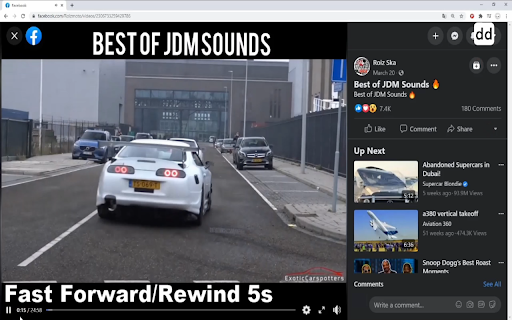


Player Assistant is an auxiliary tool for video watching. Because not every video player provides the same keyboard shortcuts, the… Player Assistant is an auxiliary tool for video watching. Because not every video player provides the same keyboard shortcuts, the goal of Player Assistant is to integrate common shortcuts of these players, make every video player can have the same integrated features, and give users a better viewing experience. Features: * Support multiple keyboard shortcuts for video watching * Adjustable time/speed/volume offset! Support shortcuts for: * Rewind/Fast Forward * Decreasing/Increasing playback speed or volume * Toggling fullscreen, mute, play/pause on every video player * Skipping to beginning/end/0% - 90% of video * Playing next episode for Netflix * Toggling caption between 'Traditional Chinese' and 'English' for Netflix For more usage and info, check me on Github: https://github.com/Preneur247/player-assistant Changelog: *v1.1.4.2 -Bug fix for Youtube play/pause issue *v1.1.4.1 -Netflix caption toggle bug fixes *v1.1.4 -Migrated to Manifest V3 * v1.1.3 -Auto focus bug fixes -Embedded Youtube videos bug fixes -Netflix draining next episode button bug fixes * v1.1.2 -Netflix next episode button bug fixes * v1.1.1 -Netflix bug fixes * v1.1.0 -cross-origin videos & Youtube is now available for Player Assistant -change default volume offset from 5% to 10% -increase reliability and decrease the possibility for keyboard shortcut conflicts -fix 's' key conflict(volume down & skipping intro) in Netflix -change max playback speed of Netflix to 16x * v1.0.0 -initial release

Aurora Player
Open the current video in the Aurora Player app for stunning glow effects. Enhance your video streaming experience with Aurora Player! Elevate your viewing sessions with mesmerizing glow effects that transform your videos into captivating spectacles. With Aurora Player, every moment becomes a visual feast! Aurora Player is a PAID application that is needed to achieve the video's realistic glow effect. It is available for both Windows and Mac. Download the premium Aurora Player app now and embark on a dazzling voyage through the digital realm! https://www.stefanvd.net/project/aurora-player/app/ Browser extension features: Enhance your video streaming experience with the immersive realism of Aurora Player. Simply click the browser button on your favorite video player website, and watch as your videos come to life with vivid, lifelike glow effects. Whether it's YouTube, Bilibili, or HTML5 videos, Aurora Player seamlessly integrates into your browsing routine, transforming mundane viewing into an extraordinary journey through vibrant visuals. Don't settle for ordinary—immerse yourself in extraordinary visuals today with Aurora Player, your ultimate companion for video streaming adventures. Application features: Aurora Player can play local files, offering seamless playback of your favorite videos in any format, all within one sleek and user-friendly interface. From classic AVI files to modern HEVC formats, the Aurora Player app effortlessly handles them all. This multimedia player supports a wide array of file types including: 3g2, 3gp, asf, avi, f4v, flv, gif, hevc, m2ts, m2v, m4v, mkv, mjpeg, mng, mov, mp4, mpg, mpeg, mts, ogg, ogv, rm, swf, ts, vob, webm, wmv, and wtv. Required application for your device: Aurora Player for Windows, Aurora Player for Mac, Aurora Player for VisionOS Required Permissions: ◆ "activeTab": Allow detection of the current video player URL on the currently open tab. ◆ "scripting": Necessary to retrieve the current video player URL for opening it in the application.

Netflix Keyboard Shortcuts Plus
for 3 secs forward/backward This extension will enable keyboard shortcuts that Netflix doesn't have. You can set the native language and learning language, and you can toggle audio/subtitles using shortcut keys. Further more, there are many extremely useful shortcuts especially for language learners and heavy users. All you need to do from now on is just install it and click the icon! (^o^) English, Japanese, French, German, Spanish, Chinese... and so on. (More than "18" languages!)

Video player extension
More control over the video player Adds keyboard shortcuts to the video player on any website. Use space bar to pause and '[' and ']' to adjust speed by 0.1x increments. 'o' and 'p' to move forward and backward by 3 seconds. '\' make the video very fast for a short time.

Video Player
Video and audio player with speed control, playlist, shuffle, and volume-boosting This is a simple, yet powerful media player that supports audio boosting to 300% and playback rate speed up to 8 times. It has a minimal interface and only appends controls that are not provided by default by the VIDEO element. This extension offers to play media files from a local disk or a remote resource. It uses the standard caching method to play remote sources with minimal interruption. Features: 1. This player can increase volume up to 300% similar to the VLC media player 2. This player can increase the video playback rate up to 8 times 3. It supports repeating one song or an entire album 4. Can extract media sources from a destination directory and all its children's directories. 5. You can take screenshots of the video with a button or with a keyboard command. 6. Can play video formats that your browser does not support (using FFmpeg transcoding) (FLV, AVI, WMV, ...) Usage Sample 1: 1. Open "https://www.w3schools.com/html/html5_video.asp" in a browser tab 2. Right-click on the player 3. Use "Play with Video Player" Usage Sample 2: 1. Open "https://www.w3schools.com/html/html5_video.asp" in a browser tab 3. Right-click and save the video to the disk 4. Open the player and drop the video to the player's interface
