
ifocfmebenhdcicabnhningpjpbniijj
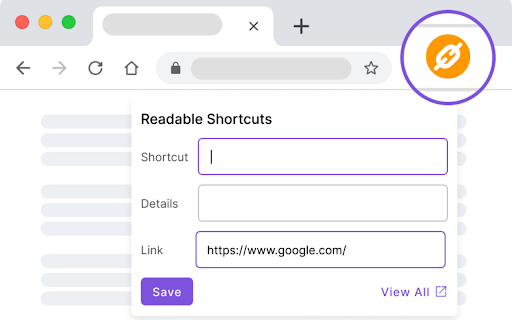


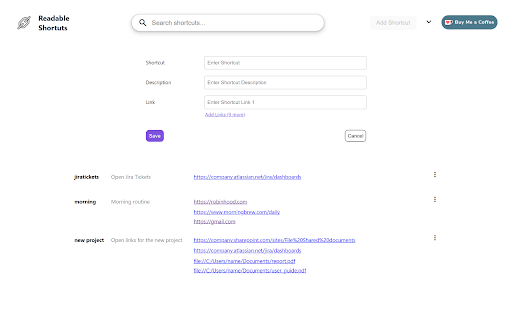
Readable Shortcuts allows you to create readable personalized shortcuts for your links that are easy to recall. Readable Shortcuts simplifies your browsing experience by allowing you to assign intuitive names or keywords to your preferred websites and files. Once you've added a shortcut, accessing the associated link becomes as easy as typing “sc” + [space] + its name into your browser's address bar. Key Features: 1. Effortless Link Management: Readable Shortcuts provides an intuitive interface where you can effortlessly manage your shortcuts. Add new links, edit existing ones, or remove shortcuts with just a few clicks. 2. Customizable Shortcuts: Tailor your shortcuts to match your preferences. Assign unique names or keywords to your links, making them memorable and easy to recall. 3. Lightning-Fast Access: Forget about bookmark folders and lengthy URLs. By typing a shortcut name directly into your browser's address bar, you can instantly navigate to the desired website without any hassle. 4. Sync Across Devices: Readable Shortcuts synchronizes seamlessly with your Google Account, allowing you to access your shortcuts from any device with the extension installed in Chrome. Whether you're on your desktop or laptop, your customized shortcuts are always at your fingertips. 5. Privacy: Rest assured that Readable Shortcuts prioritizes your privacy. The extension operates locally on your device, ensuring that your browsing habits remain confidential and secure. 6. User-Friendly Interface: Readable Shortcuts boasts a clean and intuitive interface, making it easy for users of all levels of technical expertise to set up and manage their shortcuts effortlessly. Enhance your browsing efficiency and reclaim valuable time with Readable Shortcuts. Streamline your access to frequently visited websites by creating personalized shortcuts that open with a quick keystroke. Install Readable Shortcuts today and experience a new level of convenience in your web browsing journey.

Tanuki Utilities
Provide useful utilities for GitLab users. * Change the GitLab favicon to a project icon; you can easily distinguish many GitLab tabs. * Move "Copy reference" button on top bar; the button is always shown for your easy access. This extension tries to change favicons in the **all** sites by default. You can specify which GitLab site (e.g. gitlab.com or your self-hosted site) you would like to change favicons. #### Change the GitLab favicon to a project icon

Lindle: Save, Manage Web Links
Say goodbye to scattered links and hello to streamlined productivity. All-in-one web link saver and bookmark manager Lindle is your ultimate solution for managing and organizing your web links with ease. This versatile Chrome extension empowers you to save, categorize, and access your online resources like never before. Say goodbye to the chaos of scattered bookmarks and hello to streamlined productivity. 1. Effortless Link Saving: Save links from the web with a single click, and watch as they're neatly organized in one central hub. 2. Intelligent Auto-Sorting: automatically categorizes your saved links based on their source, whether it's from social media platforms like Facebook, Instagram, LinkedIn, or other websites. 3. Seamless Integration with URL Shorteners: Enjoy the convenience of integrated Bitly and other popular URL shorteners to keep your links clean and concise. 4. Intuitive Search Functionality: Easily find any link you've saved by using our powerful search feature. No more endless scrolling or digging through folders. 5. Folder Organization: Create custom folders to sort and manage your links. Keep everything neatly tucked away for quick access. 6. Access from Messenger Platforms: Our extension embeds directly into Facebook Messenger, Instagram, and LinkedIn. You can access your saved links right from these platforms whenever you need them. 7. Share with Ease: Share links with colleagues, friends, and family without leaving your preferred messenger platform. 8. Cross-Device Sync: Enjoy a seamless experience across multiple devices. Your links are always within reach, whether you're on your desktop or mobile. 9. Clean, User-Friendly Interface: The extension is designed for simplicity and ease of use, making link management a breeze.

Devtools Console Customizer
Customize the font and background color of the Console in Chrome Devtools. Includes background-color support to match the following popular themes following themes, in both light and dark variants: - Alabaster - Solarized - Zenburn - Degas - Monokai - Neutral

Membr: Effortless & Secure Note-taking
Stay organized and productive with Membr's rich note-taking editor, AI powered summaries and secure storage. Stay In Flow, Be More Productive =============================== A huge portion of work already happens in the browser. And if you’re like us, you also take draft notes when studying, researching or ideating. You can do this through note-taking apps like Notion, Evernote, Google Docs and many more. However, most of these note-taking apps interrupt *flow* by forcing you to context switch, either by opening a new browser tab or app window. With Membr for Chrome, your notes sit alongside the source content. Why Membr Notes? =================== - Rich editor experience with all the essentials and more. The editor offers rich formatting, task lists, drag and drop images etc. with regular updates expanding this feature set. - Encrypted notes. We take the security of your information seriously and that’s why all your notes in Membr are stored and retrieved while encrypted. - It's fast. Membr runs on all browser tabs and offers single-click access to your most recent notes. - It works well with other apps. You can export to PDF with *Google Docs and Notion export coming soon. FAQs ======= 1. Membr doesn't start after install? If you are unable to start the extension immediately after install, try refreshing the browser tab(s) that you'd like to use Membr on. 2. Do my notes sync across devices? Yes, your notes will sync across all signed in Chrome browsers that have the extension installed. 3. Is there a mobile app? The mobile app will launch later in 2022. August 2024 Updates: ============= * ⚡️Improved login experience. * ❤️🩹 Minor bug fixes and improvements.
