
ifmbnpknghdiegiaphjlahdbdcgchjld
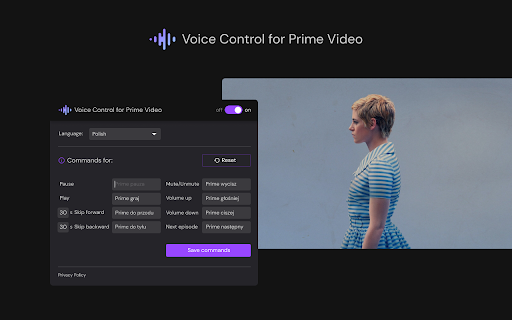
🔊Voice Control for Prime Video 🚀 Play, pause, fast-forward, and more! 🙌🎬 🔊Revitalize your Prime Video experience with 'Voice Control for Prime Video' 🚀, an innovative Chrome extension that enables voice command control of Prime Video. Play, pause, fast-forward, and more, all without lifting a finger! 🙌🎬 Main Features: 🗣️ Voice Control for Prime Video: Control Prime Video with simple voice commands. With the voice control extension, watching your favorite series and movies becomes even easier! 🌍 Support for Voice Commands in 8 Languages: Whether you speak English, Spanish, French, German, Polish, Japanese, Korean, or Thai, our extension will understand your commands. 👤 Command Customization: Tailor voice commands to your preferences. Instead of the standard "Prime Video play", set your own phrases to activate specific functions. 🔌 Easy Installation and Use: Simply install the extension and start playing any video on Prime Video. Your streaming experience will be transformed. 🖥️ Compatibility with Chrome Devices: Works perfectly with any device using the Chrome browser. Supported Commands: ⏯️ Pause / Play: Easily manage your video playback. ⏩⏪ Skip Forward / Backward: Fast-forward or rewind videos effortlessly. 🔇🔊 Mute / Volume Up / Down: Control the volume without the need for a remote or keyboard. 📺 Next Episode: Automatically move to the next episode of your favorite series. ⚙️ The Control Panel Pop-up gives access to settings and command customization For Whom: 👨👩👧👦 Perfect for any Prime Video fan looking for a more convenient and innovative way to control their favorite content. Whether you have limited mobility or simply appreciate convenience and modern solutions, our extension is for you. Get Started: 🌟 Transform the way you watch Prime Video today. Install "Voice Control for Prime Video" and enjoy the freedom that voice commands offer! 💬🎉 ❗**Disclaimer: All product and company names are trademarks or registered trademarks of their respective holders. This extension holds no association or affiliation with them or any third-party companies.**❗

Super Video Speed Controller
Adjust playback speed for any video. Video speed controller for your videos Super Video Speed Controller allows to increase or decrease playback sped on any web site. Features: 🎥 Work almost anywhere 🎥 You can adjust with presets or set a custom speed in percents 🎥 Use shortcuts Quick start: find "Super Video Speed Controller" icon by opened a menu under the "puzzle" icon in the toolbar.

Video Playback Extension
A full-featured video and audio player extension. Control playback speed, skipping, rewinding and more. Speed up, slow down, advance and rewind HTML5 audio/video elements either with shortcuts or using a clean, elegant interface. Optimize your media experience by: - controlling media on just your current active or across all tabs in Chrome - customizing playback speed - skipping forward or backward by custom time intervals - looping - restarting media from the very beginning - playing - pausing - an experimental Theater Mode (for video only) - customizable one key shortcuts for all actions Once the extension is installed, navigate to any page with an HTML5 video or audio element and click on the extension to bring down the Player User Interface. Any changes made will affect all audio/video elements on the page and you can optionally control media across all tabs in Chrome using the Player UI. - `s` = Decrease playback speed by .25 - `w` = Increase playback speed by .25 - `l` = Loop - `o` = Pause - `p` = Play - `e` = Reset playback speed - `r` = Restart - `a`= Skip backward by the Skip Interval set in the Player UI - `d` = Skip forward by the Skip Interval set in the Player UI - `t` = Theater Mode

Video Speed Controller
Control the speed of your video! It is a speed control extension that could help you speed up the video play rate. There are a few existing button for user to quick choose the playing rate and also adjusting rate for user to input.

Video Speed Controller
Video Speed Controller for netflix video, primevideo, hotstar, etc. Video Speed Controller offers stable and adjustable video speed controller extension options on various Video Streaming Services, such as Netflix, Amazon Prime Video, YouTube, Twitch, Disney+ Hotstar, and others. It’s perfect for speed control for streaming videos, making lessons quicker or action sequences slower, or adjusting video playback rate for any video in a browser, up to 4x speed. Enjoy a more personalized approach to viewing video content in 2025, whether you’re changing playback speed on Netflix, binging shows or movies, or studying important sections with ease Adjustable Playback Speed: Control AV playback speed; slow motion (e.g., 0.25x) or quick preview (e.g., 4x). Use this video speed adjustment tool for complete flexibility. User-Friendly Interface: A single, easy-to-understand pop-up menu for activation and regulation of playback speed, making it a customizable video speed experience. Keyboard Shortcuts: Get full speed control with default and personalized video speed shortcut Chrome keys for quicker adjustments. Platform Compatibility: Supports streaming on Netflix, Amazon Prime Videos, YouTube, Twitch, Disney+ Hotstar, and more. Perfect for playback speed extension for YouTube users. Fine-Tuning Options: For precise speed changes, use step adjustments to refine your playback experience. How to Use Video Speed Controller Extension Install the Extension: The video speed controller extension is available for free and can be installed via the Chrome Web Store. Open a Video: Start a video on the platform of your choice, such as Netflix or YouTube, and adjust video playback rate to your liking. Access the Extension: Locate the control video speed Chrome extension icon in the browser toolbar. Adjust Playback Speed: Use the pop-up menu to change playback speed Netflix, speed up or slow down YouTube videos, or watch Netflix faster or slower. Enjoy: Start streaming your content at your desired pace, tailored perfectly with the speed control for streaming videos feature! Open Extension: 1. Does the Video Speed Controller work on all streaming sites? Yes, it supports most popular streaming sites like Netflix, Prime Video, YouTube, and Twitch. 2. Can I use this extension to adjust speed in smaller steps? Yes, you can fine-tune the playback speed using small step adjustments for greater control. Currently, keyboard shortcuts are preset but cover the essential speed control functions for quick adjustments.
