
ifjjpkcmeeanecflmdpndenamehcdgff

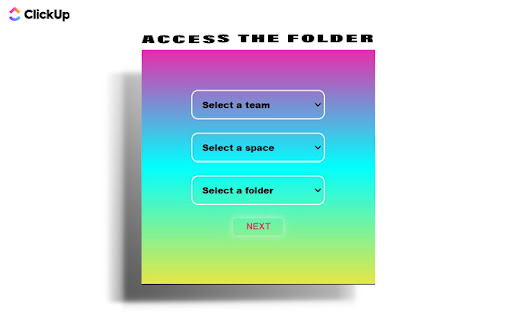
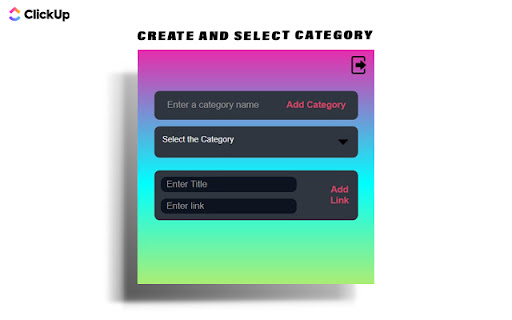
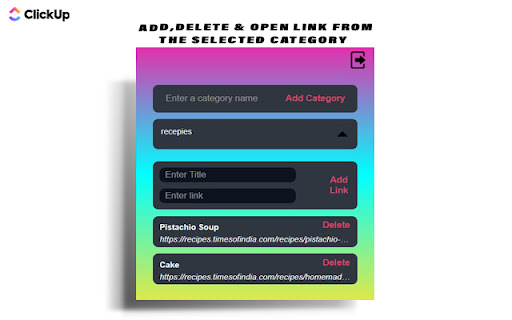
Save Links to ClickUp helps to manage all your hyperlinks in ClickUp document easily. Save Links to ClickUp is a simple and easy to use tool for managing the hyperlinks in ClickUp document. This extension helps the user to store important Links according to various categories. So next time the user wants to access any link from their document they can simply open the extension and access them. 𝐅𝐞𝐚𝐭𝐮𝐫𝐞𝐬: ●Easy , Simple UI ●Create new categories ●View links ●Add title to your links. ●Delete link 𝐔𝐬𝐞𝐫-𝐆𝐮𝐢𝐝𝐞: 1.Install the Extension . 2.Click on Connect and wait for few seconds. 3.Wait till a window for clickUp authorization opens. 4.Login with your clickUp Id(email) and password. 5.Select the team , then select the space within the team and finally select the folder inside which you want to store all the hyperlinks. 6.Make sure that you create a folder(for the links) in advance at clickUp website. 7.Now you are all set . 8.To create a new category simply type the category name and click on Add category. 9.To select a category click on "Select the Category" dropdown. 10.All Links within the category will be displayed. 11.To open a link click on the hyperlink or the title . To delete it click on the delete button. 12.To add a link select the category and enter the link title and the link in their respective section , then click on the "Add Link" button . 13. In case you find any difficulty simply restart the extension and also check the internet connection.

Copy URLs
Copy all open pages (title and/or address) to clipboard. Select what to export (all tabs or just the web-pages; all windows or current window only) and how to export it (choose between several formats -- simple url list, HTML, CSV etc.) You can define your own (custom) format to generate specific url list (for example -- JavaScript array or XLS table ready to be copy/pasted in Excel)

CopyTab URLs
Effortlessly copy and organize the URLs of your open tabs in one click. CopyTab URLs is a powerful Chrome extension that allows you to effortlessly save and organize the links of all your open tabs in the current window. With just a click of a button, CopyTab URLs copies the URLs to your clipboard. 📌 What’s New in This Update: ➤ You can now copy links from just the current tab group 📌 Why Choose CopyTab URLs? Take control of your tabs with ease! Every time you hit "Copy," your links are not only copied but also displayed in an editable text box—so you can tweak them before sharing. ✔ Need page titles with your links? We've got you covered. ✔ Want to keep tab groups intact? Just check "Include group names." (Group names appear as [GroupName]. Don't worry, the old #GroupName format is still supported for opening links.) ✔ Have a list of links to open all at once? Paste them into the text box and hit "Open"—they’ll load in the same order. ✔ Switching computers? Copy all tabs in one click, paste them in the extension, and hit "Open"—your setup is instantly restored, groups and all! Access all your tabs just the way you saved them anywhere, anytime. Stay organized and save time with CopyTab URLs—perfect for researchers, content creators, and anyone who manages multiple URLs. Download now and streamline your tab management workflow! Note: The extension doesn't store any of your data.

Copy To Notion: Clip anything to Notion
Easily capture, organize, and access all your online clips directly in Notion. Copy to Notion: The Ultimate Web Clipper and Organizer for Notion Save and organize web content seamlessly into Notion with Copy to Notion—the ultimate Chrome extension designed for Notion users. Transform how you collect, organize, and retrieve online content directly into your Notion workspace. ✅ Web Clipper for Notion: Easily save articles, text snippets, screenshots, images, bookmarks, notes, and any webpage elements directly to Notion, preserving original formatting. ✅ Multi-Select Functionality: Select multiple items—text, images, or any webpage elements—and save them to Notion in one go. ✅ Intuitive Notion Integration: Save web clips directly to specific Notion pages or databases, fitting seamlessly into your Notion workflow. ✅ Advanced Highlighting & Screenshots: Capture essential website highlights and full-page screenshots for thorough research documentation. ✅ CSS Selector Feature: Auto-fill your database fields dynamically with data such as images, text, and URLs from web pages using your preset CSS selectors. ✅ Personalized Notes: Add custom notes to your saved clips, capturing your insights and thoughts instantly. ✅ Automatic Link Saving: Each clip includes the source URL for quick reference and citation. ✅ Bookmarking & Embedding Made Simple: Bookmark URLs or embed them within Notion pages for organized access. ✅ Web Clips Manager Template: Utilize our exclusive ready-to-use Notion template to centralize and manage your clippings effectively. ✅ Flexible Saving Options: Choose exactly where in Notion you save your clips, allowing for customized organization. ✅ Right-Click Image Saving: Save images directly to Notion via right-click, streamlining your content gathering process. ✅ Full-Screen Capture: Easily capture and save entire webpage screenshots to Notion for comprehensive reference. ✅ Customizable Saving Options: Tailor how and where your clips are saved within Notion for personalized organization. ✅ Site-Specific Database Forms: Set up unique database forms for different websites, enhancing organization. ✅ Keyboard Shortcuts: Leverage shortcuts for rapid note-taking, bookmarking, and more, enhancing your productivity. ✅ Multi-Workspace Support: Easily switch between multiple Notion workspaces for diverse projects. 👥 Ideal For: ✅ Notion Users Seeking a Web Clipper: Save web content like articles, images, and text snippets directly into Notion. ✅ Researchers and Students: Build a personal knowledge base by capturing design assets, statistics, and research findings. ✅ Content Creators and Designers: Collect inspiration, visuals, and design elements for your projects. ✅ Professionals Tracking Competitive Intelligence: Gather competitor information, pricing, and marketing materials. ✅ Newsletter Curators: Compile content and resources effortlessly for upcoming issues. ✅ Project Managers: Develop project plans and roadmaps by gathering relevant information and resources. ✅ Social Media Managers: Clip quotes, articles, and images for future social media posts. ✅ Language Learners: Save vocabulary words, grammar rules, and learning resources into Notion. ✅ Recipe Collectors: Clip recipes and cooking tips from different websites. ✅ Travel Enthusiasts: Gather information on destinations, attractions, and accommodations. ✅ Anyone Streamlining Online Research: Efficiently collect and organize information from various sources. ✉️ We Value Your Input For assistance or feedback, reach out to us at support@copytonotion.com. We're committed to continually improving Copy to Notion based on your insights.

Link Saver
Save your links which you paste everywhere. While applying for jobs across many websites, we have to paste our LinkedIn, Github, Portfolio, Resume links on many forms. That time if we have a chrome extension which will save the links, copy, etc will be helpful. Made for the same. All it does is keep your links stored in your extension.
