
ifgeabdejopdnkdojbpcjhljclchmcbn
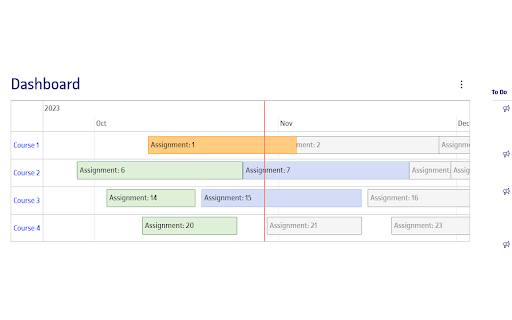


Canvas Assignments Timeline Transform your Canvas LMS dashboard with an interactive timeline to manage your assignments more… Canvas Assignments Timeline Transform your Canvas LMS dashboard with an interactive timeline to manage your assignments more efficiently. ✅ Interactive Timeline on Dashboard Introducing a dynamic timeline directly in your Canvas dashboard, allowing you to view and manage your assignments with ease. Get a comprehensive view of your workload and upcoming deadlines at a glance. ✅ Assignment Completion with One Click Simply click on an assignment in the timeline to mark it as done. Keep track of your progress and stay organized. ✅ Assignment Details on Hover Hover over any assignment on the timeline to get immediate details. No need to navigate away from your dashboard to understand what's due next. ✅ Zoom & Scroll for Enhanced Timeline Navigation Easily zoom in and out, and scroll horizontally across your timeline for a tailored view of your assignments. Whether you're planning for the week or the entire semester, we've got you covered. ✅ Persistent Timeline Customization Your timeline’s position and the status of assignments marked as done are automatically remembered. Return to your dashboard with your custom settings intact, saving time and maintaining focus. ✅ Direct Course Access Click on a course in the timeline to jump directly to its modules and assignments, streamlining your navigation through Canvas LMS. ✅ Multilingual Support for Global Users Our extension supports internationalization and is available in 13 languages, catering to a diverse, global user base. ✅ Free & Easy to Use, No Account Needed Canvas Assignments Timeline is free to use and doesn't require any account setup. Just install and improve your Canvas LMS experience instantly. This extension requires minimal permissions, including: "storage": To store your personal settings and configuration, ensuring a customized and consistent experience across your Canvas dashboard. Canvas Assignments Timeline seamlessly integrates into your Canvas dashboard, offering an enhanced, personalized, and more organized educational experience. Try it now and take control of your assignments like never before!

Canvas Reminder
Canvas Reminder helps keep track of all your Canvas assignments without having to log in. Copy and paste the assignment page… Canvas Reminder helps keep track of all your Canvas assignments without having to log in. Copy and paste the assignment page address, give it a title, and set a due date and you'll be reminded of your assignment no matter the page you're on.

Canvas Wrapped
Spotify Wrapped: "Spotify Wrapped is a viral marketing campaign by Spotify. Released annually in early December since 2016, the campaign allows Spotify users to view a compilation of data about their activity on the platform over the past year and invites them to share it on social media." Canvas LMS: "Canvas is a web-based learning management system, or LMS. It is used by learning institutions, educators, and students to access and manage online course learning materials and communicate about skill development and learning achievement." Q: But, what is Canvas LMS Wrapped? A: Similar to Spotify Wrapped, Canvas Wrapped is a tool designed for students whose schools use Canvas as an LMS. The tool enables students to view their assignment activity, including metrics such as the number of completed assignments, the number of missing assignments, the number of assignments submitted after the due date, the teachers who gave the most assignments and more. It provides a personalized and engaging experience for students, similar to how users view their music activity on Spotify. So let's get started! Using Canvas Wrapped is as easy as using Spotify Wrapped, please follow the steps below. 1) Install the Canvas LMS Wrapped extension. 2) Log in to your institution's Canvas LMS page 3) While on the Canvas LMS page, open the Canvas LMS Wrapped extension and click the "See Your Wrapped" button. You will be redirected to "wsspaper.com" where your data will be ready for you in a few minutes. Developer's Note: Canvas LMS Wrapped is a free to use tool that is developed for fun, and it does not seek any profit. Therefore user's data is NEITHER stored nor sold. Extension, Developer: Muhammed Cikmaz Designer: William Cheng

Canvas Pre-Submission Preview
Automatically gives user a preview of the assignment they're submitting on Canvas Verify your work right before submitting it on Canvas using this light Chrome Extension! It will show a preview of your assignment so that it can be verified before submission! Additionally, you can verify that you're submitting the right file for the right assignment!

Canvas Modules Organiser
• Compression:Based on the indentation level formatting of individual Module items on the Canvas LMS Modules page, this extension allows for collapsing more indented items "below" those of less indented items in a hierarchical fashion. This facilitates better and more concise overview of the Module contents. Collapsing can be done at item, module or page level using different controls. Modules can also be "tagged" with a short text defined and styled by the user. • As of version 1.0, module items as well as entire modules can be tagged, and tags can be stored for re-use. • As of version 1.0, contextual menus can be used as an alternative to hovering over extension icons to bring forward the extension menus. • The extension can also group modules in "boxes" or "tabs" (in v 0.9 +)for even better overview, and users can add their own text tags to modules • As of v 0.6 custom indentation is supported. Please visit https://www.youtube.com/playlist?list=PLP3asN9BirNAnaGPVgQGSviop-G_L-GhN for instructive videos on this extension. NOTE that Canvas Modules Organiser only works with Canvas platforms hosted on domains with the names or name types listed below. Requests for inclusion of other domains can be made to oldpikesoftware@gmail.com .
