
iffkflhcbfgfcendldlddpgpfbikibjd
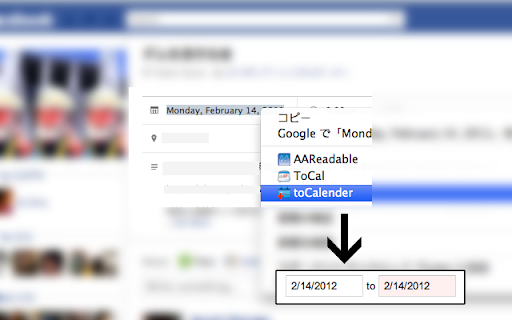
Add new events to Google Calendar from every websites you visit. Add new events to Google Calendar from every websites you visit. When you click this extension's botton, extension is creating new tab and open Google Calendar's "create new event" page. ★New (ver.1.2) Select sentence and right-click, you can add selection text into the description. If the selection text has a Date, extension will use the date. For example, if you use it on Gmail, the extension will set below: Title : "Mail title - your gmail address" (*"Gmail - " prefix is deleted by the extension) Description : Mail URI Date : today and... - Adding Manifest Version in the manifest file.(ver.1.3.0) - Fixed end-date bug.(ver.1.2.6) - Changing icon's detail.(ver.1.2.5)

World Clocks
Add any world clock of your choice to remain updated with the time in different locations. ⏰ A productivity booster World Clock browser extension! 🏆 Featured by Google on Chrome Web Store (since following all technical best practices, latest platform APIs, and meeting a high standard of intuitive user experience & design, among other things). 💪 Features: - All settings are kept in sync - Add, Remove, SORT, and Edit time zones - Convert time zone time to other time zones - Very easy to use - Responsive layout - Nice add/remove effect for better user experience - Select the color theme from the available presets - Set your color for the individual clock - Set font color and size as per your choice - Select 12 or 24-hour format - Turn on/off seconds display - Change the display name after adding the clock - Different sets of layouts added - Keep the settings panel on the left or right - Reset all settings --- New features are added regularly 👨💻 🏡 Home Page: https://weball.io/products/browsers/extensions/world-clocks ⭐⭐⭐⭐⭐⭐⭐ 🥂 Praise ⭐⭐⭐⭐⭐⭐⭐ If you like the extension, I would like to request you to give a 5️⃣⭐ rating, it keeps me motivated to contribute back to the community. 💓 /*****************/ 🐞 Bugs /*****************/ If you find any bugs or if you feel that some feature is missing, please send me a mail 📩 (justdecodeme@hotmail.com) before giving a bad review 🙏, and I'll fix that ASAP. 🙇 Thank you for your understanding, and enjoy the extension!!! :) 🎉 v 23.5.2 - New toggle buttons - UI/UX improvements - Optin for GA4 - Reduces overall extension size - Bug fix: Fixed some crossbrowser CSS issues v 22.11 - Manifest migration from v2 to v3 (very important update) - Size reduced (Increased performance, only ~500KB) - Few CSS updates in the Settings panel - Bug fix: Time conversion just after install v 21.12 (biggest update so far) - Timezone convert feature added (MOST REQUESTED FEATURE) - Multiple layouts added for eye-catching UI - New shades theme added - New mix theme added - Text color options added - Font size options added - Base input font size added to increase or decrease overall time zones font - Reset functionality added - Clock icons positions updated - Beautiful radial background added at loading time - Drag & Drop animation added - Settings panel slide effect added for better UX - Settings panel position can be LEFT or RIGHT - Font sizes change from px > rem and em for better usability - Settings panel now have a scroll bar for screen having small heights - Removed time value from tab - Overall user experience improved - Redundant code removed - Date format updated and the Month has also been added now - Bug Fixed: MAX_WRITE_OPERATIONS_PER_MINUTE - Bug Fixed: Error because of old and new database mismatch v 21.04 - Version naming changed - Few things improved as per the user's feedback - Thank you page will open only on the new install, not on the update - Credit section added - Button text replaced with icons - UI Improvements - Small bug fixed v 2.2 - Note able to drag at the end bug solved - Code refactoring - Thank you page message updated - Credits link added v 2.1 - Don't show the sort and delete icon for the last clock remaining while deleting - Thank you page added after installation - Feedback form added after uninstallation v 1.9 - Items can be rearranged now by drag and drop - Add timezone animation added - Delete buttons not showing up on first load bug fixed - Logic and UI updates v 1.8 - Remove timezone animation added - Can't add duplicated timezones - Default 4 time zones added on the first load V 1.6 - New Features + Bugs solved: - New Add button and Edit Button Layout. - Don't show am/pm in 24hr format. - Stop the user from adding an invalid Time Zone. V 1.4 - New features added: - CSS/Style updates. - Select 12 or 24-hour format. - Change the display name after adding a clock. Oh still here, you are super awesome! 🤘 Keep rocking!!! ❤️ You are breathtaking! ❤️ CWC is yours to keep. Forever.

Timely Calendar
Import events to your Timely Calendar. This Chrome extension works seamlessly with EventBrite to allow you to instantly import events to your Timely Event Management Software account. You can save and add events from EventBrite to your Timely account, and showcase them in the public view of your event calendar or any other Timely software product. ★ Be The Go-To Organization For Events In Your Industry ★ Adding external events to your event calendar enables you to broaden your website’s offerings, cross-promote events, form partnerships, build credibility, and expand your audience. Start making your event calendar more vibrant and informative today with the Timely Event Management Software extension. Trusted by over 150,000+ event creators worldwide, Timely solutions empower you to easily create, promote, manage and monetize events. We help you build beautiful and powerful website event calendars to keep your audience engaged and entertained. Thank you for being a valued Timely’s customer!

Cal Merge for Google Calendar™
Chrome extension that visually merges the same event on multiple Google Calendars into one event. Visually merge the same event on multiple Google Calendars™ into one event. Do you view at the same time: - You work and personal calendar - Your team's shared calendar - A private calendar with loads of "Busy" blocks - Or some strange combination of events? These likely clutter up your calendar and if long titled are hard to read. This extension merges all those separate events into one event, and colours it with a user selected gradient style.

Google Calendar Disable Month Scroll
This extension prevents jumping around in month view when scrolling, especially a problem for users of Mighty or Magic Mouse/Trackpad. Unlike other extensions, it doesn't break scrolling up and down in week or schedule view. If you like your more reliable month view, please leave a rating and review!
