
ifdoagofcglampmghhkbngifighmnopj
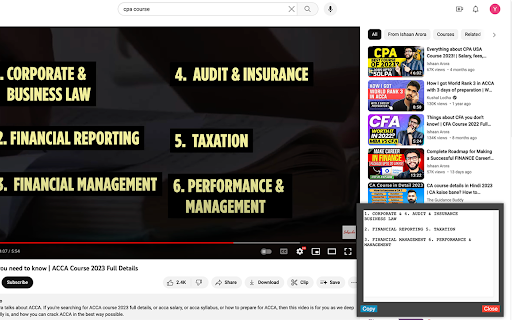
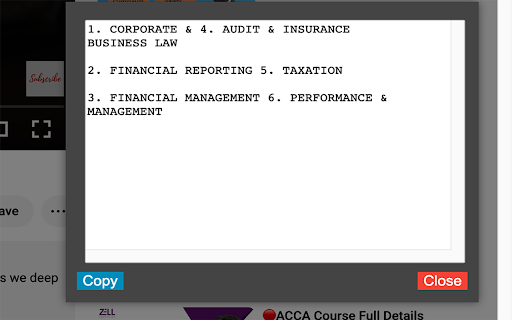
This innovative Google Chrome extension empowers users with the ability to extract and interact with text from any webpage,… This innovative Google Chrome extension empowers users with the ability to extract and interact with text from any webpage, enhancing their browsing and research capabilities. Key features and reasons to install: 1. Text Extraction from Webpages: Harnessing the power of Optical Character Recognition (OCR), the extension allows users to recognize and extract text from any part of a webpage. This can be especially useful for academic research, data collection, or when dealing with non-editable web text. 2. User-Friendly Selection Tool: Users can easily specify the area of text extraction using intuitive vertical and horizontal lines that can be drawn directly on the webpage. This precise selection tool ensures users extract exactly what they need. 3. Convenient Text Display and Interaction: Extracted text is displayed in a floating box that can be moved and resized according to user preferences. This makes it simple to reference the extracted text while continuing to browse. 4. Clipboard Copy Functionality: With just one click, users can copy the extracted text from the floating box to the clipboard, making it effortless to paste and use the text in other applications or documents. 5. Broad Compatibility: The extension is compatible with all URLs, making it a versatile tool for text extraction across various websites and platforms. 6. Continuous Improvement: The extension is under active development with regular updates aimed at improving user experience and performance. Future updates are planned to move OCR processing to the background for even faster and smoother performance. By installing this extension, users can enhance their browsing experience, streamline their research process, and interact with web content in a more dynamic and efficient way.

Esticra
Extract text from any part of your browser screen using Esticra OCR. 🚀 Extract Text & Data from Anywhere with AI Precision – Instantly! Stop manually retyping. Esticra is a next-generation Chrome extension that uses advanced Large Language Models (AI) to extract text with superior accuracy from any part of your screen. Capture content from images, videos, protected PDFs, presentations, and even locked websites where regular copy-paste fails. More than just OCR, Esticra understands the content, allowing you to convert complex tables and forms into structured data in seconds. ✅ AI-Powered Accuracy – Leverages cutting-edge LLMs for superior recognition, even on low-quality images, handwritten notes, and complex layouts. ✅ Blazing Fast Processing – Get near-instant results streamed directly to you. ✅ Works on Any Content – Capture text from anywhere in your browser: images, video pauses, slides, and restricted documents. ✅ Structured Data Extraction – (Pro Feature) Convert tables, invoices, and forms directly into clean JSON or CSV format. ✅ Multilingual Support – Accurately extract text in multiple languages, including English, Arabic, and French. ✅ Privacy-Focused – Your images are processed securely and are never stored. 🎯 Who is this for? Students & Researchers 📚 – Grab quotes and data from lecture slides, locked PDFs, and research papers instantly. Developers & Data Analysts 💻 – Turn UI mockups, error logs, and data tables into usable code and structured JSON/CSV. Professionals & Writers ✍️ – Quickly copy text from reports, presentations, and protected articles without reformatting. Anyone who wants to save time and eliminate manual transcription errors. Try Esticra today and experience the fastest way to get text off your screen!

FabCapture – Web Text Extractor
Capture text elements with metadata and save as various formats. Here is the updated text for **FabCapture 2.0**, incorporating all the new features (formatting, encryption, new export formats, and direct copying) while maintaining the energetic and clear tone of the original description. FabCapture is the fastest way to extract only the text you actually want from a webpage. Instead of grabbing the entire page—ads, menus, or irrelevant content—FabCapture lets you click and select specific text elements (headings, paragraphs, lists, links) and save them instantly in your preferred format. No more copy-pasting and manual cleanup—you stay in control. * **Enhanced Formatting Preservation:** We’ve significantly upgraded how content is captured. FabCapture now perfectly retains **tables**, **lists**, **blockquotes**, and **code blocks**. * **Syntax Highlighting:** Developers will love this—captured code snippets now maintain their syntax highlighting for easier reading. * **Direct Markdown Copy:** Need to paste text into Notion or Obsidian immediately? You can now copy directly to the clipboard in Markdown format without saving a file. * **Expanded Export Formats:** Beyond RTF and Markdown, we have added: * **HTML:** Preserves full formatting. * **Plain TXT:** For pure, unformatted text. * **JSON:** Ideal for developers and data processing. * **Local Encryption:** Maximum privacy protection. Your data can be encrypted locally before export. * **Select only the content you need**—no junk, ads, or clutter. * **Click & capture**—manually pick text elements directly from any webpage. * **Versatile Export Options**—Save as Markdown, HTML, RTF, JSON, or TXT. * **Smart Clipboard**—Copy Markdown directly to your clipboard for instant use. * **Privacy First**—Works entirely locally with new local encryption options. No external servers, no tracking. * **Dev-Friendly**—Excellent support for code blocks and syntax highlighting. 1. Click the FabCapture extension icon to activate selection mode. 2. Click on the text elements, tables, or code blocks you want to keep—they’ll be highlighted. 3. Toggle metadata checkboxes to include/exclude Title, Description, Date, or URL. 4. Choose your format (MD, HTML, JSON, etc.) and click **Download** to save, or simply hit **Copy** to paste the Markdown elsewhere immediately. * **🛠 No clutter:** Extract exactly what matters, skip the rest. * **⚡ Fast & simple:** Click, select, and save/copy in seconds. * **📝 Rich Content:** Handles tables, lists, and code better than standard copy-paste. * **🔒 100% Private:** Runs entirely in your browser with optional encryption. * **📄 Perfect for AI & AI agents:** Creates clean, structured JSON or Markdown ready for LLM processing. FabCapture was developed with AI’s help—concept, structure, and functionality guided and refined by the creator. **🚀 Download FabCapture 2.0 now and take full control over your web text extraction!**

Capios - OCR, Screenshot & Video Capture Tool
Capios - Your perfect OCR, Screenshot & Screen Recording tool, makes it easy & fun to extract Text, Capture or Record screen, edit, annotate and share. You can access dashboard to access your captured images and videos on cloud and save OCR snippets. Keyboard shortcut to activate extension - Alt + Shift + X A fuss-free Text extracting, Screen Capture Tool to capture all your important web pages as Images or Videos (even offline apps & screens). It lets you capture your working screen, record it and share it with others as needed. 1️⃣ OCR CAPTURE MODES: The tool allows users to extract text in various modes: 1. Full Page: Users can capture the text entire screen with a single click. This mode is useful when the user wants to extract everything that is displayed on the screen. 2. Select Area: Users can extract text only by selecting the area of the current tab. This mode is useful when the user wants to extract text only a specific part of the screen that is currently visible. 3. Upload File: Users can upload a file (JPG, PNG or PDF) to extract text. This mode is useful when the user wants to extract text from images and documents. OCR Editor: Users can extract the text by uploading their files and edit it. Editing Tools: The editing tools include Font, highlight, keyword search, Text to Speech (coming soon). It also provide summary of the extracted text using AI (coming soon). 2️⃣ SCREENSHOT CAPTURE MODES: The capture tool allows users to take screenshots in various modes: 1. Full Screen: Users can capture the entire screen with a single click. This mode is useful when the user wants to capture everything that is displayed on the screen. 2. Visible Area: Users can capture only the visible area of the current tab. This mode is useful when the user wants to capture only a specific part of the screen that is currently visible. 3. Select Area: Users can select a specific area of the screen to capture. This mode is useful when the user wants to capture a specific part of the screen that is not currently visible. Open Image Editor: Users can upload an image from their local storage and edit it. Editing Tools: The editing tools include annotations, image upload, and sharing as a link, email attachment, or download. 1. Annotations: Users can annotate their captures with various tools such as text, arrows, shapes, and freehand drawing. This feature is useful when the user wants to highlight specific areas of the capture or add additional information. 2. Image Upload: Users can upload an image to edit or annotate. This feature is useful when the user wants to edit an existing image or add annotations to an image that was not captured using the extension. 3. Edit Image: Users can rotate, Flip, add different shapes, highlight and add Emojis. Users can also add padding, adjust borders, and add different pre-defined gradients to the Image. Also users can also add watermark, Add Tags, Generate QR code for the Image. 4. Sharing: Users can share their captures as a link, email attachment, or download. This feature is useful when the user wants to share their captures with others or download them for future use. User can also share Images to platform like Twitter, Instagram, YouTube, Facebook and LinkedIn. 3️⃣ VIDEO RECORDING: The video recording feature enables users to capture: 1. Entire Screen: Users can record their entire screen, including multiple tabs and applications. This mode is useful when the user wants to create a tutorial or record a presentation. 2. This Tab: Users can record only the current tab. This mode is useful when the user wants to create a video of a specific website or application. 3. Camera Only: Users can record only the webcam feed. This mode is useful when the user wants to create a video of themselves. 4. Select Area: Users can select a specific area of the current tab to record. This mode is useful when the user wants to create a video of a specific part of the screen. 5. Open Video Editor: Users can upload a video from their local storage and edit it. 6. Sharing: User can also share Videos to platform like Twitter, Instagram, YouTube, Facebook and LinkedIn. Dashboard Integration & Sign-in/Sign-up: ▸ Upload captures to cloud storage for easy access, organizing and sharing ▸ Dashboard integration for organizing and accessing captures ▸ Local captures can be manually uploaded to the dashboard ▸ No sign-in required for local downloads ▸ Cloud storage and dashboard access require Gmail login (social logins coming soon!) ▸ Edit Video: User can Add text, trim the video, Insert Images while editing, Add video clips, Create GIF’s from the videos, also insert music and add voiceover to the video. ▸ More features like add effects to the video, convert speech to text and text to speech, Transcription of the video, Remove Noise, and Filler Words and Initial cloud storage limit mentioned in application upgrade section and a lot of Upcoming features lined up in the future roadmap… 🏆 Intuitive, Addictive & Creative user experience. 💨 Quick & Smooth in Capturing and Processing Screen Annotations. ⚡ Instant sharing via Email or Share as a Link with anyone. 🚨 Immediate Customer support. 🐞 Bugs fixed & major feedback implemented 📢 We value user feedback; and retain the flexibility of adding the best features for our users. This is the Beta version of the Capios Application. For this Beta version we would not retain unused data (Images & Videos) from users of Capios after a period of 180 days (about 6 months). We will soon be adding paid feature for unlimited duration of data retention & storage. ▸ Premium upgrade plan How to take screenshots with your device? Capios tool lets you take screenshots on your windows laptop, and you can also take screenshots on your mac. Connect with us for feedback at support@capios.ai. Use it as your chance to advise us to make Capios better by suggesting features you want to see in our next updates. Quixy is a cloud-based digital transformation platform that helps business users with no coding skills to build unlimited enterprise-grade applications. That too, with simple drag-and-drop dynamics, which is ten times faster than the traditional software development method.

Text From PRO
Copy text from images videos PDFs YouTube Google Books protected docs web pages. Copy, grab, extract text for best productivity. Introducing "TextFrom PRO" – The Ultimate Text Copy Chrome Extension Text From PRO is a cutting-edge browser extension that revolutionizes the way you extract text from various sources across the web. With its AI-powered capabilities, it enables seamless text copying from any webpage, making it an indispensable tool for researchers, writers, e-commerce professionals, dropshippers, and anyone working with digital content. Unleash the Power of AI: TextFrom PRO harnesses the power of artificial intelligence to effortlessly extract text from a multitude of sources, providing you with quick and accurate results. Whether it's text from videos, YouTube content, protected websites, Google Books, PDF documents, or even locked Google Docs, this extension tackles them all with ease. Gone are the days of tedious manual transcription or endless copying and pasting. With TextFrom PRO, you can simply activate the extension and watch as it swiftly captures the desired text from virtually any online resource. From image captions to subtitles, insightful quotes to critical information, extracting text has never been easier. By streamlining the text extraction process, Text From PRO empowers you to focus on what truly matters – your work. Spend less time on repetitive tasks and more time on analysis, writing, or creative endeavors. This extension seamlessly integrates into your browser, delivering efficiency and boosting your productivity to new heights. Unlock the full potential of your browsing experience with Text From PRO. Extract text from protected websites, Google Books, and locked Google Docs effortlessly. No longer limited by access restrictions, you can delve into the valuable insights and knowledge hidden within these platforms.
