
ieinjhnflpkoheailbgaickpoaehjoal


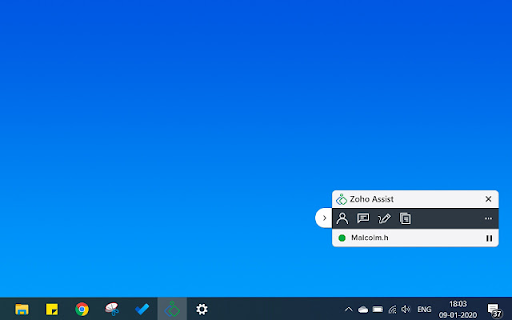
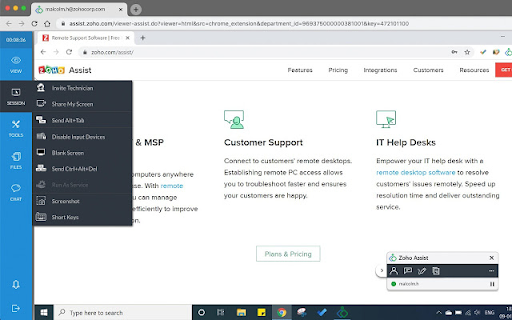

Free Remote Support and Remote Access from your Chrome browser Free Remote Support and Remote Access from your Chrome web browser Overview : Zoho Assist is a web-based application that helps you provide technical support to your customers from a remote console. Using Zoho Assist's Chrome Extension, you can access, manage, and establish control over your remote PCs, laptops, and mobile devices in just a few clicks directly from your Chrome browser. Key Features : Initiate an instant or scheduled remote support session directly from your browser. Mass Deployment for Unattended Remote Access. Firewall and Proxy friendly. Instant Chat. Clipboard Sync. User-Account Control Compatibility. 256-bit AES Data Encryption. Cross-Platform Support. Note : You can continue using our free version with a limited set of features, or purchase our paid edition to enjoy the full benefits.

Zoho Expense
Snap screenshots of online receipts and automatically convert them into expense claims Snap screenshots of online receipts and automatically convert them into expense claims. Users can instantly take screenshots of online receipts from any website or email and directly upload it into Zoho Expense without switching tabs. Zoho Expense automatically scans screenshots, extracts relevant information, and uses it to create business expenses and expense claims. The same can then be submitted for approval and reimbursement. Zoho Expense can scan receipts in over 14 languages and is capable of extracting receipt data even at a line item level. About Zoho Expense: Zoho Expense is the go-to travel and expense management solution for thousands of businesses in over 150 countries. It helps business streamline travel and booking, automate and customize every aspect of business travel and spend, and get complete control over spend. To learn more about how it works, try it free for 14-days! Drop an email to for any help.

Zoho Books Easier Time Tracking
Time tracking for Zoho Books, made easier and more efficient! The Zoho Easier Time Tracking extension provides a better experience for all Zoho Books user who need to track and manage their time entries. Amongst other things, the extension includes: ● Improved time entry management ● Improved timers ● Recurring tasks ● Overview of current week ● Advanced search features ● Multi-organization support ● Keyboard shortcuts for power-users Want more details before you try it out? Here is a detailed description of every feature we just listed. Improved time entry management Manage all of your own time entries in the main "tracker" interface. There, you can see your time entries for the day, create and delete time entries, track your time via a built-in timer, drag entries around to better organize your day, add color indicators to quickly spot your main projects, and more. You can also view and manage different days, both in the past and in the future, by simply going to a different date using the calendar navigator. Improved timers Start the timer on an entry, and it will run until you stop it, keeping track of how much time you have spent on this specific task. As soon as you stop your timer, the time entry will be updated in Zoho Books. You can use the timer on all entries that appear in your tracker interface for the current day. Here's the best part: you can still use the extension while your timer is running. Recurring tasks You have a team meeting every Monday and Thursday? Instead of creating it manually every time, you can set up a recurring task for it. Every Monday and Thursday, a time entry will be created automatically when you first open the plugin. You can then start your timer for that task when the meeting starts, or leave it as is if you have already pre-defined a duration for it. Overview of current week It can be useful to see what you've been working on since the start of the week, and how much time you've spent on each project or client. The "My Week" tab allows you to see exactly that: a summary of your time for the current week, grouped by project. You can even see the percentage of your time spent each project represents! Advanced search features Need to find a specific time entry? Want to know how many hours someone has worked in August? Wanna see who has worked on a specific task? You can find all of that, and even more, with the extension's advanced search features available in the "Reports" tab. Multi-organization support Managing time entries in multiple organizations has never been easier. In the extension, you simply don't have to think about the different organizations: all of your organizations' projects, and time entries are available in the same interfaces. The extension automatically handles all of the organization switching stuff behind the scenes, so you don't have to. Keyboard shortcuts for power-users There's no reason why time tracking shouldn't be fast and efficient. Power-users will be glad to find out that we have implemented simple keyboard shortcuts for almost every feature in the main Tracker interface. Simply press Alt+D to open the extension's popup. In the main interface, simply press Enter to create a new time entry, or tab-target an existing entry and press Enter to open it. You can fill the form like any other online form, and simply press Cmd+S or Ctrl+S to save your changes. You can also use the left and right arrow keys in the Tracker interface to navigate between days. A few more tips & tricks... ● In the Tracker interface, you can put your cursor over an entry and press 1-5 to assign a color to your entry. ● When switching tasks, you don't have to stop your existing timer and then start the next one. Simply start the timer on the second task, and the first one will automatically stop and save. ● Make sure you don't close the extension's popup while a saving / loading screen is in progress to ensure that your data is correctly being updated on Zoho Books. Version 1.6.3 - (internal) Fix CORS errors with new Zoho Books v3 API Version 1.6.1 - (internal) Update URL of the Zoho Books v3 API Version 1.6.0 - Adds an automatic re-syncing mechanism that runs in the background in order to ensure all local time entries are up-to-date on Zoho. Version 1.5.8 - Improved the Project Manager features Version 1.5.7 - Improved the Project Manager features Version 1.5.6 - Improved the Project Managers interface Version 1.5.5 - Fixed auto-login issues that prevented some users from login in to begin with - Removed the unneeded Alarms permission Version 1.5.4 - Fixed issues with the login process for new users Version 1.5.3 - Another bugfix with the automatic re-authentication with Zoho when Error 57 occurs. Version 1.5.2 - Bugfix with the automatic re-authentication with Zoho when Error 57 occurs. Version 1.4.3 - UX bugfix (Enter key wasn't submitting like before after the addition of the new cache clearing buttons) Version 1.4.1 - Fixed an issue with the rounding of timers - Added specific cache clearing for project and task type autocomplete fields in the entry creation interface. Version 1.4.0 - Added the "My Week" tab, which shows you an overview of the projects you've worked on so far this week. Version 1.3.8 - Fixed many issues related to login, logout and login refresh Version 1.3.6 - Fixed an issue following changes in the Zoho Books API Version 1.3.4 - Fixed automatic re-authentication issues - Fixed issues with the entries drag & drop sorting Version 1.3.3 - Fixed an issue where disabled tasks would still be available inside the plugin when creating entries. Version 1.3.1 - Bugfix for the drag & drop sorting, which was way too sensitive. Version 1.3.0 - Time entries can now be sorted via a simple drag & drop mechanic in the Tracker interface - Color flags can now be added to time entries in the Tracker interface by pressing 1-5 while hovering over an entry. - Fixed issues with authentication, which kept resetting for no reason - Other bugfixes Version 1.2.3 - Changed the time tracker's title to show the day of the week for the selected date - Bugfixes Version 1.2.1: - Bugfix for the recurring tasks Version 1.1.7: - Fixed an issue with the Zoho authentication Version 1.1.6: - Added safeguards to avoid running into issues with the chrome.storage API and Zoho API, by limiting the maximum amount of calls per minute. Version 1.1.5: - Added decimal display of hours worked in the summarized reports Version 1.1.3: - Added automatic error reporting - Added user sorting in the Reports tab summaries - Made entries billable by default - Made it easier to notice when a project's entries cannot be specified as billable or not - Bugfixes Version 1.1.1: - Implemented state saving and restoring: if you accidentally close the extension, you can open it again and keep working right from where you left. - New keybindings: Alt + Left Arrow triggers all of the "back" buttons, Ctrl/Cmd + Enter can now be used as an alternative to Ctrl/Cmd + S, Left and Right arrow keys can now be used to navigate between dates in the Time tracking section. - Bugfixes.

Zoho Books Timer
Start a timer and log time for your projects in Zoho Books, anywhere on the web! Zoho Books Timer Extension Log your work time anywhere on the web with the Zoho Books Timer Extension, built right into Chrome What is Zoho Books? Zoho Books is a robust and complete accounting solution used by thousands of businesses worldwide to invoice customers and get their accounting tasks done. With the built-in time tracking features, you can easily invoice your clients for the hours that you put in. Timer Extension for Google Chrome With the Zoho Books Timer extension, turn on a timer whenever you get to work, and stop the timer when you're done. You can also manually log time after you are done with your work, or view and edit all your recent time entries right from the extension. When you're done recording your work time, use the Zoho Books web-app and send an invoice to your client for the work you've done with just a few clicks! Try out Zoho Books for FREE! If you haven't signed up already, start your 14 day free trial for Zoho Books at http://www.zoho.com/books. Join thousands of businesses who have taken the headache out of their accounting tasks. If you're facing problems with the extension, or if you have any questions at all, don't hesitate to email us at support@zohobooks.com, and we will get back to you as soon as we can. Shortcut keys: shift + alt + b will open the Zoho Books timer extension.

zShare
zShare - The easiest way to share content on social media. Capture, create & share instantly with zShare zShare is your go-to browser extension for effortless content sharing for social handles. As social media marketers, we are always on the lookout for content that resonates with our audience. Whether it’s a compelling article, an inspiring quote, or a striking visual, we often stumble upon pieces that inspire us and might pique the interest of our audiences too! How can we capture such catchy phrases or images immediately before they slip out of our mind? zShare to the rescue! zShare is a powerful browser extension designed to help you capture and share content seamlessly across your social media channels. With zShare, you can instantly select key phrases, quotes, or images from any webpage and draft or schedule posts for platforms like Facebook, Instagram, X, and more, all without leaving your browser. No more switching tabs or losing great ideas. With zShare, inspiration meets action in just a click. Zoho Social is a robust, unified social media management platform designed to help businesses and marketing agencies streamline their social media efforts. From AI- powered content creation to real-time engagement and advanced analytics, Zoho Social offers a smart, centralised solution for managing multiple social channels. With Zoho Social, you can: ●Create, schedule, and publish content across various social platforms from a single dashboard. ●Leverage AI-powered tools to generate engaging, on-brand content in seconds. ●Automate workflows by automating repetitive tasks for greater efficiency. ●Collaborate with your team seamlessly to ideate, review, and approve content all within the platform. ●Monitor brand mentions and tags across the web to stay informed and responsive. ●Access detailed analytics and reports to drive data-backed decisions and optimize performance. ●Work collaboratively on insights, turning data into actionable marketing strategies. Whether you're a growing brand or an agency managing multiple clients, Zoho Social equips you with everything you need to elevate your social media presence. The Chrome extension requires a Zoho Social account and is included with all plans. For more information about Zoho Social, visit https://www.zoho.com/social/
