
jmlaohefegdedjnmgpedcoococlpdida


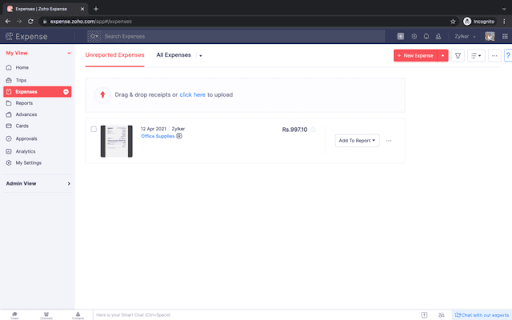

Snap screenshots of online receipts and automatically convert them into expense claims Snap screenshots of online receipts and automatically convert them into expense claims. Users can instantly take screenshots of online receipts from any website or email and directly upload it into Zoho Expense without switching tabs. Zoho Expense automatically scans screenshots, extracts relevant information, and uses it to create business expenses and expense claims. The same can then be submitted for approval and reimbursement. Zoho Expense can scan receipts in over 14 languages and is capable of extracting receipt data even at a line item level. About Zoho Expense: Zoho Expense is the go-to travel and expense management solution for thousands of businesses in over 150 countries. It helps business streamline travel and booking, automate and customize every aspect of business travel and spend, and get complete control over spend. To learn more about how it works, try it free for 14-days! Drop an email to for any help.

zShare
zShare - The easiest way to share content on social media. Capture, create & share instantly with zShare zShare is your go-to browser extension for effortless content sharing for social handles. As social media marketers, we are always on the lookout for content that resonates with our audience. Whether it’s a compelling article, an inspiring quote, or a striking visual, we often stumble upon pieces that inspire us and might pique the interest of our audiences too! How can we capture such catchy phrases or images immediately before they slip out of our mind? zShare to the rescue! zShare is a powerful browser extension designed to help you capture and share content seamlessly across your social media channels. With zShare, you can instantly select key phrases, quotes, or images from any webpage and draft or schedule posts for platforms like Facebook, Instagram, X, and more, all without leaving your browser. No more switching tabs or losing great ideas. With zShare, inspiration meets action in just a click. Zoho Social is a robust, unified social media management platform designed to help businesses and marketing agencies streamline their social media efforts. From AI- powered content creation to real-time engagement and advanced analytics, Zoho Social offers a smart, centralised solution for managing multiple social channels. With Zoho Social, you can: ●Create, schedule, and publish content across various social platforms from a single dashboard. ●Leverage AI-powered tools to generate engaging, on-brand content in seconds. ●Automate workflows by automating repetitive tasks for greater efficiency. ●Collaborate with your team seamlessly to ideate, review, and approve content all within the platform. ●Monitor brand mentions and tags across the web to stay informed and responsive. ●Access detailed analytics and reports to drive data-backed decisions and optimize performance. ●Work collaboratively on insights, turning data into actionable marketing strategies. Whether you're a growing brand or an agency managing multiple clients, Zoho Social equips you with everything you need to elevate your social media presence. The Chrome extension requires a Zoho Social account and is included with all plans. For more information about Zoho Social, visit https://www.zoho.com/social/

Zoho Vault - Password Manager
Online password manager for teams to securely store, share and manage passwords and other sensitive data. Zoho Vault is a robust password manager designed to help you securely store, autofill, generate, share, and manage sensitive information—all from a single, encrypted vault. Access your confidential data anytime, anywhere, whether you're using an Android, iOS, Apple Watch, MacBook, or Windows. Built entirely on the cloud, Zoho Vault seamlessly integrates with your existing apps for a smooth, secure experience. IT teams gain centralized visibility and control, preventing data breaches, ensuring compliance, and implementing zero-trust security effortlessly. For over a decade, tens of thousands of businesses have trusted Zoho Vault as their password management solution for its simplicity, strong encryption, and affordability, making it a truly dependable choice for modern workplaces. Zoho Vault for personal and business use cases ----------------------------------------------- 1. Securely store and manage passwords, passkeys, and other sensitive information like bank details, documents, and more in an encrypted vault. 2. Embrace passwordless authentication with advanced passkey compatibility. 3. Generate strong, unique passwords instantly across all of your devices with the password and passphrase generator. 4. Autofill usernames, passwords, addresses, payment details, and TOTP codes for quick logins. 5. Seamlessly autofill and auto login to websites. 7. Skip the master password and access your vault using biometrics, Zoho OneAuth, Windows Hello, TouchID, Passkey, and YubiKey. 8. Ensure regulatory compliance with tamper-proof audit trails and detailed security reports. 9. Keep your data safe with encrypted backups to email and cloud services like Google Drive, Dropbox, and OneDrive. 10. Benefit from enhanced integrations with Zoho and third-party applications. 1. Implement the principle of least privilege with granular role-based access controls for secure sharing. 2. Enforce strong password complexity and expiration rules through built-in password policies, ensuring continuous regulatory compliance. 3. Gain real-time insights into your security posture with a security dashboard and proactive dark web monitoring to detect compromised credentials. 4. Enhance security by restricting access based on IP address and geographical location. 5. Empower developers with robust API and Command Line Interface (CLI) tools for custom integrations. Security and compliance ------------------------ - Data is encrypted with AES-256 on your device before transmission—your master password is never stored, even by Zoho. - Secured through regular third-party audits, white-hat testing, and internal security assessments. - Built on our own tech stack and data centers to ensure your data remains private and exclusively yours. - Fully aligned with GDPR, HIPAA, CCPA, and other global data protection standards. Plans and pricing ----------------- Free: Sign up for our powerful free password manager app and enjoy unlimited storage and device access at no cost. Standard: $1 USD/user/month and $10.80 USD/user/year Professional: $5 USD/user/month and $54 USD/user/year Enterprise: $8 USD/user/month and $86 USD/user/year Secure your business the way tens of thousands already do with Zoho Vault. Download now! For questions or feedback, email us at support@zohovault.com or support@eu.zohovault.com (for EU users).

Zoho Bookings
An appointment scheduler that makes it easy to find the right time to connect with your customers.Scheduling made incredibly simple. Zoho Bookings - Free browser extension to make your scheduling easier than ever. Automate meeting scheduling with Zoho Bookings. Say goodbye to double bookings, no-shows, endless emails, and delayed payments. CONSOLIDATED AVAILABILITY * Sync multiple calendars and manage availability across popular calendars. * Benefit from a dedicated booking page which consolidates your schedule. * Have people self-schedule by looking at your available slots. * Add your team and manage appointments of your team members. MORE FEATURES * Send personalized email notifications and reminders to both customers and your team. * Conduct online meetings and remote sessions. * Sync your CRM and boost customer relationships. * Collect full or partial payments. Using this extension, you can: * Access the booking page links right from the browser tab you are in. * View the appointments details and their status. * Get notifications within the extension. * Mark your favorite booking page and access it quickly. * Add appointments instantly. Add special availability, break time, and time off at ease. * Access frequently used options like My Profile, Staff, and Services. HELP & SUPPORT Help center: https://help.zoho.com/portal/en/kb/bookings Write to our support team: support@zohobookings.com Reach us through the community forum: https://help.zoho.com/portal/en/community/zoho-bookings

Zoho Annotator
The most elegant and efficient annotation tool. Capture screenshots or recordings of your web page or desktop screen. Add annotations to the captured screenshot of your web pages or images on your desktop, such as design mockups, illustrations, and diagrams, by uploading the respective image. Check out the features below. - Capture the full page, the visible area of a page, or only part of the page.. - Capture the whole desktop screen or an application window. - Use delayed capture to screenshot sections that appear only after clicking a link or button within the page. SCREEN RECORDER - Record the visible screen of a page or part of the page. - Record the whole desktop screen or an application window. - Record a video with your webcam to share your knowledge with your target audience. - Use square and circle shapes to mark areas to comment. - The freehand drawing tool enables you to circle portions correctly without disturbing other parts of the document. - The highlighter pen emphasizes the content that needs attention. - Add contextual comments to the highlighted areas. - Use tagging tools to number the places to comment and describe them in any of your communication apps after completion. - Blur or smudge private or confidential data. - Get a shareable link and share it in social media (Facebook, Twitter, and WhatsApp) and other websites/applications. - Upload the files to your Zoho WorkDrive, Google Drive, OneDrive, and Dropbox accounts. - Share the files in Zoho Cliq, Zoho Connect, Zoho Projects, and Zoho Sprints. Customize the default values, such as Line Color, Font Family, Text Color, etc., as per your preference. For any questions or help, send an email to annotator-support@zohocorp.com.
