
ieffkiaajoikjeliemfkiobkfnccbooh

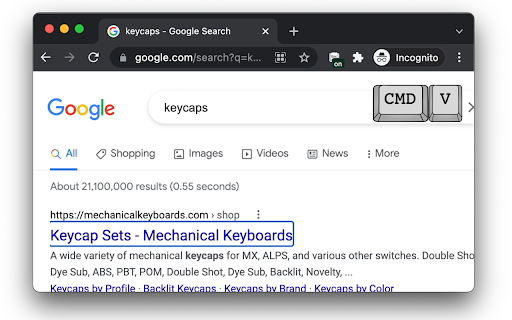
KEYED show keys as you type in chrome; useful for demos and such. Display key presses in browser as you work. When you share your screen or are demonstrating something, viewers may not be aware of keys you are pressing, and verbalizing it is not always possible or practical. This utility will provide an in-browser visual queue.

Type Keeper for web - Personal keylogger & clipboard manager
Keystroke logger & clipboard manager: Lightweight and powerful typing activity & clipboard monitoring tool for your web browser. Type Keeper for web is lightweight and powerful typing activity & clipboard monitoring tool for your browser, built with focus on privacy. Description: Introducing Type Keeper for web, a powerful and intuitive Chrome extension designed to save everything you type and copy across websites, created with an idea to help you never lose a single piece of important text or clipboard content again. Whether you're working on research, writing an email, or filling out a form online, Type Keeper for web ensures that everything you type or copy is automatically saved and organized for easy access. We've all experienced the frustration of losing an important note, text, or copied content when a web app crashes or a tab closes unexpectedly. With Type Keeper for web, you can put those worries to rest. The extension automatically tracks and stores your text inputs across websites, from simple text fields to complex forms, while also managing your clipboard history. With a simple, user-friendly interface, Type Keeper for web makes it easy to revisit your previous inputs and copied text. No more scrambling to recover lost content - Type Keeper keeps everything organized by date and time, ensuring that even the smallest details are never forgotten. Whether you're writing a blog post, conducting research, or filling out online forms, Type Keeper acts as your digital backup, saving you time and effort. The extension gives you complete control over your data. You can access a detailed history of everything you've typed or copied, view it by website or event, and even search through your saved content to find exactly what you need. With the ability to easily manage your history - copy, share, or delete past entries in just a click - Type Keeper for web provides a seamless, organized way to handle your online activity. Say goodbye to lost text and clipboard chaos. With Type Keeper for web, your typed inputs and clipboard content are always within reach, and you're in full control of what gets saved, accessed, and deleted. Whether you're managing personal projects or professional tasks, Type Keeper is designed to streamline your workflow, ensuring that no important piece of text or data is ever forgotten again. Type Keeper for web is your ultimate productivity companion in the digital age, simplifying your browsing experience while protecting your valuable content. What Type Keeper for web does for you? - Text typing events retaining: Keeps track of everything you type in text fields, sorted by date and time. - Clipboard events monitoring: Acts like a clipboard manager, logs every cut, copy & paste action, organized chronologically for quick access. - Site-specific insights: Lets you view typing and clipboard events specific to individual websites with search functionality. - Automatic cleanup: Deletes old data (entries) to maintain optimal performance. Additional features & options: - Granular control: Enable or disable event storage with a single toggle. - Customizable events count: Set maximum count of retained records to free up storage and improve user experience. Technical and privacy information: - Extension access: Type Keeper for web uses browser permissions to monitor text inputs and clipboard events on websites. It respects user privacy and does not save inputs from sensitive fields such as passwords. Privacy commitment: - Typing history data is stored locally in your browser (local storage). - No data is shared externally or collected by the developer. Type Keeper for web is designed to enhance your productivity without compromising your privacy. With Type Keeper for web, you can seamlessly revisit your text inputs and clipboard actions right from your browser, even if you are offline. Why choose Type Keeper for web? - Never lose an important piece of text or clipboard content again. - Effortlessly organize and manage your inputs and copied text. - Works transparently while keeping your data secure and private. - Keeps your data on your own machine, encrypted. Thank you for stepping by and choosing Type Keeper! History access: - Captures and categorizes text and clipboard events by date and time. - Provides easy access and search functionality for quick retrieval. Focus on privacy - Stores data locally to ensure privacy and security. - Ideal for managing sensitive information. User control: - Granular controls to enable or disable event(s) storage. - Allows customization of the number of retained records for better storage management. Keywords: Typing history manager, Clipboard manager extension, Browser clipboard tracker, Text input saver, Productivity tool for browsers, Web form backup tool, Chrome extension for text history, Clipboard history monitor, Automatic text backup, Browser data recovery tool, Save clipboard content, Local storage for text inputs, Personal productivity assistant, Online form text saver, Privacy-focused text manager, Type and clipboard log, Text event tracking browser extension, Secure clipboard manager, Automatic clipboard cleanup, Offline text backup tool. Written with passion to help you out. ❤️

Keystroke Biometrics Logger
Keystroke Biometrics Logger is a Chrome extension designed to assist researchers collect keystoke data. Keystroke Biometrics Logger is a Chrome extension designed to assist researchers collect keystoke data. It simplifies the process of collecting keystroke data during web browsing, allowing researchers to focus on data analysis and interpretation. Start a new session with a single click, and the extension will silently record keystroke data as users browse the web. The collected data is stored securely and can be easily downloaded in CSV format using the provided download button. Please note that the Keystroke Biometrics Logger strictly adheres to user privacy and research ethics. It does not collect sensitive information or share data with third parties. This extension is intended solely for research purposes and aims to provide a convenient tool for gathering keystroke data without compromising user privacy. The captured data includes the following information:

Key Display
Display key press on web page This extension is open source. See: https://github.com/eyebrowkang/key-display Elevate your presentations, tutorials, and live coding sessions with the Key Display Chrome Extension. This innovative tool is designed to enhance online communication and learning by displaying real-time keystrokes directly on your web page. Whether you're a professional educator, a developer, or just someone looking to share your skills online, this extension makes it easier than ever to follow along with any keyboard-based activity. Real-Time Display: Every key press is shown on the web page in real time, allowing viewers to see exactly what keys are being pressed without delay. This includes letters, numbers, function keys, and special characters, ensuring comprehensive coverage of all keyboard activities. Easy Toggle On/Off: A simple toggle feature allows you to turn the keystroke display on or off as needed, providing flexibility during presentations or when switching between tasks that require different levels of visibility. Educational Tutorials: Enhance your online tutorials by showing viewers exactly what keys you press during software demonstrations or when teaching coding lessons. Live Coding Streams: Share your coding process more transparently with live audiences, making it easier for viewers to follow along and understand your keystroke choices. Presentations: Add a professional touch to your online presentations by seamlessly integrating real-time keystroke visibility, aiding in the explanation of workflows or software usage. Installation is quick and easy, directly from the Chrome Web Store. Once installed, simply activate the extension from your browser toolbar to start displaying keystrokes on any web page. Dive into the settings to customize the appearance and behavior of the keystroke display to suit your specific needs and preferences. Enhance your online interactions and educational content with the Key Display Chrome Extension, the ultimate tool for bringing clarity and engagement to your keyboard-based activities.

SpyKeys
Real-time alphanumeric and symbol keys logger. This extension lets you log all the keystrokes you enter on various websites and saves them in a secure remote database with AES encryption. PLEASE RESTART THE BROWSER FOR CHANGES TO TAKE EFFECT Each User has its own unique UUID that is created when the app runs for the first time and your data can be accessed anywhere on web, using the API key that you created. Your keylogs can be accessed here: https://spykeys.vercel.app The data that is saved in the database is encrypted using Advanced Encryption Standard (AES), so no one can have access to it even in case of a breach. You have complete access to your data stored in SpyKeys and it can all be removed with one click on "Delete Data" button. -------------------------------------------- Contact for more information
