
iednajabaofgiiphckijdamkjjeehbfg
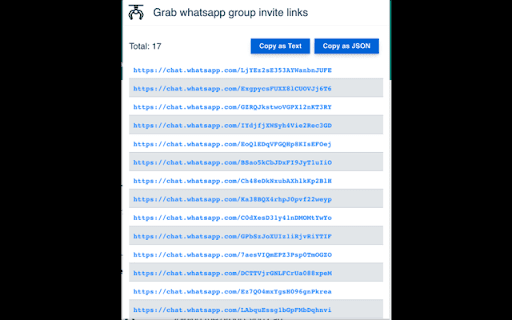


Are you looking for a hassle-free way to extract WhatsApp group links from HTML pages or Google search results? Look no further! Our WhatsApp group link extractor or grabber is here to simplify the process for you. With no special permissions required, our user-friendly tool makes it easy to grab WhatsApp group links with just a few clicks. Rest assured that we do not collect any usage information or analytics from you, so your privacy is always protected. In addition to providing you with the links you need, our tool also offers the option to copy links to your clipboard as both text and JSON formats and download as CSV. Plus, we log whether you are extracting WhatsApp group links from Google search results for your convenience. So, whether you need to join a group for work, study, or just for fun, our WhatsApp group link extractor is the perfect solution. Try it out today and see how easy it is to grab WhatsApp group links with just a few clicks! Features: * Requires no special permissions * Copy links to the clipboard as text and JSON and download as CSV * Logs if you are extracting WhatsApp group hyperlinks from Google search results. * View the logs and able to download as CSV after links extracting from Google search results.

Free WA Chat Export - Download WA Number to Excel/CSV/VCard - WAExport
Export WA chat with media to HTML, save group number & download contact to Excel. Local, Secure, Private. Zero data collected. 🔒We promise never to collect any user data, 100% privacy and security guaranteed. 🌟 Powerful WA Export Features 1. Advanced WA Group Number Export Batch Download WA Group Number from all or selected groups. Includes smart filtering to exclude Admins and exports rich data (Group Name, Public Display Name, Business Status). 2. Comprehensive Chat List Export Extract WA Number from your entire history. Use Country Filters to specific Download WA Number lists (e.g., +1, +86). Includes analytics like "Is Blocked", "Last Message Date", and "Unread Chats". 3. Flexible Contact Saving Efficiently Save WA Contact and Save WA Number. Keep your lists clean by filtering out existing contacts and focusing on new leads. 4. All Major File Formats Support WA Number to Excel (CRM ready), WA Contacts to CSV, and WA Contacts to VCard/VCF for easy import to iOS/Android. 【NEW!】 Ultimate WA Chat Export Tool Looking for the best way to export WA chat history? Our latest update brings a powerful and secure way to export your messages directly from your browser. Whether for business records, legal evidence, or personal archiving, we've got you covered. 🔥 Key Features: ● Export WA chat to Excel, HTML, or CSV: Choose the perfect format for your data. Excel and CSV are ideal for data analysis, while HTML provides a beautiful, readable offline interface. ● Export WA chat with media: Don't lose your valuable files! Seamlessly export images, videos, and documents attached to your conversations. ● Custom Date Range: Only need specific messages? Filter and export chats between specific dates to save time and storage. ● Safe & Fast Export Modes: Choose 'Safe Mode' to minimize account risks and ensure stable data extraction, or 'Fast Mode' for lightning-speed processing. ● Target Specific Chats: Easily select and export individual group or private conversations without exporting your entire inbox. 🎯 Who is this WA Export Tool for? ● Marketers: Download WA phone number lists for campaigns. ● Sales: Save WA Contact details to Excel for lead management. ● Analysts: Analyze activity with fields like "Last Message Date". ● Users: Easily Backup WA Number and save lists to PC. 💡 Why Choose This Extension? Native WA Web lacks a bulk WA Export function. Manually saving a WA Group Member or copying numbers is tedious and time-consuming. This tool bridges that gap. It is the most complete WA Contact Export utility that allows you to extract WA contact details with precision. Stop wasting time—automate your WA Group Number extraction and WA Number to Excel conversion today. We make WA Export simple, secure, and free. Whether for backup or marketing, use this tool to Download WA Group Number lists and extract WA contact details effortlessly. 📝Privacy Note: WAExport respects your privacy. We do not collect personal information or violate WhatsApp's terms of service. We do not request any authorization to user personal data. The extension works solely with the data already available on your device. 🔒 Disclaimer This extension is an independent project and is not affiliated with WhatsApp Inc. "WhatsApp" is a registered trademark of WhatsApp Inc. All WhatsApp Export and WhatsApp Number Export operations are processed locally on your device for 100% privacy and security.

Premium Sender - WhatsApp Bulk Sender
Personalize WhatsApp Web messages with templates, CSV lists, and scheduling. Free Bulk Messaging: Send bulk messages on WhatsApp at no cost. Attachment Support: Add attachments to your messages. Real-Time Updates: Receive real-time updates and notifications. Detailed Reports: Get detailed delivery reports for your campaigns. CSV Preview: Preview uploaded CSV files in real-time. No Contact Saving: Send messages without saving contacts. Completely Free: No charges for features. User-Friendly: Intuitive and easy to use interface. Affordable Premium: Cost-effective premium features. Customer Support: 24/7 live customer support. Join us and take advantage of the best tool for WhatsApp marketing. By downloading the extension, you agree to our Terms of Service and Privacy Policy. Premium Sender is an independent tool and is not associated with WhatsApp Inc. or its affiliates.

Group Contact Extractor for WA
Easily export WhatsApp group contacts and chats contacts to CSV, Excel files. 🏷 What is Group Contact Extractor for WA? Group Contact Extractor for WA is a Chrome extension that allow people export and save all WhatsApp contacts, includes unknown phone numbers of group contacts. 🏷 Who is the WhatsApp group contact extractor designed for? We developed this extension to make it easier for marketers, salespeople or e-com sellers to better use WhatsApp for marketing and sales. 🏷 What can it do for you? Whether you're looking to boost your brand's visibility or drive product sales, whether you operate offline or sell on platforms like Amazon, Shopify, Shopee, or MercadoLibre, as long as your potential audience utilizes WhatsApp, this Chrome extension is your key to initiating communication with them. Group Contact Extractor for WA enables you to export contact details of members from the groups you've joined, as well as the phone numbers of individuals you chat with. Additionally, the extension can save your extracted WA numbers locally as a file, allowing you to review them at your convenience. You can download phone numbers of group member in various formats such as csv, xlsx, json, and more. 🏷 Feature: Export contacts Export the phone numbers you have chatted with. Export the phone numbers of WA group members (optional whether to include administrator) Save contact information to csv, xlsx, json and other file formats Easy to use Constantly updated. Respecting your privacy and security, the chrome extension will not record any of your information. 🏷 Disclaimer: This Chrome extension is an unofficial enhancement tool, not endorsed or certified by WhatsApp Inc., and must not be used in violation of its policies.

TG Sender - TG bulk message send and invite
Scrape Telegram group members and send bulk message, invite bulk members automatically on Telegram This Chrome extension helps you scrape any group members, send messages to many people, and add members to Group automatically. Use the extension, you don't need one by one sending off messages to all your customers anymore. you boost your work. It is very easy to use and saves a lot of time for you. And this extension doesn't require your account and password and runs only locally on your browser, so services don't depend on any 3rd parties. Frequently Asked Questions: ➢ How to Scrape Group Members? 1. Login account on web.telegram.org and check K version 2. Click Group that you want to scrape 3. Set the number you want to scrape 4. Click START SCRAPING button to scrape ➢ How to Send Bulk Messages? 1. Input a list of usernames/Groups/phone numbers 2. Input the message/sticker 3. Set the interval between two messages 4. Click START MESSAGING button to send it automatically ➢ How to Invite Bulk Members to your Group? 1. Login account on web.telegram.org and check K version 2. Input a list of usernames or paste usernames from the clipboard 3. Set the interval between two Invites 4. Click START INVITING button to invite automatically ➢ How many messages should we send per day to keep your account safe? There are no restrictions on sending messages to your mutual contacts (contacts you have already chatted with) on TG; This means that you can send messages to as many people as you want with your TG account and you would not face any problems. But the story is different for sending messages to strangers (contacts you have no chat history with). In general, depending on the positive score of your TG account, you can send up to 50 messages to strangers in one day. ➢ How can I get new accounts to send more messages? 1. Upload a photo for your profile and complete the profile information 2. If your account gets older (since the date of its creation) 3. And the most important point: when you chat with different people on TG and they respond to your messages, your account will receive more positive scores If you collect more positive scores for your TG account by doing the above-mentioned activities, TG will find your account more authoritative and won't grow suspicions of your account activities. If you have more questions, feel free to join our group to discuss together, we have many partners here to discuss how to play with TG Marketing (the link to the group is inside the Extension) Note: Telegram Sender is an independent project and has no relationship to Telegram Inc.
