
ieboeloojjkpimfigcgijnkncjpabhbj


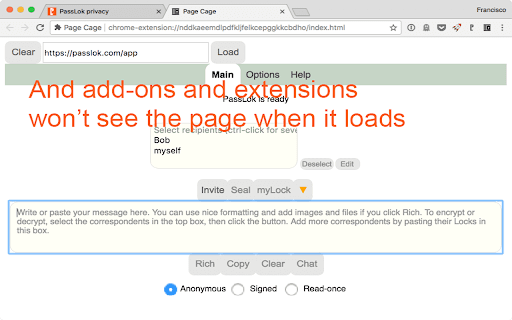
Loads a page inside a frame so it can't be seen by other extensions ⚠️ NOTICE: THIS EXTENSION HAS EVOLVED INTO PRIVACY BAR ⚠️ This legacy standalone tool is no longer actively maintained. The exact same functionality has been integrated, upgraded, and fully secured inside our flagship extension: Privacy Bar. Looking for pure Symmetric Encryption? Privacy Bar handles it entirely offline. Looking for Read-Once payloads? Privacy Bar generates self-destructing messages out of the box. Looking for Page Isolation/Sandboxing? Privacy Bar features an enhanced, isolated "Safe Space" tab like Page Cage, and has an additional mode for when you want to protect the browser from a potentially malicious page. 👉 Search the Chrome Web Store for "Privacy Bar" or visit privacybar.net to upgrade to the complete, modern suite. Hasn't it ever bothered you to see a password manager box popping unexpectedly and offer to save your login? Password managers can do this because they can see everything on that page, including all your precious private information. In fact, most extensions and add-ons installed on your browser can do it. Feeling better now? Now, you can open the page in incognito mode, which by default blocks all extensions from loading, but if you have allowed some extensions to load in this mode, it's rather tedious to go one by one making sure they are safe. Page Cage protects your private pages from intrusion by loading them inside a frame to which the other extensions do not have access. It's as simple as clicking the Page Cage icon and typing the URL. Since this is quite a neat to prevent from intrusion my encryption and security web apps, starting with version 1.0 there is a nifty list that allow you to load them without having to remember their URL. Not all pages will load, however, because many websites refuse to be placed inside a frame in order to prevent Clickjacking. This comes from the server so there's nothing that we can do about it. Please bear this in mind as you use Page Cage.

SynthPass
SynthPass: The Zero-Vault Password Synthesizer Conventional password managers are part of the problem. They ask you to trust a "vault"—a centralized database of your most sensitive secrets that lives on a server, waiting to be breached. SynthPass is the solution. It doesn’t store your passwords; it synthesizes them. ELIMINATE THE TARGET With SynthPass, there is no database for a hacker to steal. Your passwords exist only for the split second they are generated, calculated mathematically from the domain name and your Master Key. Because no secrets are stored, there is no central vault for an attacker to find—even if your computer is seized or a server is compromised. NEW IN v2.0: ENHANCED SOVEREIGNTY Version 2.0 introduces a superior synthesis engine for even stronger cryptographic results. The v2.0 Standard: Our most robust generation logic to date, now set as the default. Classic Mode Toggle: Total backward compatibility. If you have legacy passwords generated with the original engine, simply check the "Classic mode" box to generate them exactly as before. CORE ARCHITECTURE Master Key Security: Your Master Key is never stored. It resides in volatile memory only as long as you are using it, before a mandatory Security Auto-Wipe purges it after five minutes of inactivity. WiseHash™ Logic: We don't just hash your key; we "stretch" it. Our WiseHash algorithm evaluates the entropy of your Master Key and applies a variable number of SCRYPT iterations. The weaker the key, the harder the math—forcing hackers to waste years of compute time on simple guesses. Infinite Serials: When a site forces a password change, don't change your Master Key. Just increment the optional Serial; SynthPass remembers the serial and your User ID locally so your password remains unique and high-strength. THE VAULT (LOCAL-ONLY STORAGE) For data that cannot be synthesized, SynthPass provides a secure Vault. Specific Passwords: If you must use a certain non-synthetic password, store it here. Zero Cloud: Everything in the Vault is encrypted with your Master Key and synced only via the browser’s internal files—never our servers or a third-party cloud. MOBILE & EXTERNAL ACCESS Since the logic is purely mathematical, you can generate your passwords on any device using our secure web apps: UPGRADE TO PRIVACY BAR Looking for more than just passwords? Privacy Bar is our comprehensive security suite that includes the full SynthPass 2.0 engine alongside post-quantum encryption, steganography, and secure file management. If you use Privacy Bar, you already have the power of SynthPass 2.0 integrated into your digital sovereignty toolkit. Stop storing your secrets. Start synthesizing them.

PassLok Universal
High security encryption for any email, plus Passwords. This legacy "Universal" extension is no longer actively updated for new web page layouts. To get the latest security features, cross-platform compatibility, and seamless real-time page interactions, please install our flagship Chrome Extension: Privacy Bar. Privacy Bar contains the exact same serverless, battle-tested XSalsa20 encryption and SynthPass password management engines you trust from PassLok, but features a massively upgraded, actively maintained interface that integrates effortlessly into your favorite webmail and texting apps. Privacy Bar is fully backward-compatible with all your existing PassLok contacts and locks. 👉 Search the Chrome Web Store for "Privacy Bar" or visit privacybar.net to upgrade. TAKE PRIVACY INTO YOUR OWN HANDS Easy, end-to-end secure encryption for email and other web-based communication systems, plus real-time chat, that does not rely on servers and is therefore immune to hacking or government intervention. Very similar to PassLok for Email, also in this store, except that it supports any Email Service, including Gmail, Yahoo, Outlook online, and many more. And if you're not exchanging messages or filling passwords, clicking the PassLok Universal icon will allow you to save secure notes on any website, or to load it into a special "Incognito" page that loads within the normal Chrome window. This function, also available via the right-click menu, is borrowed from Page Cage, also in this store. To encrypt a message or file, just click the PassLok icon when the email service's Compose or Reply window is visible. A popup will take your private message and encrypt it with the click of a button. Then you can send it out like any other message, or as an attachment. To decrypt it, display the encrypted message and click the PassLok icon. A popup will show the decrypted message or file immediately, if there is one. PassLok asks you for your Password only once. It can be anything you want, so you can actually remember it. PassLok will evaluate its strength and compensate for its weakness by lengthening the computations. It won't be stored or sent anywhere, and PassLok will forget it after five minutes of inactivity. If you want to change your Password, go ahead and start using a new one when PassLok asks you for it. You may be asked for the old Password if PassLok can't decrypt something, but otherwise that's all you'll have to do. You can use either of these five encryption modes, by just clicking a button: 1. Signed mode: encrypted messages can be decrypted again, so long as the recipients supply their authentic passwords. Recipients are also assured that the message was encrypted by the sender. 2. Read-once mode: after a few encrypted messages have been exchanged they can no longer be decrypted by anyone, even if they supply the correct passwords. 3. Chat mode: you can make invitations which, when decrypted by the recipients, open a webRTC real-time chat session where participants are directly connected to one another. The chat session includes text, files, audio, and even video. 4. Anonymous mode: for when you are using a dummy email account or otherwise do not wish to reveal your identity. 5. Shared password mode: most secure when you have previously shared a secret with the recipients PassLok Universal allows you to encrypt files and images as well. Just load them with a toolbar button. You can also encrypt them separately and load them as regular attachments. For the very paranoid (and who isn't these days?), PassLok Universal includes four special features: 1. Encrypt to image: the message is encrypted into an image you supply and then attach to your email, so the presence of a hidden message cannot be detected even by computer analysis. 2. Concealed mode: the encrypted message does not look encrypted, but actually looks like normal text. PassLok still detects it and decrypts it normally, though. 3. Invisible mode: the encrypted material cannot be seen at all. It is hidden in the space between the lines of an otherwise normal message. 4. Hidden msg: there is a hidden message in addition to the regular message, and it is encrypted by a separate key. The hidden message is completely undetectable to those who don't know it exists. Images also can contain hidden messages. --State-of-the art security-- PassLok is based on the NaCl encryption engine, which uses 255-bit standard elliptic curves vetted against weaknesses by experts. On top of that, it uses the 256-bit XSalsa20 symmetric cipher, a high-performance, open source algorithm, which has been scrutinized by experts for nearly a decade without any practical weaknesses being found. The image-encryption part of PassLok, developed in-house but open-source, has recently been shown to be much harder to detect than F5, the champion steganography tool until now. PassLok does not use servers that might eventually compromise your private data. All encryption is done client-side. All data sent to the email server is encrypted, and they don't have the password that decrypts it. With PassLok, you can actually SEE that that your messages have been encrypted. You can also see the code. PassLok hides nothing from you. --PassLok Universal may be the only password manager you'll ever use-- With PassLok Universal, there is no "vault" that has to be protected from hackers because your passwords are synthesized on the fly, just as you need them. PassLok-made passwords are always high strength and comprise letters, numbers, and special characters. Passwords for different websites are guaranteed to be totally different. You never have to change your Master Password. When a website forces you to change its password, simply change the optional serial that is used to synthesize that password. PassLok will remember the serial, as well as your user ID. Your Master Password will never be stored, and it disappears from memory after five minutes not using it. But if you absolutely must use a certain password, PassLok got you covered too! It is encrypted before storage and synced with the browser itself, so no third parties need to be involved. Unlike conventional password managers, PassLok - won't pop up and interrupt your flow; it is activated only when you click its icon on the browser toolbar - won't force you to store anything secret, only user IDs and optional serials, if you allow it - is always available, because it does not have to connect to "the Cloud" - makes only strong passwords - won't ask you for money - won't show ads PassLok Universal uses the SynthPass engine, which is based on the WiseHash key-stretching algorithm. WiseHash evaluates the information entropy of your Master Password and subjects it to a variable number of rounds of SCRYPT key-stretching. The weaker the password, the more stretching. This forces would-be hackers to spend an inordinate amount of computer time testing weak passwords before they can get to yours. PassLok displays an accurate measurement of your Master Password's entropy to help you come up with a strong one. If you are neither encrypting email nor filling passwords, clicking the PassLok Universal icon displays a popup with two nifty functions: 1. You can save a note on any website, which syncs with it and is securely encrypted. Again, no servers involved. The content can be anything, not just passwords. 2. Or you can put the whole page into an "Isolation cage" similar to incognito mode, but running next to your regular tabs. The cage also contains links to Web search services that won't track you (or so they say, we don't make claims about it), and additional free apps in PassLok's family. This is the same functionality as that of Page Cage, also in this store. PassLok Universal is fully compatible with PassLok for Email and SynthPass, and is now in public beta testing.

IMDbae - IMDb Age Extension
Adds actors and actresses age besides their born date on IMDb A simple extension that displays actors and actresses age after their born date, just like how it's shown on wikipedia. Works 4 june 2025 (now also works on actors with only a birthyear but no day date) + Lightweight + Displays correct age (other similar extensions only check for birth-year) + Works on desktop and mobile site

Pinn – Photos, Videos & Memories
Pin photos, videos & slideshows to any webpage. Beautiful frames, filters, decor & stickers. Your memories, everywhere you browse. Pinn – Pin photos, videos & slideshows to any webpage. Beautiful frames, filters, decor & stickers to personalize your browser. 📷 Photo Frames Pin photos in beautiful frames – from elegant Baroque to modern Polaroid. Choose from 14 unique frame styles that make your memories pop. Resize and rotate as you like. 🎀 Decor & Stickers Add pins, clips, tape, hearts, stars, and more to personalize your space. 🎬 Video Clips (Premium) Add looping video clips to bring your frames to life. Perfect for short memories, pet moments, or aesthetic clips. 🖼️ Photo Slideshows (Premium) Add up to 5 photos per frame with automatic rotation and smooth fade transitions. 🎨 12 Photo Filters Apply beautiful filters like B&W, Sepia, Vintage, Warm, and more – all included free. ✨ Key Features: • Pin photos and videos to any webpage – they stay where you place them • 14 frame styles – Baroque, Polaroid, Neon, Holographic, Wooden & more • Drag, resize & rotate frames anywhere on the page • Per-website control – show or hide pins on specific sites • Works on any website – your pins persist across browsing sessions • 6 decorative items + 8 fun stickers • Photo filters and effects included free 💎 Premium – $4.99 One-Time Payment (50% discount for a limited time) Pay once, unlock forever. No subscriptions, no recurring fees. One license key works on unlimited devices – just enter your key on any browser to activate. All 14 frames, 12 photo filters, decor & stickers are free for everyone!
