
idpkmnlndeiaagbilpehieiehocikhdc

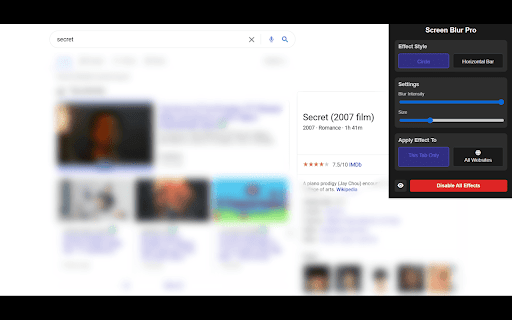


Focus your audience’s attention by blurring distractions during screen sharing and presentations. Screen Blur Pro Version 2.0 — New Overlay Modes & Performance Improvements ~ Solid Color Overlay — You can now choose between blurring the surrounding area or covering it with a solid color. Simply go to Settings and switch from "Blur" to "Solid Color". Black — Great for a clean, distraction-free spotlight effect (the most requested feature!) White — Works well on light-colored pages Custom — Pick any color you want using the color picker Performance improvements ~ The extension now runs significantly smoother, especially on older computers and during long screen sharing sessions: Faster and more responsive cursor tracking Reduced CPU usage while the effect is active Solid Color mode is a great alternative if Blur mode feels slow on your device ~Tip: If you experience any lag with Blur mode, try switching to Solid Color — it achieves the same spotlight effect with much less processing power. ~ Screen Blur Pro - Share Screen Stress Free Screen Blur Pro is the ultimate Chrome extension designed to enhance your privacy and streamline your online presentations. Whether you’re hosting a virtual meeting, sharing your screen during a live presentation, or recording a tutorial, Screen Blur Pro ensures that your sensitive information remains protected while allowing your audience to focus on what truly matters. This powerful tool is perfect for professionals, educators, content creators, and anyone who values privacy and productivity in their online activities. With its easy-to-use interface and customizable settings, Screen Blur Pro is your go-to solution for creating distraction-free and professional screen-sharing experiences. Key Features That Set Screen Blur Pro Apart - Blur Sensitive Content with Precision: Instantly blur chats, profile pictures, or any specific areas of your screen with just a few clicks. Maintain your privacy while keeping the content relevant to your audience in clear view. - Customizable Blur Intensity: Adjust blur levels and sizes to suit your needs. Whether it’s hiding sensitive information or simply reducing distractions, Screen Blur Pro gives you full control over your presentation. - Focus-Driven Highlighting: Highlight key areas of your screen while ensuring unimportant or private sections are obscured, helping your audience stay focused on what matters most. - Lightweight and Seamless: Designed for efficiency, Screen Blur Pro integrates effortlessly into your browser without slowing down your workflow. - User-Friendly Interface: The extension offers an intuitive design that’s easy to navigate, even for first-time users. - Privacy Protection: Safeguard your sensitive data during live meetings or screen recordings. - Professional Edge: Present with confidence, knowing your screen looks polished and distraction-free. Who Is Screen Blur Pro For? - Professionals: Keep confidential client or company information hidden during online meetings. - Educators: Conduct virtual classes while protecting student data or personal files. - Content Creators: Record tutorials or product demos without exposing your private information. - Team Leaders: Maintain focus during collaborative sessions by reducing distractions on shared screens. Why Choose Screen Blur Pro? Screen Blur Pro isn’t just another browser extension—it’s a powerful productivity tool that prioritizes your privacy and professional image. With the ability to blur sensitive areas and highlight key content, this extension empowers you to create an engaging and distraction-free viewing experience. 1. Install Screen Blur Pro from the Chrome Web Store. 2. Activate the extension and customize your blur settings via an intuitive interface. 3. Toggle blur effects on and off, or adjust the blur intensity to match your needs. 4. Share your screen confidently, knowing your private information is secure. Boost Productivity and Protect Your Privacy In a world where online collaboration is the norm, Screen Blur Pro ensures that your screen sharing is always professional, private, and distraction-free. By combining advanced privacy tools with a focus on simplicity, this extension offers a solution that’s as powerful as it is easy to use. Start Using Screen Blur Pro Today! Download Screen Blur Pro now and take control of your screen-sharing experience. Protect your privacy, maintain professionalism, and ensure your audience stays focused on what matters.

Focus Blur
Provides privacy by blurring everything on your screen except the selected area. Focus Blur - Screen Privacy Tool Protect your sensitive information in public spaces! Focus Blur lets you blur everything on your screen except the area you want to keep visible, providing instant privacy while working in public places. 🔒 Key Features: • Selective Area Focus: Choose exactly which part of your screen remains visible • One-Click Privacy: Instantly blur everything except your selected area • Easy Toggle: Quick enable/disable with a simple click • Customizable Selection: Resize and reposition your focus area anytime • Non-Intrusive Design: Works seamlessly with any website or application ✨ Why Choose Focus Blur: • Perfect for working in public spaces like cafes, airports, or co-working spaces • Protect sensitive information from shoulder surfing • Maintain privacy during presentations or screen sharing • No account required - works right out of the box • Lightweight and performance-friendly 🎯 Perfect For: • Professionals working with confidential information • Remote workers in public spaces • Anyone concerned about visual privacy • Students working on sensitive documents • Business presentations with confidential data 💡 How to Use: 1. Click the extension icon 2. Select "Choose Area" button 3. Draw your focus area 4. Remove blur anytime with the close button or extension menu Works on any webpage without affecting its functionality. Free, simple, and effective privacy protection for your screen. Note: This extension requires permission to access your current tab to create the blur effect.

Blur. The Image and Video blur extension
A browser extension that blurs all images on a page, for when you want to be discreet or don't want to look at certain images. Celebrating 100,000 installs, we've updated your favourite browser extension with a new look and feel! Here's to many more years of blurring! Watch this space as we continue to roll out new and exciting changes. The Blur Team. We’ve all had those times when we've 'accidentally' searched for something online and ended up seeing images we didn't want to see. Or maybe you’ve experienced browsing Facebook or Instagram at work or in a public place, only to catch someone glancing at your screen. Or perhaps you just want to read an article without being distracted by all the images and videos. Well, now you can. This add-on blurs all images and videos on a webpage, so you can concentrate on what’s important. You can choose to view the content or not. To see or not to see? The choice is yours. Shortcuts: ALT + K: Blur or unblur an image or video when hovering over it ALT + L: To quickly enable or disable the extension Language Support: We now support over 5 languages including English, Mandarin, Russian, Arabic, Bangla, Hindi and Urdu. Simply change your preferences via the settings tab. Themes: Change between light and dark theme or choose the system default. Two additional fun themes have been added, install to find out what they are. Allow list: You can also white list websites, simply open the extension and add the site to your allow list!

Blur Fields Extension
Blurs specific fields which are required and allows blurring the whole page via a shortcut. Enhance your online privacy and control over your browsing experience with Blur Fields Extension, a powerful and easy-to-use Chrome extension designed to help you obscure sensitive information on any webpage. Whether you're sharing your screen during a meeting, recording tutorials, or simply browsing in a public space, Blur Fields Extension ensures your personal data remains confidential. Key Features 1. Blur Specific Elements Selective Blurring: Enter selection mode and click on any element to blur it instantly. Persistent Blurring: Blurred elements remain obscured on future visits to the website. Unblur with a Click: Simply click on a blurred element to remove the blur effect. 2. Blur Entire Page One-Click Privacy: Blur all content on the page with a single click. Toggle Visibility: Easily switch between blurred and unblurred views. 3. User-Friendly Toolbar Accessible Controls: A minimalist toolbar appears at the bottom of the page, providing quick access to all features. Icon-Based Interface: Intuitive icons for easy navigation and operation. 4. Keyboard Shortcuts Quick Activation: Use customizable keyboard shortcuts to activate features without leaving the keyboard. Toggle Toolbar: Ctrl+Shift+T (Windows/Linux), Option+Shift+T (Mac) Blur Selection Mode: Ctrl+Shift+U (Windows/Linux), Command+Shift+U (Mac) 5. Escape Key Support Exit Selection Mode: Press the Escape key to exit blur selection mode at any time. 6. Seamless Integration No Interference: Works smoothly without affecting the website's functionality. Local Processing: All operations are performed on your device; no data is transmitted or stored externally. Use Cases Screen Sharing: Protect sensitive information during online meetings or presentations. Tutorials & Demos: Create professional content without revealing personal data. Public Browsing: Maintain privacy when using shared computers or public Wi-Fi networks. Focus Mode: Hide distracting elements to improve concentration. Privacy & Security Local Data Storage: All your blur selections are stored locally on your device. No Data Collection: The extension does not collect, transmit, or store any personal information. Open Source: Review the code yourself to verify security and privacy practices. Note: Blur Fields Extension is continuously updated to improve performance and add new features. Stay tuned for updates! Disclaimer: This extension is provided "as is" without warranty of any kind. Use it at your own risk.

Screen Privacy Blur
Blur parts of your screen to hide private information during screen sharing Screen Privacy Blur helps you protect sensitive information during screen sharing, video calls, demos, live streams, and recordings. Create manual blur overlays anywhere on a webpage, resize and move them freely, save layouts per site, or use Smart Auto Blur Pro to automatically detect and blur sensitive fields such as emails, passwords, phone numbers, card fields, API keys, tokens, and private text patterns. Perfect for remote work, client demos, product walkthroughs, support calls, online teaching, streaming, and any situation where you need to share your screen without exposing private data. Key Features: • One-click manual blur overlays • Drag, resize, and position blur areas • Save and load blur layouts per website • Per-overlay pin controls • Adjustable blur intensity, opacity, color, and glass blur • Smart Auto Blur Pro for automatic sensitive field detection • Presentation Mode for instant full-screen privacy • Works across websites and web apps • Local blur detection and overlay rendering Privacy-first by design. Manual overlays and Smart Auto Blur detection run locally in your browser. No screenshots, page content, form values, or browsing history are collected.
