
idlhkplabmebgdadacglfnpgpnbhnkdp
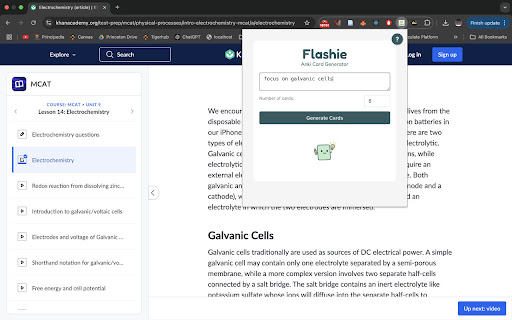


✨ Flashie helps you turn any webpage into smart, editable flashcards — in seconds. ✨ 🧠 Just highlight content (or let Flashie grab the page), and let AI generate study cards you can tweak, lock, or refine. 💾 Then, export your deck directly to Anki using AnkiConnect — no copy-pasting, no hassle. 🔍 Currently works on most websites – PDF and textbook handling incoming Features: ⚡ Scrape any webpage or text selection 🤖 Generate flashcards using AI (Basic or Cloze) ✍️ Fully editable before export 🎯 Target cards for precise AI edits 🪄 Apply prompts to refine or rephrase cards 📤 Export directly to Anki (via AnkiConnect) 🔐 Permissions & Privacy Flashie needs access to all websites to scrape content for card generation. No personal data is collected, stored, or sent. All AI processing is handled via our backend. 🎓 Whether you’re a student, language learner, or lifelong autodidact — Flashie makes studying from the web actually work.

AnkiNLM
The fastest way to export your generated Notebook LM flashcards and import them to your Anki decks ✨ Better LaTeX compatibility — CSVs are now formatted to preserve LaTeX syntax (e.g., \sin(x), \frac{a}{b}, etc.) so your math renders correctly in Anki. 🧮 Optimized for math-heavy flashcards — When imported, cards can now display formulas and equations just like they appear in NotebookLM. 📄 Cleaner CSV output — Minor formatting refinements for improved readability and consistent field separation. To properly render mathematical formulas in Anki, you’ll need an add-on that interprets LaTeX syntax. After testing several options, we recommend “Better Markdown Anki” (ID 2100166052) — it provides the best rendering results and works seamlessly with the CSVs exported by AnkiNLM. Note: This add-on is not developed or maintained by the AnkiNLM team. You’re free to use any other add-on or template that supports LaTeX or MathJax rendering in Anki. AnkiNLM is a lightweight browser extension that helps you instantly transfer flashcards generated in Google NotebookLM into Anki. Once installed, it adds “Copy CSV” and “Download CSV” buttons at the bottom of the NotebookLM Studio flashcard footer, giving you a ready-to-import CSV file in one click. 1. Open any NotebookLM Studio with generated flashcards 2. Scroll to the flashcard section footer 3. Click “Download CSV” or “Copy CSV” 4. Open Anki and import the CSV 5. Set Field 1 = Front and Field 2 = Back 6. Choose your deck and finish the import ✅ * One-click CSV export * Copy or download support * 100% compatible with Anki field mapping * No setup required * Lightweight and privacy-friendly 🔒 1. File > Import 2. Choose the CSV 3. Map Field 1 → Front, Field 2 → Back 4. Confirm import 1. Transfer or paste the CSV 2. Import via app or AnkiWeb sync Perfect for: * NotebookLM users who rely on flashcards * Students looking for a faster study workflow * Anyone building an automatic NotebookLM → Anki pipeline 🚀

Anki Highlight Helper
Easily create Anki cards from highlighted text in your browser. Elevate Your Learning with Anki Highlight Helper! (Setup instructions below) Anki Highlight Helper is designed for students, educators, and lifelong learners who want to maximize their study efficiency. This intuitive Chrome extension integrates smoothly with Anki, enabling you to generate flashcards quickly and easily from any webpage. With Anki Highlight Helper, your study sessions become more productive, allowing you to capture key information in just a few clicks. Whether you're browsing articles, research papers, or online textbooks, this tool ensures that you never miss an important detail. ----------Features---------- ✅ One-Click Card Creation – Select text, right-click, and choose “Make Anki Card” to instantly add flashcards. ✅ Deck & Note Type Selection – Choose from your existing Anki decks and note types. ✅ Persistent Preferences – Your last-used deck and note type are saved for a seamless experience. ✅ Cloze Deletion Support – Easily generate Cloze cards without manual formatting. ✅ Dynamic Fields – Automatically adapts to different note types, ensuring a flexible workflow. ----------Setup---------- ⚠️NECESSARY STEPS⚠️ 1) Open the Anki desktop application. 2) Navigate to Tools > Add-ons > Get Add-ons. 3) Enter the code 2055492159 to download and install the AnkiConnect add-on. 4) Go to Tools > Add-ons and find AnkiConnect in the list. 5) Select AnkiConnect and click Config. 6) Update the address field from "http://localhost" to "*". 7) Save your changes and restart Anki to apply the configuration. Privacy: We respect your privacy. No personal data is collected. Support Us: Your participation helps support the development and maintenance of this free extension. Version History: v1.1: Improved setup instructions and error handling. v1.2: Enhanced security and optimized extension permissions. v1.3: General optimizations and minor bug fixes. v1.4: Major UI update – improved design, persistent deck/note type selection, added Cloze card support, and dynamic field loading to accommodate different note types.

Anori: productivity new tab
Customizable new tab: compose your own page from widgets 🚀 Boost Your Browser: Unleash your browser's full potential with Anori transforming your start page into a productivity powerhouse. With an interface designed for entrepreneurs, designers, developers, project managers, students and just productivity geeks, Anori isn't just a new tab - it's a springboard to your daily tasks. 🛠️ All-in-One Widget Toolbox: 📌 Manage your bookmarks with ease. ✅ Keep on top of your todos. 📝 Jot down important notes in seconds. 🌍 Worldly Features: Navigate the world effortlessly from your new tab with Anori's global features. 🕰️ Track multiple time zones. ☀️ Stay updated with real-time weather forecasts. 💡 Easy Access: Anori puts your most-visited sites and recent tabs at your fingertips, making your browsing experience smoother and faster. 💫 Unique & Competitive: Anori outshines the competition, setting itself as a superior alternative to Momentum Dash, Infinity New Tab, Speed Dial, Homey, Tabrr Dashboard, and Infinite Dashboard. With unique features and a beautiful interface, Anori raises the bar for what you can expect from a new tab extension. 👩💻 Customizable Dashboards: Tailor your start page to your unique needs with customizable dashboards. 🔄 Easily switch between work and personal contexts. 🎨 Upload your own icons for a personal touch, or choose from 10,000 provided icons. 🎨 Beautiful & Adaptable: Whether you love minimalist tones or prefer colorful, cute themes, Anori has a color scheme for you. 🌟 Transform Your Start Page: Start your day with a bang. Anori gives you shortcuts to your essential tasks, right from your new tab. It's not just beautiful - it's your partner in productivity. Download Anori today and experience the difference!

Flashcard Generator
Use Flashcard Generator to create flashcards. The ultimate AI flashcard maker and flashcard generate for Quizlet and Anki. ⚡ Meet the ultimate AI-powered flashcard tool that transforms the way you study, memorize, and organize knowledge. This generator is designed for learners, teachers, and professionals who want to boost productivity and retention with ease. Whether you’re preparing for exams, mastering a new language, or organizing information, this ai flashcard maker brings your notes to life in seconds. ✨ Our flashcard creator extension integrates cutting-edge artificial intelligence with a sleek Chrome interface, allowing you to generate cards directly from any webpage or text you highlight. You don’t need to waste time typing definitions or copying terms — simply select, right-click, and let the ai flashcard generator do the rest. 📚 With the flashcard generator, you can create unlimited card sets tailored to your learning style. Students can enjoy instant access to anki cards and quizlet alternatives that are simple, interactive, and customizable. Teachers can turn study materials into visual learning aids using this card generator and share sets instantly with their classes. Why users love this extension 1️⃣ Easy and fast flashcard maker ai that saves hours of manual work. 2️⃣ Compatible with ankiweb and quizlett. 3️⃣ Perfect quizlet alternative for students seeking flexibility and speed. 4️⃣ Available anytime as a reliable flashcard generator online tool. 5️⃣ Helpful for creating anki cards or exploring new quizlet create methods. 🔹The ai flashcard maker version provides everything you need to study smarter. You can review, shuffle, and test your memory right in your browser. Plus, it syncs easily with your favorite anki web account, enabling smooth import and export between apps. Enhance your learning environment with: ● Smart suggesting based on your study patterns. ● Editable layouts for definitions, images, and terms. ● Seamless integration with online flashcard generator tools. Key Benefits ➤ Generate flashcards instantly from any study material. ➤ Work with countless sources — PDFs, articles, notes, or even quizlet create sets. ➤ Combine AI features with human review for accuracy. ➤ Save and organize cards through the integrated flashcards maker dashboard. 🌐Tired of switching tabs and wasting time organizing notes? The online flashcard generator gives you all tools in one simple interface. Effortlessly build card decks for language learning, science terms, or history facts using this powerful flash card generator. ❗️If you’ve used quizlett or quizlet alternatives, you’ll love how this extension feels familiar yet faster. It syncs easily between anki web, anki, and local storage options. So whether you favor ai flashcard generator formats or anki cards, you can stay organized and efficient without limits. 🎓 For teachers wanting a collaborative edge, the flashcards generator lets you share decks directly with students or colleagues. Create, update, or merge sets from different sources — perfect for distributed study groups or online classrooms. ✦ Click the ai flashcard generator button. ✦ The AI analyzes and instantly gives you front-and-back cards. ✦ Review, edit, and export them through ankiweb, quizlett. That’s how simple it is to use this flashcard generator. Within minutes, your notes transform into interactive study tools. ▸ Use the flashcard maker ai to revise vocabulary lists. ▸ Store your decks in anki, upload to quizlet create, or share via links. ▸ Access all decks offline too — it’s a 100% flashcard generator online option. 🌟 No registration? No problem — learners can experience the ai flashcard maker functionality instantly after installation. And with continuous updates, the extension ensures compatibility with all major browsers and learning systems. 🚀 This flashcard generator online combines the creativity of AI with the tradition of the anki cards methods. Forget copying data manually; this extension streamlines creation, review, and sharing, becoming your all-in-one solution for flash cards and flash card maker needs. Boost your memory, save time, and study the smart way with this ai flashcard generator Chrome extension. It’s designed for modern learners who want every minute to count and every review session to feel effortless 🔥 Experience the future of flashcards maker tools — join thousands mastering knowledge faster with our innovative card creator!
