
ideeeggffajjohachhmmekodlkgahdhi


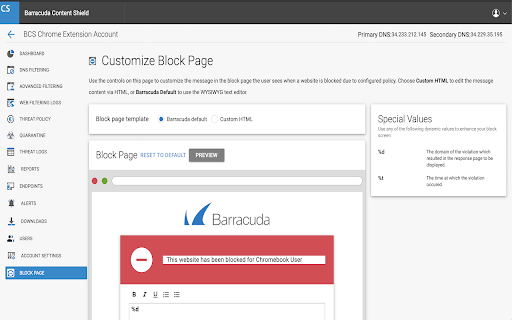
Barracuda Chromebook Security For BCS Extension is designed to protect you from malicious and inappropriate web content The Barracuda Chromebook Security Extension enables you to protect your Chromebook users from malicious and inappropriate content by enforcing the policies you configure on your Barracuda Content Shield (BCS) Portal. The Barracuda Chromebook Security Extension leverages the cloud-based Web Categorization Service to filter content from over 80 million URLs, while also dynamically scanning websites not yet in the database. This allows administrators to provide safe Internet access to your Chromebook users, whether they’re on or off of your network. - Single sign-on, user-based access. - Policies are cached on the Chromebook, ensuring that if it loses contact with the Barracuda Content Shield, last-known policies are still enforced. No need for the extension to fail open or closed. - The extension works on or off network. - Policies configured on the Barracuda Content Shield Portal are synchronized to the Chromebook periodically. - All Chromebook user access to websites is logged and the logs are available on the Barracuda Content Shield Portal. - Create customizable block page through the Barracuda Content Shield Portal. - The administrator can use the Barracuda Content Shield Portal report generation feature to generate reports on Chromebook user web access. - The Barracuda Chromebook Security Extension comes with the Barracuda Content Shield subscription at no additional cost!

Kompositor
Design web animations with ease. Dive into 3D transformations using mouse control to transform and captivate your creations Discover Kompositor, the powerful and user-friendly web extension that revolutionizes the way you create animations and visual effects for your web projects. Design and implement stunning motion graphics, digital visual effects, and compositing applications with just a few clicks. From dragging elements to creating nested 3D transformations, Kompositor offers a world of possibilities for web designers and developers. a. Effortless animations: Craft engaging animations by simply dragging elements into place. Build visually striking designs without the need for complex coding. b. Easy HTML element transformations: Quickly and effortlessly transform any HTML element using your mouse. The extension supports both 2D and 3D transformations, allowing you to create truly immersive and dynamic web experiences. c. Nested transformations: Achieve even more with nested transformations, where transformations sum up from ancestor to child elements. Unlock new creative possibilities for your designs through this advanced feature. d. SVG elements support: Bring your vector graphics to life with support for SVG elements. Animate and manipulate your SVG designs to create interactive and visually appealing web content. e. Animate plain JS objects: Go beyond HTML and SVG elements, animating plain JavaScript objects for a flexible and versatile solution to all your animation needs. Upon completing your design and animations, export your work to the GreenSock Animation Platform (GSAP) effortlessly with just one click. Generate GSAP-ready code to seamlessly integrate your stunning animations into your web projects. Unleash your creativity and transform your web designs with Kompositor. Experience the power of intuitive and dynamic animation creation right at your fingertips.

Chromebook usage monitoring - Sateraito Office
Chromebook usage monitoring function allow write to log user using device Chromebook利用確認機能はChromeブラウザの拡張機能で追加してから、Chromebook端末に本人がログインされているかどうかを管理者は確認出来ようになる機能です。

Celiveo Secure Documents Pull-Print
With Celiveo.me, pull-print documents from Chrome OS Enterprise with Zero Trust Access security With the Celiveo.me printer provider installed on your Chromebooks and the Celiveo.me SaaS option activated in Celiveo 8, users can send documents from Chromebook Enterprise laptops for pull printing on the company network printers, with full Zero Trust Access security and data encryption. • Users just print documents using the “Celiveo Secure Documents” printer provider, those are processed, encrypted when leaving the Chromebook and are stored on the company premise until they are released or deleted • Celiveo is easy to use and the most secure: there is no login/password to enter/define on the Chromebook, users identity is determined from the Zero Trust Access session validation. • Users reach any network printer in the company equipped with Celiveo, authenticate using their card or PIN code to list their documents, ready to be printed the way they are authorized to, such as duplex, monochrome or in multiple copies. • Print jobs are tracked with full granularity and the related cost can be linked to the users OU or group for bill-back purposes. *Dynamic encryption and Zero Trust Access for a true security* Documents leaving Chromebooks are fully encrypted using TLS 1.2 or 1.3. The Celiveo Print Provider for Chrome Enterprise leverages from the Google Zero Trust Access to identify users and forward print jobs. Upon validation in the Cloud, documents are encrypted with a dynamic and random AES128-GCM key tied to the user who prints. No print job or user information related to printing is kept in the Cloud by Celiveo. This Chrome Enterprise printer provider requires a Celiveo 365 SaaS subscription, or Celiveo 8 on-premise with the Celiveo.me option.

Chromebook Serial Getter
Users who need a quick way to see their serial number for a multitude of devices need look no further! This extension will simply show you the serial number and model number for your Chromebook!
