
idbfabodbjebjbhimhgfonhhbjlilffb

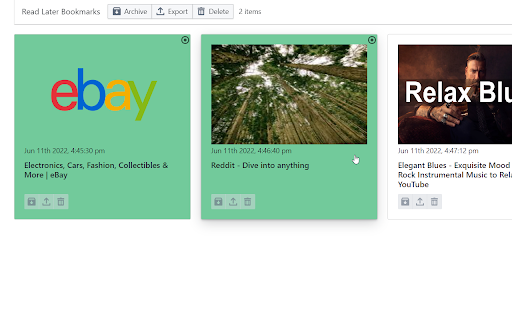
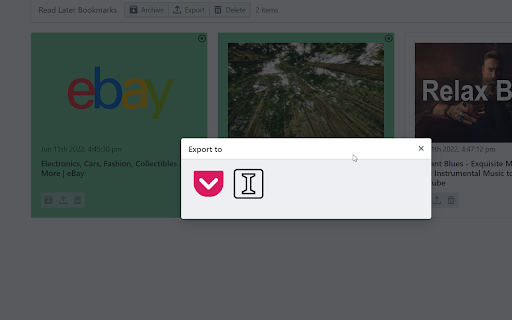
Read later view addon for chrome bookmarks Turn your bookmarks into a read later reader without relying on any third party applications! Click on the extension icon to open its menu and start adding bookmarks as read later pages! Features - Add bookmarks as read later pages - Archive visited bookmarks to native chrome bookmark manager - Search and sort bookmarks in read later view - Archive or delete after visiting a bookmark - Export to Pocket and Instapaper - Bulk actions: archive, export, delete Planned Features - Assign and manage tags *** This extension relies on the use of the bookmark folder "Read Later Bookmarks" under "Other bookmarks". Please do not modify the folder and its contents to ensure functionality. *** This extension is open sourced at https://github.com/XcrossD/read-later-bookmarks.

Chrome Notes
A simple notepad extension for Google Chrome NEW: You can now use speech to text NEW: You can now open Chrome Notes with Ctrl+Shift+X (Command+Shift+X on mac) NEW: You can now download and upload complete backups NEW: Chrome Notes adds a right click menu option to send the selected text to a new note! NEW: You can now have multiple notes! NEW: You can now customize the font size! A simple notes extension, right in your browser! Easily copy around a few words to and from different browser windows and other apps. Thank you for over 100,000 users, 100 ratings and 4.5 stars! Chrome Notes remembers your notes and mode, even after closing your browser or restarting your computer! Notes are stored in local storage, so nobody else will ever see them, not us, and not Google, Microsoft, or Apple. Features: * Resizable notepad * Shortcut buttons for cut, copy, paste, and select all * Normal keyboard shortcuts work too * Save as a .txt file * Open in new window * Speak selected text out-loud * Remembers last notepad size for you next time * Store multiple notes, and quickly create, edit, share, or delete * Focus mode for distraction free writing * Adjustable font size * Right click and send selection to new note * Download and upload full backups * Speech to text (click the mic and speak to put your words on the notepad) * Keyboard shortcut Ctrl+Shift+X (Command+Shift+X on mac) to open Chrome Notes is the smart, simple notepad built for you 😊

Quran Extension
A Chrome extension for reading and listening to the Quran Quran Extension - Read, Listen, Translate & Hijri Calendar Description: Easily read and listen to the Holy Quran directly in your browser sidebar! This Quran Extension provides seamless access to Surahs and Ayahs, allowing you to listen to beautiful Quran audio recitations or read the text without leaving your current page. Experience the Quran with high-quality, gapless audio playback. Choose from a wide selection of over 20 renowned reciters to listen to your preferred style. Understand the meaning better with accurate Quran translations available in 15 languages. 🎧 Listen to Quran Audio: High-quality gapless playback with over 20 reciter options — no delays between Ayahs. 📖 Read Quran Text: Clear display of all Surahs and Ayahs. 📅 Hijri Calendar: View a full monthly Islamic calendar with both Gregorian and Hijri dates, and jump to any month/year instantly. 🌙 Hijri Age Calculator: Find out your age in Hijri years — a fun Islamic calendar tool. 🕌 Prayer Times: See today's prayer schedule for your city (Fajr, Dhuhr, Asr, Maghrib, Isha) with the next prayer highlighted. 🌐 Multiple Translations: Understand the text in 15 languages (English, Arabic, French, Spanish, German, Turkish, Urdu, Russian, Persian, Indonesian, Chinese, Hindi, Bengali, Portuguese, Japanese, Korean). 📌 Convenient Sidebar Access: Access the Quran anytime without switching tabs. 🎨 Beautiful Dark Theme: Clean, intuitive, and easy on the eyes. Install Quran Extension now to conveniently read, listen, and connect with the Quran daily. Quran text, translations, and audio features are powered by the excellent alquran.cloud API. Calendar, prayer times, and Hijri date features are powered by AlAdhan API.

Genio Notes
The Chrome extension for Genio Notes We’re making it easier to use Genio Notes for online learning and video content, eliminating the need for multiple tabs and windows. Maximize your focus and retention with our handy integrated side panel to take notes directly alongside your online lectures and videos. 'It was great having everything in one spot and not using split screen to be able to watch and take notes at the same time!' You must be a Genio Notes user (excluding our Genio Notes Teams plan) to access this extension. Not used Genio Notes before? Try it free for 30 days at https://app.genio.co/try

BrowserGrow
BrowserGrow Chrome Extension Connect BrowserGrow to Your Browser and Get Real Work Done The BrowserGrow Chrome Extension connects the AI agent directly to your browser, allowing it to complete everyday tasks using your own browsing context. BrowserGrow works securely within the tab you choose, helping you automate tasks that require access to your logged-in accounts and personal workspace — without ever sharing your passwords. What You Can Do with BrowserGrow Work Inside Your Accounts Let your agent handle tasks in Gmail, Google Calendar, Notion, and other web apps you’re already signed into — safely and seamlessly. Use Your Real Browsing Context BrowserGrow allows the agent to interact with websites exactly as you would, accessing information and taking action within your live browser session. Stay Fully in Control You explicitly approve each session. The agent only operates in the tab you assign, and you can stop it at any time by simply closing the tab. Install the BrowserGrow Chrome Extension to unlock AI assistance that works directly inside your real online environment — securely, transparently, and under your control. Let your browser do more.
