
icmpjbkbjlbfpimllboiokakocdgfijb
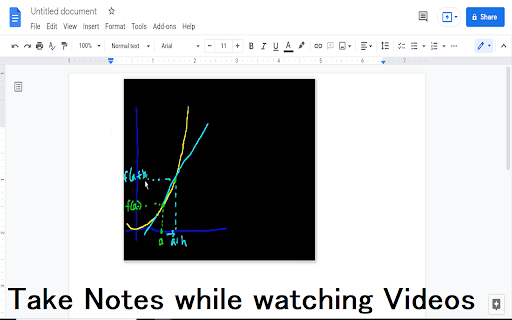
Free! Make a video float in the browser and watch videos using Picture-in-Picture. Want to watch your videos and browse the Internet at the same time? Ever wanted to use picture in picture mode when you are watching a video? The goal of this extension is to allow you to surf the Internet and watch videos at the same time. To begin using this software, simply click on the extension icon when you are on a website which has a video. The video should pop out and be in a smaller window, this allows you to navigate away from this webpage while you are watching the video. Try it today, its a quick and easy method to watch videos. 1) Watch a video by Khan Academy 2) Click on our extension icon 3) Go to another tab and open Google Docs, you can take notes inside Google docs while you're watching the Khan Academy video. Disclaimer: Please note this extension is NOT made by Google and is made by an independent development team. All copyrights belong to their respective owners. Google doesn’t endorse or sponsor this extension. Picture in Picture for Videos is not owned by, is not licensed by and is not a subsidiary of Google Inc.

Picture in Picture - Floating player
Picture-in-Picture mode allows you to watch a video in a floating window with playback video and volume controls. This extension brings a PiP view to all websites with an HTML video element. Press the extension icon to open the active player in the picture in picture mode. This extension automatically tries to use the active player. Now stream movies, series or sports on any tab. Install Picture in Picture chrome extension to enable the floating video. We support this feature on every streaming site. For YouTube, the extension also offers an in-player button next to the settings button to open the YouTube video in the picture-in-picture mode. You can use this extension to watch YouTube videos in a floating window that is on top of all other windows so tabs can be switched and still the player is visible. The floating window has play and pause buttons, and you can exit from the picture-in-picture mode anytime. How Extension works: 1. Find the video and run it. 2. Click the extension icon to reduce the video player on YouTube and other sites. 3. Select the “Floating Picture in Picture” and you're done. A floating video allows the viewer to scroll through your webpage and keep your video in view the whole time. Video Playback Controls Enjoy full control over your video playback with intuitive controls directly within the floating player: - Volume control; - Stop and play video; - Video speed control; - Switch to next video. Just click on the Floating Player and Video Control icon to display the video player on YouTube, Netflix or any other websites on the Web. This window will play the video on all pages of the browser on which there is a video resource. Pic-in-pic mode supports all video formats and works with popular video hubs like Youtube and many others We hope you find our tool useful! We are waiting for your feedback and ratings!

Picture-in-Picture - Floating Video Player
The extension lets users watch videos in Picture-in-Picture (PiP) mode. Picture-in-Picture (PiP) extension is a convenient web application that allows you to play videos in Picture-in-Picture mode. You can watch any video in a floating window that always stays on top of other windows, letting you multitask seamlessly while browsing the web. The extension supports all popular video platforms. Just click on the icon to activate PiP mode and enjoy uninterrupted video playback. How to Get Started: 1. Open any video. 2. Click the extension icon in your browser toolbar. 3. Enjoy watching videos in a floating window while continuing to browse the internet. Key Features: • Floating video player that always stays on top. • Compatibility with any video platform. • Ability to reposition the floating window along the screen borders. • Support for all video formats. • Customize hotkeys to control video playback easily without interrupting your workflow (Windows: Alt+Shift+P; Mac: Command+Shift+P). With Picture-in-Picture extension, you can watch your favorite movies, series, live streams, and educational videos without missing a beat, even when switching tabs or windows. Affiliate Disclosure: This extension may use affiliate links, meaning we could receive a commission if you make a purchase through links promoted within the extension. We fully comply with extension store policies, ensuring transparency about affiliate activities. Users will be informed about any affiliate actions, such as cookies or referral links, both during installation and use. To keep the extension free and continuously improve features, non-personal data (like cookies and referral links) may be shared with third-party partners. These practices are fully compliant with store policies and do not affect your privacy. Privacy Assurance: We do not collect, store, or share personal data. Picture-in-Picture (PiP) operates entirely on your device, ensuring complete privacy and data security. Our practices fully comply with extension store privacy policies for a safe and secure browsing experience. 🚨 Important Note: YouTube is a trademark of Google Inc., and its use is subject to Google’s policies and permissions. The Picture-in-Picture mode for YouTube is an independent feature not created, endorsed, or supported by Google Inc.

Открывашка
Открывашка — ваш доступ к мессенджерам Telegram и WhatsApp Достало замедление YouTube? Теперь его можно обойти и ускорить Ютуб! Расширение "Обойти замедление YouTube. Ускорить Ютуб в России" создано специально для вас! Это простое расширение для браузера, которое поможет вам обойти все замедления и наслаждаться просмотром видео в высоком качестве без задержек. 🚀 Почему стоит выбрать наше расширение? Медленный интернет и замедления на YouTube могут стать настоящей проблемой, особенно когда вы хотите насладиться любимым контентом. Расширение решает эту проблему, обеспечивая быструю загрузку и плавное воспроизведение видео. Ключевые функции нашего расширения: 1️⃣ Обход замедлений: С нашим расширением вы можете обойти все замедления и наслаждаться быстрым интернетом. 2️⃣ Высокое качество видео: Смотрите видео в высоком качестве без задержек и прерываний. 3️⃣ Легкость использования: Простой и интуитивно понятный интерфейс делает использование расширения легким для всех. 4️⃣ Быстрая установка: Установите расширение за несколько секунд и начните использовать сразу. 5️⃣ Поддержка пользователей: Мы всегда готовы помочь вам с любыми вопросами и проблемами. Как использовать Google Chrome расширение: 📌 Использовать наше расширение очень просто. Следуйте этим шагам: ➤ Установите расширение из Интернет-магазина Chrome. ➤ Нажмите на значок расширения в панели инструментов вашего браузера. ➤ Активируйте функцию обхода замедлений. ➤ Наслаждайтесь быстрым и качественным просмотром видео на YouTube. Преимущества использования нашего расширения: 🧭 Наше расширение предлагает множество преимуществ: ➤ Экономия времени: Быстрая загрузка видео без задержек экономит ваше время. ➤ Улучшенное качество: Наслаждайтесь видео в высоком качестве без прерываний. ➤ Легкость в использовании: Простой интерфейс и легкость установки. ➤ Безопасность: Ваши данные защищены, и мы не собираем никакой личной информации. Кто может использовать наше расширение? Наше расширение подходит для всех пользователей, которые хотят улучшить качество просмотра видео на YouTube: ▸ Студенты: Смотрите учебные видео без задержек и улучшайте свои знания. ▸ Профессионалы: Используйте YouTube для работы и обучения без замедлений. ▸ Обычные пользователи: Наслаждайтесь любимыми видео и каналами без прерываний. Совместимость: Наше расширение полностью совместимо с браузером Google Chrome, что обеспечивает беспрепятственную интеграцию с вашим любимым браузером. Независимо от того, используете ли вы Chrome на настольном компьютере, ноутбуке или Chromebook, вы сможете наслаждаться всеми преимуществами нашего расширения. Безопасность и конфиденциальность: 🔐 Ваши безопасность и конфиденциальность являются для нас приоритетом. Расширение "Обойти замедление YouTube. Ускорить Ютуб в России" не отслеживает вашу активность в интернете и не собирает личные данные. Мы предлагаем безопасный и надежный способ улучшить ваше интернет-опыт. Оставайтесь на связи: 🔔 Мы постоянно работаем над улучшением нашего расширения и добавлением новых функций на основе отзывов пользователей. Мы ценим ваши отзывы и предложения, поэтому не стесняйтесь обращаться к нам в любое время. Заключение: Наше расширение - идеальное решение для тех, кто хочет улучшить качество просмотра видео на YouTube. С его помощью вы сможете обойти замедления, насладиться высоким качеством видео и сэкономить время.

TwiHD - вернет качество 1080p на Twitch
Увеличивает качество 1080p на Твиче бесплатно и без рекламы. Смотрите твич в высоком качестве как раньше. Вернуть качество 1080p в Twitch? — TwiHD вернет Твич в Chrome, Яндекс.Браузера, Opera, Edge. Смотрите стримы в 1080p и выше в твич в России. Бесплатное расширение TwiHD без рекламы, чтобы вернуть 1080p качество на Twitch, как раньше: без ограничений, без лагов, без мыла. Twitch ограничил качество до 720p? С TwiHD вы снова смотрите любимых стримеров в Full HD. Никаких подписок, никаких всплывающих баннеров. 🔧 Возвращает 1080p в твиче — стримы снова чёткие и резкие. 🚀 Твич без лагов и тормозов. 🖱 Установка за 1 минуту — просто установите и откройте Twitch. 🧘 Без рекламы — никаких баннеров, трекеров и отвлекающих окон. 💡 Ничего настраивать не нужно. 🎥 Смотрите Twitch в 1080p так, как он должен работать — с TwiHD, бесплатно и без рекламы. Работает сразу после установки. Следите за новостями в Telegram: https://t.me/Twitch1080
