
ichiiknkackionkhdadajbffjmfhkhmn
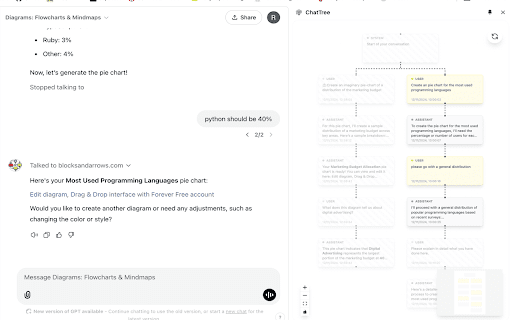

Visualize ChatGPT and Claude.ai conversations as interactive trees ChatTree - Visual Graph View for ChatGPT and Claude.ai Transform your AI conversations into intuitive graph visualizations! This extension helps you navigate complex discussions by displaying your chat history as an interactive graph in Chrome's side panel. Works with both ChatGPT and Claude.ai! Key Features: • Interactive Graph View: See your entire conversation flow at a glance • Non-linear Navigation: Easily switch between different conversation paths • Advanced Search: Search through your entire chat history to find specific messages • Flexible Export Options: Export your conversations to: - Markdown (for general use) - Obsidian (for note-taking) - XML (for structured data) • Message Navigation: Quick access to any message in the conversation • Local Processing: All data stays in your browser - no external servers • Side Panel Integration: Non-intrusive viewing alongside your chat • Cross-Platform: Supports both OpenAI's ChatGPT and Anthropic's Claude.ai Perfect for: • Complex problem-solving discussions • Multi-branch brainstorming • Educational conversations • Code review discussions • Project planning chats • Research and exploration • Technical documentation ChatTree makes it easy to track and manage multiple conversation threads in both ChatGPT and Claude.ai, helping you stay organized and focused on your creative process. Privacy-focused and open source: Your data never leaves your browser - all processing happens locally. The project is open source and available on GitHub at https://github.com/rikardradovac/chat-tree

Capsule Hub by Tilantra
Capture AI conversations as capsules and reuse context instantly across ChatGPT, Claude, Gemini and other Tools. Capsule Hub by Tilantra is the context-transfer layer for modern AI workflows. Capture once, reuse everywhere. ✨ Whether you brainstorm in ChatGPT, build in Claude, research in Gemini, or explore in DeepSeek, Capsule Hub turns your conversations into reusable “Capsules” 💊 so you never have to restate goals, constraints, or project background again. Why Capsule Hub? Most teams lose time switching AI tools and rebuilding context from scratch. Capsule Hub gives you a portable, searchable context system that moves with you across platforms. 1. ✅ Capture Your Context: When you are in a chat on AI tool - click the capture button to save the core details of that conversation into a Capsule. 2. ✉️ Save Emails as Capsules: Open an important email in Gmail and click once to turn the project details into a Capsule. 3. 👥 Organize for Your Team: Save your Capsules into team folders (like Engineering, Marketing, or Product) so your whole team can stay on the same page. 4. 🪄 Drag & Drop to Inject: To use a saved Capsule, simply drag it from your library into any AI chat box. The AI will instantly understand all the background, goals, constraints and even attachments! 5. 🔄 Keep Context Updated: If a conversation changes, you can choose to add a "New Version" to an existing Capsule or create a brand new one to keep your history organized. You can also rollback and diverge from a current version 6. 📁 Transfer attachments: Apart from context, drag and drop the attchments you added or generated across fragmented tools. 7. 🔍 Search Your Library: Use the fast search bar to find the exact context you need by searching for names, tags, or team filters. Unlock more with paid tiers built for power users and teams - Multiple integrations across more AI and work tools - Split workflows for better context management - One-click package installer to set up Capsule Hub across tools on your system - Mobile app: Your Capsule library, anywhere Download Capsule Hub today and never start a chat from zero again

GPT Folders
Organize your ChatGPT and Claude conversations into folders 📂 GPT Folders - Organize Your ChatGPT & Claude Conversations! Tired of endless scrolling through your AI chat history? Get organized with GPT Folders! ✨ MAIN FEATURES: • Create custom folders to organize your conversations • Drag and drop chats into folders • Save frequently used prompts for quick access • Clean, modern interface that matches both ChatGPT and Claude's design 🎯 KEY BENEFITS: • Find important conversations instantly • Group related chats together • Access your favorite prompts with one click • Seamless integration with ChatGPT and Claude 💡 PERFECT FOR: • Professionals managing multiple projects • Students organizing research conversations • Writers keeping track of different topics • Anyone who wants a more organized AI chat experience 🔒 PRIVACY FIRST: • All data stored locally on your device • No external servers or data collection • Works entirely within your browser • No account required 🚀 GET STARTED: 1. Install the extension 2. Create your first folder 3. Drag chats into folders 4. Save your favorite prompts Make your AI chats work better for you with GPT Folders - your personal chat organizer! 💪 Actively maintained and regularly updated

ChatbotsPlace: All-in-One AI Sidebar (ChatGPT, Claude & Gemini)
Access ChatGPT, Claude, Gemini, and Grok in one sidebar. Chat with multiple top-tier AI models without switching tabs or accounts Stop juggling multiple subscriptions and tabs. ChatbotsPlace is the ultimate all-in-one AI sidebar that integrates the world's most powerful LLMs directly into your browser workflow. Whether you need to write code, generate art, or summarize articles, do it instantly without leaving your current webpage. 🚀 Why ChatbotsPlace? We act as a unified interface (wrapper) for the best AI tools, giving you the freedom to switch between models instantly to get the best answer every time. 🔥 Powerful Features: - 🤖 Multi-Model Access: Chat with GPT 5.5, Claude 4.7, Google Gemini 3.1, and Grok 4.2 in a single window. - 🌎 No VPN Required: Access restricted AI models from anywhere in the world. No country blocks. - 🎨 AI Image Generation: Turn text into stunning visuals instantly using integrated diffusion models. - ⚡ Lightning Fast Shortcut: Open your AI sidebar instantly with Ctrl+M (Cmd+M on Mac). 💡 Who is this for? - Writers: Compare output from Claude vs. ChatGPT to find the best tone. - Developers: Debug code snippets without switching windows. - Researchers: Summarize long articles instantly. 🎁 Start for Free: Enjoy a generous free trial with no payment required. Experience the future of browsing today. Disclaimer: ChatbotsPlace is an independent interface and is not affiliated with OpenAI, Anthropic, or xAI.

thredly — ChatGPT, Claude & DeepSeek Summarizer
Instantly summarize your ChatGPT, Claude, and DeepSeek conversations with thredly thredly is a free Chrome extension that adds a Summarise button directly inside ChatGPT, Claude, and DeepSeek. When your conversation gets too long, hit Summarise — thredly generates a structured continuation summary with your instructions, decisions, progress, and next steps. Paste it into a new chat and carry on from exactly where you left off. No copy-pasting giant transcripts. No rewriting context from scratch. No losing what you built. Open any long ChatGPT, Claude, or DeepSeek conversation Click the thredly Summarise button in the chat interface thredly generates a clean continuation summary Open a new chat, paste the summary, and continue Your original instructions and constraints Key decisions already made Work completed so far Current status and blockers Exact next steps Tone, format, and style preferences WORKS WITH: 30 summaries per month Saved threads for 7 days Export as .md & .txt Structured output Works inside ChatGPT, Claude & DeepSeek Unlimited summaries Saved threads for 30 days Export as .md & .txt Upgraded AI engine Priority processing queue Works inside ChatGPT, Claude & DeepSeek thredly is built for people who use AI every day: developers, writers, researchers, consultants, and anyone who has ever hit the "conversation too long" wall. Install free and try it on your next long chat.
