
iccobiiifcfnhefjkmcpblpbbiphhpgp

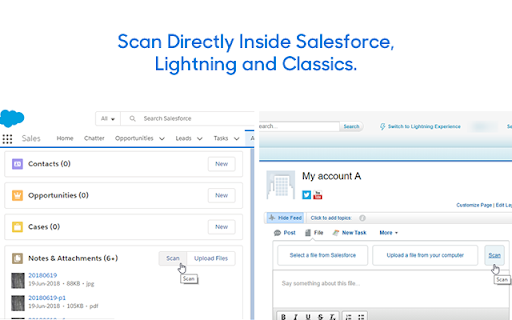

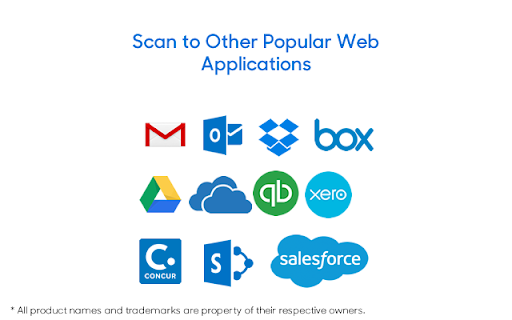
Attach documents from flatbed ADF scanners as PDF in Chrome browser from other web apps too: Dropbox, Office 365, QBO, SAP etc. Scan paper documents directly from Salesforce from flatbed, ADF (automatic document feeder) scanners.

YouTube Quick Speed & Loop Control
Control video playback, enhance audio, and access powerful browser tools — across YouTube and other websites. YouTube Quick Speed is a productivity-focused Chrome extension that helps you control video playback more effectively. It provides tools to adjust playback speed, manage volume levels, and reduce interruptions so you can focus on the content that matters most. Designed for learners, professionals, and everyday viewers, this extension enhances the YouTube viewing experience without modifying core platform functionality. All features operate directly on the YouTube player to improve convenience and efficiency. 𝐊𝐄𝐘 𝐅𝐄𝐀𝐓𝐔𝐑𝐄𝐒 • Advanced Speed Control – Set precise playback speeds beyond YouTube’s default options, including custom speeds such as 1.25x, 2.5x, or higher. • Picture-in-Picture (PiP) Mode – Instantly pop the current video into a floating, resizable window so you can continue watching while working in other tabs or applications. • Cinema Mode with Brightness Control – Dim the surrounding page elements and customize video brightness levels to create a distraction-free, theater-style viewing experience tailored to your environment. • Temporary Speed Boost Mode – Hold a configurable key (Shift, Ctrl, or Alt) to temporarily increase playback speed, then instantly return to your normal speed when released. • Automated Playback Handling – Detects playback transitions and video overlays and responds automatically to keep playback moving smoothly. • Playback Acceleration During Interruptions – When promotional or transitional segments appear, the extension can temporarily increase playback speed and restore your preferred settings afterward. • Volume Enhancement – Boost audio levels for videos with low volume using a built-in volume amplifier. • A-B Loop Playback – Define custom start and end points to loop specific sections of a video, ideal for tutorials, music practice, and repeated review. • Zen Mode (Distraction Reduction) – Optionally hides non-essential page elements to create a cleaner and more focused viewing environment. • Auto-Scroll Shorts Mode – Automatically advances to the next Short after the current one finishes playing. Customize delay timing for smoother hands-free browsing and continuous viewing. 𝐍𝐄𝐖 𝐀𝐃𝐕𝐀𝐍𝐂𝐄𝐃 𝐅𝐎𝐂𝐔𝐒 𝐀𝐍𝐃 𝐓𝐎𝐎𝐋𝐒 • Advanced Focus Filter – Intelligently reduces unwanted content by analyzing video titles and metadata in real time, helping you stay focused on the topics that matter most. • Custom Block Categories – Create your own block categories with custom names, multiple keywords, and unique icons (e.g., Politics, K-Pop, Clickbait) for full personalization. • Preset Focus Categories – One-click blocking for common distractions including Shorts, Food, Tech, AI, Spiritual, and Gaming content. • Blur Mode (Premium Focus) – Blocked videos are elegantly blurred using a glass-morphism overlay with a “Filtered” indicator, allowing you to reveal content on demand. • Strict Mode – Completely removes blocked videos from the grid without leaving gaps or empty spaces, ensuring a clean and distraction-free browsing experience. • Timestamp Notes & Export – Add notes at specific video timestamps while watching. Each note is automatically linked to its exact moment in the video for quick navigation and review. Export your notes for study, documentation, or reference. 𝐇𝐎𝐖 𝐈𝐓 𝐖𝐎𝐑𝐊𝐒 1. Install the YouTube Quick Speed extension 2. Open any video on YouTube 3. Use the popup menu or keyboard shortcuts to control playback 4. Optional automation features manage playback behavior automatically 5. No page reloads are required. 𝐏𝐑𝐈𝐕𝐀𝐂𝐘 𝐀𝐍𝐃 𝐏𝐄𝐑𝐅𝐎𝐑𝐌𝐀𝐍𝐂𝐄 • Runs entirely on your local device • Does not collect, store, or transmit personal data • No analytics, tracking, or external servers • Permissions are limited strictly to YouTube playback pages 𝐖𝐇𝐎 𝐈𝐒 𝐓𝐇𝐈𝐒 𝐅𝐎𝐑 • Students and online learners • Developers and technical professionals • Podcast and long-form video viewers • Anyone who wants a more efficient YouTube viewing experience 𝐖𝐇𝐀𝐓’𝐒 𝐍𝐄𝐖 𝐈𝐍 𝐕𝐄𝐑𝐒𝐈𝐎𝐍 2.1.0 • Custom Speed Presets – Save your favorite speeds with emoji icons for one-click access • Enhanced Ad Blocking – Advanced detection with 900+ blocking rules • Improved UI – Cleaner, more professional interface design • Bug Fixes – Enhanced performance and stability improvements YouTube Quick Speed helps you watch content more efficiently while staying fully in control of your viewing experience.

CamScanner Extension
Extension CamScanner. Extension CamScanner for Chrome. The "CamScanner for Chrome" extension enhances your experience on the CamScanner website by allowing you to customize the quality of images and change the background color of the page. Image Quality Adjustment: A user-friendly slider lets you easily change the brightness of images displayed on the CamScanner page, allowing for better visibility and clarity. Background Color Customization: Choose your preferred background color to personalize your viewing experience and make it more comfortable for your eyes. Easy to Use: The extension features a straightforward popup interface that enables quick adjustments with just a few clicks. Whether you're using CamScanner for document scanning, image processing, or just for viewing, this extension provides the tools you need to optimize your workflow and improve your overall experience. this is an unofficial CamScanner extension

Google Lens Scanner Online - Document, Image & More
Google Lens Scanner Online - Document, Image & More Will help you to search and detect images pattern and download with single click Google Lens Scanner Online - Document, Image & More This extension helps you analyze documents quickly and easily. You can upload PDF or Word files, and it uses AI to provide useful insights from the content. It’s perfect for students, professionals, or anyone who wants to understand a document better. 🔴 Extension Features: ✔Upload PDF and Word files for instant analysis. ✔Get quick and clear insights from the document. ✔Easy-to-use interface for anyone. ✔Copy the AI-generated result with just one click. ✔Works fast and saves time. 🔴 Why Use This Extension: This extension is a simple tool that saves time by helping you understand documents quickly. Whether you're working on homework, reading reports, or analyzing text for any purpose, this extension makes it easy to get useful information from your files. 🔴 How to Use This Extension: ✔Upload your PDF or Word document. ✔Click the "Analyze Document" button. ✔Wait a few seconds while the AI processes your document. ✔View the results and copy them if needed. 🔴 Disclaimer: This extension uses AI to provide document insights, but it might not always be 100% accurate. Always double-check important information. Your uploaded documents are processed securely.

Make PDF Look Scanned
No need for printers and scanners anymore - everything you need to do is just a few clicks. Many times, you come across a situation where you need to submit Scanned Documents in the PDF format. You may have the original document in the digital PDF form but evidently it doesn’t look like a scanned document. 🔹 Features ➤Everything is processed in your browser. No privacy risk. ➤Works without network connection using PWA. ➤See scanned PDF side-by-side in real time. ➤Works on all modern browsers and devices. ➤All files are static. No backend servers needed. ➤Tweak the settings to make your PDF look bette. 🔹 Advantages ➤Privacy Your data stay on your device. We don't store any of your data. Everything is processed on your browser. ➤Speed Based on WebAssembly, No waiting for your PDF to be scanned. Just click the button and your PDF will be scanned in a second. ➤Customization Tweak the settings to make your PDF look better. See the preview in real time. What You See Is What You Get. All data are automatically deleted every day. You can also delete the file yourself immediately. By design, your data stays at all times on your Google account, never saved in our database. Your data aren’t shared with anyone, including the add-on owner. We complies with privacy laws (especially GDPR & California Privacy Act) to protect your data.
