
icbnjddomcacgkbfikejkkcbjpfdbkcg

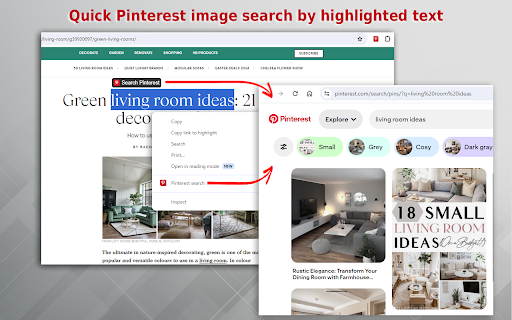
Discover Pinterest search without login and fast image search from highlighted text. Transform your navigation on a vast repository! ✨ Elevate your Pinterest pictures, photos, images browsing experience to new heights with our bespoke Chrome extension. Our extension not only saves you time but also promotes creative and visual exploration. ⚡ With just a click on the extension icon, new avenues for browsing open up right before your eyes for Pinterest image search. Enter any your needs in the query box and instantly unveil a world of relevant ideas. Experience the joy of finding the perfect image faster and more efficiently than ever before. 💫 Expand your Pinterest search capabilities with this handy tool! 1️⃣ Install our search in the Pinterest extension Chrome from the store page. 2️⃣ Please make sure to pin it for fast access: click on the puzzle icon, find it in the list of extensions and click on the pin. 3️⃣ Launch the extension: click on the pinned icon. 4️⃣ Enter your query in the Pinterest search bar that appears or use hunt for visuals right from highlighted text: select words, open context menu and launch our extension 5️⃣ Explore the array of Pinterest pins, photos and ideas that match your search. Unlock the effortless charm of Pinterest search without login. Install this now and transform your image search into an adventure. 🎉 Simplify your visual quest with our extension. Our extension simplifies your visual quest, especially with the feature that allows searches directly from highlighted text. This innovative and intuitive approach to image discovery is perfectly suited for various scenarios: 🔍 Image Discovery While Browsing the Web: Effortlessly find images as you surf. 🎨 Curating Images for Impactful Presentations: Select the ideal visuals to communicate your message. 📈 Keeping Up with Trending Visuals: Stay ahead of the trends with easy access to the latest visuals. 💡 Unleashing Creativity and Exploring New Concepts: Find inspiration for your next creative project. 📚 Educational Image Searches: Enhance your learning materials with relevant images. 🖼 Crafting Personal Collections: Build a personal collection of images that speak to your interests. 🌐 Finding the Perfect Background Images: Choose ideal backgrounds for websites or blogs with ease. Benefits working in Chrome Pinterest extension: ➤ Save Time: Quick access to search Pinterest means less time searching and more time discovering. ➤ Enhanced Browsing Experience: The Pinterest browser plugin chrome enhances your browsing experience by integrating seamlessly with your daily workflow. ➤ Ease of Use: A user-centric interface showcasing a search bar and immediate search outcomes. ➤ Explore on the Go: Whether you're looking for Pinterest photos, pics, or specific pictures, this tool makes it easy. ➤ Effortless Access: Instantly tap into the Pinterest search engine without the need to log in every time. 🔶 Whether for work, education, or personal interest, our extension is designed to enhance your experience, making it more enjoyable and less time-consuming. 🔶 Experience the unparalleled joy of locating the perfect image swiftly and more efficiently than ever before. This handy tool expands your Pinterest search capabilities, making it an essential addition to your digital toolkit. 🌟 Start your journey this our searching Pinterest Chrome extension today and see where your creativity takes you!

ContextSearch web-ext
Add search engines easily and search from the context menu and convenient popup The most powerful, most complete search enhancement for Firefox comes to Chrome This Add-on was written as a Firefox 57+ web-extensions compatible replacement for Ben Basson's popular Context Search Add-on but has grown into much more. * Access search engines from the Context Menu * Manage search engines using subfolders and separators * Access search engines from a popup menu (QuickMenu) * Compatible with all search engines using POST or GET requests * International character-set support * Reverse-image search * Site search compatible * Add new search engines simply with a right-click * Edit search engine parameters and icons * Access bookmarklets from the context menu * Toolbar Search * Set hotkeys for each search engine * and much more

Mutable - Customizable Content Filtering
Improve your browsing experience by muting keywords across the web! Now open source! Take control of the websites you browse every day and eliminate the content you don't want to see! Mutable helps you mute unwanted content across multiple sites at once. Just pick the keywords you want to hide and Mutable will blur, hide, or replace any posts it finds containing those terms! - Control what you see (and what you don't) across multiple social media sites at once! - Create keyword mute lists that work across Twitter/X, Facebook, Reddit, and more! - Choose between blurring out posts, blurring with a preview, or hiding them altogether - You can even replace posts with cute images of kittens, puppies, or hedgehogs for that additional serotonin! Mutable is still being developed and I would love to hear from you. For questions, comments, or concerns, feel free to reach out!

Image Finder for Bloggers
Find free stock images for your blog article or website quickly without wasting time searching. Introducing Image-Finder, the ultimate tool for bloggers and website owners looking to find free, high-quality stock images quickly and easily. Our newly updated Chrome extension now includes even more features to help you find and download the perfect image for your article or website without wasting valuable time. With our user-friendly interface, you can search for images by simply right-clicking on a word or sentence in your article. The extension will automatically generate a list of relevant images for you to choose from, and you can easily crop and download the image in your desired aspect ratio. We've also added the ability to load even more images than before, so you can be sure to find the perfect fit for your content. Plus, you can copy the alt text for each image to ensure your posts are SEO-optimized. Image-Finder is completely free to use, with no ads, and provides high-resolution images that are perfect for blog articles or website content. Whether you're a blogger, web designer, or marketer, this extension is an essential tool to help you save time and improve the quality of your content. If you have any suggestions or ideas on how we can improve this extension, please let us know. We are always looking for ways to make our tools more useful for our users. Download Image-Finder today and start creating visually stunning content for your website or blog! ● Easy image search: Search for images by right-clicking on a word or sentence in your article, and let Image-Finder do the rest. ● High-quality images: Our images are royalty-free and high-resolution, ensuring that your content looks professional and polished. ● Alt text copying: Our extension allows you to copy the alt text for each image, ensuring that your blog posts are optimized for SEO. ● Image cropping: Easily crop your selected image to your desired aspect ratio, without the need for additional editing tools. ● Load more images: With our updated version, you can now load even more images to find the perfect fit for your content. ● Instant download: Download your selected image instantly with one click, saving you time and effort. ● Copy image link: Easily copy the image link to share with others or use in your content. With these added features, Image-Finder is even more versatile and user-friendly, making it the perfect tool for bloggers and website owners looking to enhance their content with stunning visuals.

Substack Archive Search - Substack Post Indexer
Substack Archive Search lets you index, search, and browse entire Substack publications locally — with no backend and full privacy. Build your own offline, searchable archive of Substack posts and instantly find what you’re looking for. Whether you’re a researcher, writer, journalist, or power reader, this extension turns any Substack into a fast, personal knowledge base. 🔍 Powerful Local Search - Instantly search posts by title. - Sort and filter large archives with pagination - Jump directly to any post in the publication’s history Pro users can unlock full-text search across entire articles. 📂 Local Archive Indexing - Index thousands of Substack posts directly in your browser - Data is stored locally using IndexedDB Once indexed, your archive is available even offline. 💎 Deep Search (Pro) Upgrade to Pro to enable deep indexing, which downloads and indexes the full text of every post. - Search inside article content - Find exact phrases, topics, and references - Ideal for long-running newsletters and research-heavy publications 🔒 Privacy-First by Design - All data stays on your device - No cloud storage -No tracking - No data resale Your reading history and indexed content are never uploaded anywhere. ⚡ Fast & Efficient - Optimized local indexing and search - Built for large archives - Faster than Substack’s built-in search 🎯 Perfect For - Researchers exploring long-running Substack archives - Writers collecting references and inspiration - Newsletter readers managing multiple subscriptions - Anyone who wants fast, offline access to Substack content 🛠️ How It Works - Visit any Substack publication (including custom domains) - Open Substack Archive Search - Index the archive (shallow or deep) - Search and browse instantly 🆓 Free vs Pro Free includes: - Shallow indexing (titles) - Local archive browsing - Basic search and sorting Pro unlocks: - Deep indexing with full-text search - Unlimited indexing - Advanced controls Stop scrolling endlessly through old posts. Explore Substack archives the smart way: locally, privately, and fast. Extension contains links to other useful free tools from the developer.
