
ibokdibmagcemmllgdhapnmnlebchlae
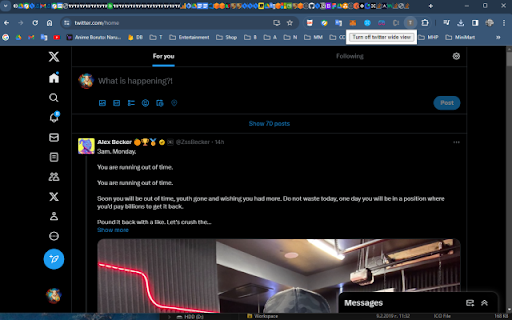
Turns on and off twitter wide view This is a simple extension allowing you to turn on and off twitter wide view. It simply removes the right section of the page when it's on and expands the width of the middle section.

Xetter - Enhance Your X/Twitter Experience
Enhance X/Twitter by customizing layouts, downloading media, highlighting and hiding elements for a better and enjoyable experience Xetter is a powerful and lightweight Chrome extension designed to give you more control over your X/Twitter experience. With a range of features that enhance usability, customize the layout, and improve interaction visibility, Xetter makes navigating X/Twitter more efficient and enjoyable. ➤ Change Layout Easily adjust the X/Twitter layout to suit your preferences. Expand the content area, hide sidebars, and make the interface cleaner and more user-friendly. ➤ Download Media in best quality Save your favorite media directly from X/Twitter. Whether it’s a photo, video, or GIF, Xetter lets you download media with a simple click. And it will look for the best quality available, so you don't have to worry about low-resolution downloads. ➤ Highlight Interactions Never miss an important interaction again. Xetter highlights your likes and retweets, making them more visible and easier to track what you've already seen. ➤ Hide annoying elements You don't care about "Premium" or "Grok"? Then hide the unnecessary links in the sidebar! No more accidental clicks on unwanted links. ➤ Simple Popup Configuration Xetter’s configuration is straightforward and accessible. Toggle features on and off, adjust settings, and manage your storage all from a convenient popup menu. ➤ Fill Width: Expand the main content area to use the full width of your screen, giving you a more immersive experience. ➤ Disable Content-Warnings: Skip the content warnings and view sensitive media without interruption. ➤ Hide "New" Notification: Remove the distraction of the “new” tweet notifications for a more focused browsing session. ➤ Hide Tweet text: Hide the text of tweets to focus on the media content. ➤ Keyboard Navigation: Navigate through X/Twitter using your keyboard for faster and more efficient browsing. ➤ Log Debug in Console: Enable detailed logging for troubleshooting and development purposes. Xetter is perfect for power users who want to get the most out of their X/Twitter experience. Whether you're a casual user looking to streamline your interface or a social media manager needing better control over interactions, Xetter provides the tools you need. Performance is a top priority, and Xetter is designed to be lightweight and efficient, so you can enjoy a seamless browsing experience without any lag or slowdown. Download Xetter from the Chrome Web Store today and take control of your X/Twitter experience like never before! 1. Change Layout: Adjust your X/Twitter layout to fill the screen and hide sidebars. 2. Download Media: Easily download any media from X/Twitter with one click. 3. Highlight Interactions: Highlighted likes and retweets for better visibility. 4. Simple Popup Config: Toggle features and adjust settings through a user-friendly popup menu. 5. And more: Xetter keeps track of your downloaded media, making sure you don't reach the API limit by saving fetched links. This will also help you remember what you've already downloaded. If something isn't working, please use the Support Hub so I can actually reproduce and fix it. Reviews that only say "broken" are sadly impossible to debug. If you leave a review (or send a Support Hub report), please include: • Your Device/OS. • What page it happens on, or even better a link to a page/post where it happens. • What you expected vs what actually happened. • Any error message, plus a screenshot or short screen recording if possible. • Whether you use an ad blocker or other extensions that modify X/Twitter. 💙 PS: New features will be added in the future, so stay tuned! If you have any feedback or suggestions, please feel free to reach out. Your input is valuable and helps me improve Xetter for everyone. 💙 Enhance your X/Twitter experience with Xetter – download now!

Twitter Media Only Toggle
Credit goes to Greasy Fork user Cro, from whom I referenced the script. Modified to be an extension that has an extra button below the tweet button that is reactive to the theme you have. If you do not see the new button, please refresh the page.

Twitter Large Thumbnails
This extension makes so that images in X (Twitter) appear without cropping in single-image posts. See posts of your favorite artists and photographers without image cropping.

Twifiner
Fine-tune your 𝕏 (twitter) experience No More Ads or Clutter! 🚀 Twifiner enhances your Twitter experience by removing ads, reducing clutter, and providing cool features like easier word muting, account age display, and more. version 5: You can now add notes to other users' profiles. Tweets are now displayed using the Vazirmatn font (thanks to Saber Rasti Kardar, may he rest in peace). Fixed an issue where the profile icon was being moved to the first position. Some other minor bug fixes and improvements. version 4: Message requests are now highlighted on the Messages page for better visibility Retweets are now hidden on user profiles, in addition to the timeline #9 Hiding the "Discover More" is now optional #5 Fixed a major issue causing incorrect display of some numbers in tweets #7 Fixed an issue that prevented notification count reset when the header was hidden #8 Removed the link replacement feature and extension disabling option for better performance and enable the removal of some unnecessary permissions Removed a few permissions to address safety worries, at the value of losing some minor conveniences some refactor and enhancements version 3: Added option for justifying tweet and chat messages Fixed font issue by reverting tweet fonts to the default Fixed issue with RTL alignment of Persian chat messages Fixed issue with RTL alignment of Persian descriptions in images Hide some new inline prompts, which appear in the timeline Minor UI tweaks for better accessibility Some fixes and improvements version 2: Fixed dark mode issues in navigation, pinned tweets, follow page, notifications, and hashtags Added option to hide retweets Added option to change font size Restored default font for non-Persian tweets and Twitter UI Highlighted mutual friendships on verified followers page Made Persian tweet normalization optional Made hashtag styling optional Made ad display optional Made title display instead of link optional Made color of mutual friendships on follow page optional Made color of pinned tweets optional Made moving profile to top optional Made highlighting reply notifications optional Made advanced search link display optional Some bug fixes and improvements
