
ibinnfpnfbcfdblmjpmjjmffcjlcadig
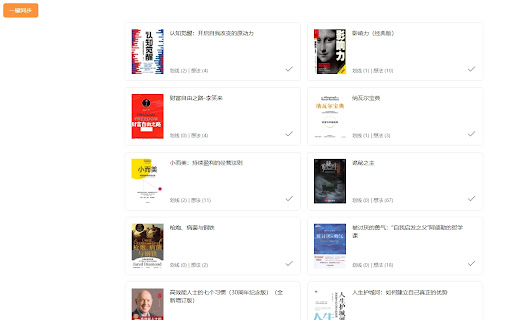


只需几步轻松获取并保存微信读书笔记,自定义你的笔记回顾方式,不错过每一个阅读瞬间 通过安装该浏览器插件,一键将微信读书的读书笔记同步和导出

bookline - 微信读书笔记导出与回顾
- Export notes: including highlights and thoughts, support markdown, html, json, text formats. - Daily review: randomly show 10 notes of a book. - Experience: show reading history through calendar. - Statistics: statistics reading records.

YouMind: AI Web Clipper, Youtube Notes & Annotate | Claude Gemini Assistant
YouMind is the #1 personalized AI learning and creation agent. YouMind is the first personalized AI learning & creation agent where learning meets writing. It’s like having a smarter NotebookLM-style assistant combined with a note-taking hub – helping you save, understand, and create from anything you read or watch. From web articles and PDFs to YouTube videos and podcasts, YouMind lets you capture and annotate content into your personal knowledge base. It serves as a web highlighter, PDF annotation tool, and even a video notebook for streaming content. You can take notes on YouTube videos as easily as you highlight text on a page, turning video watching into an active learning experience. With YouMind, all your materials ↔ insights ↔ drafts stay connected in one workspace. Highlight key ideas or add comments (web pages, images, even annotate PDF files) and ask follow-up questions – the AI will help you connect dots across sources. YouMind can generate summaries and YouTube transcripts, essentially converting any video YouTube to text for you. It even provides quick YouTube video notes and mind-map overviews so you grasp complex topics at a glance. When you’re ready to create, flip your insights into structured outlines or editable drafts. In short, YouMind bridges research and creation: what you save naturally flows into what you write. 🌐 YouMind Browser Extension – What Can It Do? • 🧩 Highlight & Annotate – The Web is Your Canvas Go beyond just clipping. Actively engage with content by highlighting key passages, adding sticky notes, and capturing your thoughts directly on any webpage. YouMind turns passive reading into active analysis, saving the page along with your valuable annotations into your AI workspace. • 🎬 The Ultimate YouTube Notebook – Capture Moments as You Watch Turn video watching into an active learning session. YouMind not only extracts full YouTube transcripts and AI summaries but now lets you take timestamped notes and capture screenshots *while you watch*. Every key insight, every critical frame is captured instantly, transforming video content into tangible assets for your projects. • ⚡ Instant AI Summaries No more tl;dr. Get concise AI summaries of any web page, PDF, or video while you browse. Powered by ChatGPT, Claude, Gemini, and more, YouMind’s AI can quickly generate structured overviews — even mind-map outlines — so you grasp the gist in seconds. • 🧠 Learn and Ask with AI Highlight ideas, pose questions, and get contextual explanations or deeper analysis. YouMind acts like your personal expert, simplifying complex paragraphs or translating content when needed. • 🌍 Page-Level Side-by-Side Translation Reading foreign content? YouMind can generate a bilingual version of the entire web page, displaying the translated text below each paragraph for an immersive reading experience. • 🚀 Batch Link Analysis Select multiple links on a web page and have YouMind process them all at once — generating summaries or notes for each. Ideal for research, competitive analysis, or reading lists. • 🐦 Twitter/X Bookmark Sync & Curated Digests Automatically sync your Twitter/X bookmarks on a schedule into specific Boards or groups in YouMind. Combined with YouMind Shortcuts and AI workflows, you can generate a curated digest in one click — filtering out noise, extracting high-signal insights, and turning scattered bookmarks into a refined knowledge brief. This helps you reduce information overload and transform Twitter from an endless feed into a structured research input for learning and creation. • 🔒 Privacy First Your data stays private. YouMind never uses your clips, notes, or content to train AI models. Everything you save is securely stored and yours alone. With YouMind and its browser extension, you get a powerhouse for web clipping, YouTube note-taking, and intelligent drafting – all in one place. Learn smarter from anything, then let your ideas flow and create bolder with help from AI. • Beyond NotebookLM's limitations. NotebookLM is excellent for analyzing uploaded documents, but YouMind goes further — capturing live web content, PDFs, YouTube videos, and podcasts. NotebookLM focuses on summaries; YouMind transforms insights into structured outlines and editable drafts. And unlike lightweight writing tools such as Rytr or TextCortex that generate short-form text quickly, YouMind connects your research materials directly to your creative workflow. You can also switch between AI models (ChatGPT, Claude, Gemini), offering flexibility similar to what Writesonic provides for its marketing and SEO tasks. • More than save-for-later tools like Pocket, Instapaper, and Raindrop. Readwise and Glasp help you recall what you highlighted, but YouMind turns those highlights into creative fuel. Instead of generating isolated text blocks like Rytr or Jasper do, YouMind lets insights flow through your entire research-to-creation pipeline in one integrated system. • Smarter than MyMind, more integrated than Joplin. MyMind stores visual ideas privately; Joplin keeps your notes local and secure. Capacities excels at object-based thinking and structuring personal knowledge. YouMind bridges these worlds by combining structured knowledge management with multi-format capture (web, PDF, video), cross-source reasoning, and AI-assisted drafting. It’s more than a smarter notebook — it's a thinking partner that helps you turn stored knowledge into new writing. • Beyond specialized tools. Snipo captures YouTube highlights; Askify helps with video notes; Hypothesis and Diigo focus on annotation; AskYourPDF extracts information from PDFs. YouMind handles all these formats in one workspace and then elevates them into outlines, insights, and drafts. Compared to tools like Writesonic or Jasper that specialize in output, YouMind specializes in the entire flow from consumption to creation. • More purposeful than writing assistants. Jasper, Rytr, and Writesonic are excellent at generating written content — blog posts, marketing copy, SEO text — but they work mainly as output engines. YouMind integrates reading, note-taking, knowledge organization, translation, and creation in one loop. It’s where captured ideas turn into real drafts you can refine, not just isolated paragraphs generated on demand. • Transcends language tools like Trancy. Trancy provides immersive translation for videos and web pages, but stops at making content readable. YouMind not only translates but weaves multilingual information directly into your notes and drafts, turning global content into creative material. • Unlike NotebookLM's closed ecosystem. NotebookLM works brilliantly within a controlled environment, but YouMind breaks free — supporting web sources, PDFs, videos, images, podcasts, and letting you choose different AI models. It delivers a creation experience more flexible than single-purpose platforms like TextCortex or short-form generators like Rytr. YouMind is where tools converge — the upgrade for creators ready to turn everything they read and watch into something they can create.

Weread2Notion —— 微信读书笔记同步到Notion
📚 【WeRead2Notion】- 你的知识整合新伙伴!🚀 微信读书笔记同步到Notion数据库 你是否在「微信读书」上发现了令人眼前一亮的金句,却苦于无法高效地整合到你的知识体系?… 📚 【WeRead2Notion】- 你的知识整合新伙伴!🚀 微信读书笔记同步到Notion数据库 你是否在「微信读书」上发现了令人眼前一亮的金句,却苦于无法高效地整合到你的知识体系? 现在,有了「WeRead2Notion」,你的笔记和划线内容可以无缝同步到Notion数据库,让你的知识管理更加高效和有序! 🔗 无缝同步:一键将微信读书中的划线和笔记同步到Notion Database,让你的知识管理更加高效。 📝 灵活展示:无论是卡片形式还是列表形式,WeRead2Notion都能满足你的个性化展示需求。 🔍 智能管理:充分利用Notion的强大数据库功能,让你的笔记检索和查看变得无比简单。 📈 提升效率:节省手动复制粘贴的时间,让你专注于阅读和思考,而不是信息的搬运。 🌈 立即体验「WeRead2Notion」,你的阅读笔记,一键同步到Notion! 联系开发者:penghe01@gmail.com

微信读书评论插件
微信读书评论插件,让支持微信读书PC页面显示评论。A chrome extension show comment on pc WeChatRead 项目地址:https://github.com/my19940202/wx-read-comment-extension 问题反馈: - Github:https://github.com/my19940202/wx-read-comment-extension/issues - Email:xishengbo1994@163.com
