
odhgbajlliopigmjfeekjdgebpecjohk
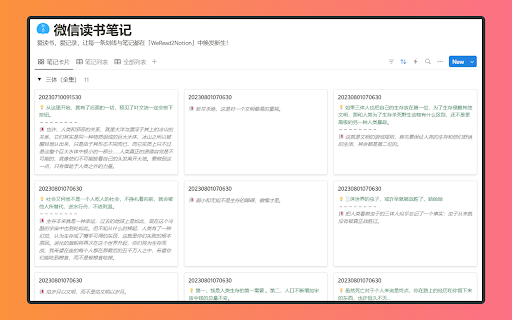


📚 【WeRead2Notion】- 你的知识整合新伙伴!🚀 微信读书笔记同步到Notion数据库 你是否在「微信读书」上发现了令人眼前一亮的金句,却苦于无法高效地整合到你的知识体系?… 📚 【WeRead2Notion】- 你的知识整合新伙伴!🚀 微信读书笔记同步到Notion数据库 你是否在「微信读书」上发现了令人眼前一亮的金句,却苦于无法高效地整合到你的知识体系? 现在,有了「WeRead2Notion」,你的笔记和划线内容可以无缝同步到Notion数据库,让你的知识管理更加高效和有序! 🔗 无缝同步:一键将微信读书中的划线和笔记同步到Notion Database,让你的知识管理更加高效。 📝 灵活展示:无论是卡片形式还是列表形式,WeRead2Notion都能满足你的个性化展示需求。 🔍 智能管理:充分利用Notion的强大数据库功能,让你的笔记检索和查看变得无比简单。 📈 提升效率:节省手动复制粘贴的时间,让你专注于阅读和思考,而不是信息的搬运。 🌈 立即体验「WeRead2Notion」,你的阅读笔记,一键同步到Notion! 联系开发者:penghe01@gmail.com

WeRead2Note
微信读书书架管理、阅读进度管理、笔记管理;支持以markdown格式导出书籍信息和笔记,联动Obsidian管理微信读书书架和笔记,搭建个人知识库 专为微信读书用户设计,将读书笔记同步至Obsidian和思源笔记实现阅读与知识管理无缝衔接。本插件能一站式同步和管理您的微信读书书架、进度、划线与笔记。 核心功能是将您的阅读数据,包括丰富的书籍元数据,以结构化的Markdown格式,通过API直接保存至Obsidian和思源笔记知识库。您可完全自定义文件的存储路径与命名,并能一键生成Dataview动态书架索引,轻松打造可视化个人图书馆。 我们的目标是终结繁琐的复制粘贴,让知识沉淀高效、自动。立即安装,让您的阅读思考真正形成闭环,构建属于自己的知识花园。 如何安装: 在应用商店搜索“WeRead2Note”并安装

Notionhub
将微信读书、小宇宙、豆瓣、滴答清单、Keep 等 10+ 平台数据自动同步到 Notion,一站式构建个人知识库。 NotionHub:您的全能个人数据同步专家 NotionHub 是一款为您打造的一站式自动化数据集成工具,旨在将您散落在各平台的数字足迹无缝同步到 Notion 数据库。 【目前已支持的服务】 阅读与社交: 微信读书(笔记/时长)、豆瓣(书影音评分)、小红书。 播客与影音: 小宇宙(订阅/听完)、哔哩哔哩(收藏/点赞)、网易云音乐。 笔记与学习: Flomo(每日回顾)、多邻国(学习进度)。 效率与健康: 滴答清单(已完成任务)、Keep(运动打卡)、Forest(专注时长)、Toggl(时间追踪)。 【核心功能】 全自动同步: 一次配置,后台自动运行,彻底告别手动复制。 多平台集成: 一个插件搞定 10+ 国内外主流应用。 高度自定义: 支持自定义 Notion 属性映射,让数据按您的逻辑排列。

Cubox
Highlighter, Clipper, AI Reader. Read, annotate and take notes with AI assistant. One-click Saving, Clipping, Highlighting and Taking Notes. Cubox is an AI reader built for learning. With the Cubox browser extension, you will unleash the full potential of highlights and notes. • You can quickly select multiple sections of text, images, or links on a webpage with just one shortcut, and easily highlight or clip them. • In capture mode, you can multi-select, or click and drag to batch select adjacent content. • Select contents on webpage with mouse dragging, then highlight them with just one click. • It supports adding notes, changing colors, allowing you to fully experience all the highlighting features right on the webpage. • Get a quick understanding of the article’s summary through summarization. Use key questions to understand the main points of the article and their answers. • Automatically highlight with Ghost Highlight and mark your favorite sections with annotations. • Save the web page you are browsing with one shortcut. • Save web snippets by dragging, Capture, dropping, and right-clicking. • Suggest tags, website title, description, and cover image. • Update information for already saved content. • Automatically detect same saves. More features on https://cubox.cc/ Please visit the Cubox web app or download Cubox apps. Your collections will automatically sync across all your devices.

微信读书导出
一键导出微信读书笔记 一个极简风格的导出 Markdown 笔记的微信读书扩展 代码已开源,项目地址:https://github.com/scarqin/wxread-export 联系我: - Github:https://github.com/scarqin/wxread-export - Email:scarqin@gmail.com
