
ibfbpkkkccodmhkkpamenigjibohapdf
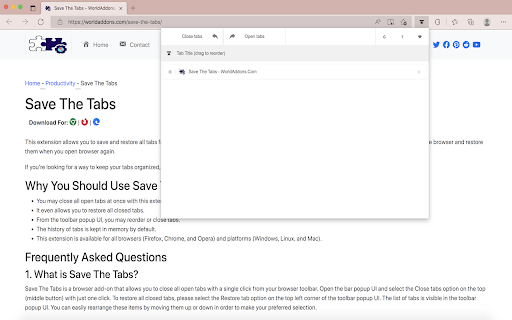
Save The Tabs - Save and restore all open tabs from the toolbar popup! "Save The Tabs" is a browser add-on that allows you to save and shut all tabs with a single click from your browser's toolbar To remove a tab, simply open the toolbar popup UI and click on the - Close tabs - button on the top-left corner. Please click on the Open tabs - button on the top toolbar to re-open all closed tabs. Within the toolbar popup UI, you will see a list of tabs as well as a list of opened tabs (drag & drop). The items in this list may be easily rearranged (drag & drop). All existing open tabs will be automatically resized to match your new order. Aside from that, you may click on the close button in the toolbar pop-up to close a single tab (and remove it from the list). The precise change will be shown for all open tabs in your browser when you make any modifications in the toolbar popup UI; vice versa, once you alter any settings on the open tabs, the toolbar popup will reflect these changes.

Save All Tab URLs
Get the raw URLs of all your open tabs! When clicked, this extension shows all the URLs of your open tabs in a convenient way for you to copy/paste and save wherever you want, allowing you to re-visit all the open tabs you had the last time you used your browser!

Tabox - Save and Share Tab Groups
Save your open tabs into collections and reopen them whenever you want in a single click! Tabox lets you save all open tabs in the current window to a "Collection". You can click on the collection to open all tabs instantly! The extension's export and import feature is especially useful for working teams that need to share list of work URLs. Want to help support Tabox? Checkout our sponsorship page! https://tabox.co/sponsorship/ Additional Features: - Save all your open tabs and tab groups to a collection - Save all windows at once! - Allow auto updating of collections once you open them (enable in settings) - Assign colors to collections for easier sorting and categorization - Export / import collections - Sync your collections across multiple devices using Google Drive - Drag & Drop to rearrange your collections Terms of Service: Tabox is completely free and does not charge for its service or cloud sync option Loss of saved tabs can happen, backup your collections to file periodically to avoid data loss

Bookmark All Tabs
𝗪𝗵𝗮𝘁 𝗶𝘀 𝗕𝗼𝗼𝗸𝗺𝗮𝗿𝗸 𝗔𝗹𝗹 𝗧𝗮𝗯𝘀? Save all tabs to any bookmarks folder anywhere at the press of a button. No annoying menus, popups or questions asking you to name things when bookmarking. Save bookmarks to an auto generated folder using values like the active page title you were on when saving, the current date, day, time etc. nested under any folder you want. Auto generate a “Recent” folder to quickly access your most frequently used bookmarks. Plus tons more features to tweak for whatever your workflow… • Save using date, day, time, current tab and more as nested sub folders. • Option to bookmark the active tab only.

Undo Closed Tabs Button
Easily undo closed tabs via your browser's toolbar popup! Undo Closed Tabs Button is an extension to allow users to reopen closed tabs via the toolbar popup. To work with this addon, simply open the toolbar popup and click on the desired tab to open. By default, 25 items are shown in the popup, but you can change this from the options page. Each item has a title and a favicon (if available). Within the UI bottom section, there are few buttons. On the bottom-left side, there is a button to open all closed tabs. There is also a button to open the history tab. On the bottom-right side, the first button is to reload the UI. Next is the settings button to open the options page. The last two buttons are for the support page and donation. Note: The extension interface supports dark mode. To switch the toolbar popup interface theme to dark, please press the moon icon in the bottom-right toolbar. If you have a feature request or found a bug to report, please fill out the bug report form on the addon's homepage (https://mybrowseraddon.com/undo.html).
