
ialabhbhegakcagjafaaljebepkgpfag
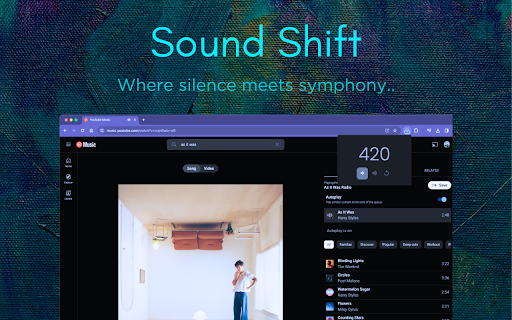
Change Volume of any screen on Youtube, Hotstar, Jio Cinema or Netflix Introducing Sound Shift, the ultimate Google Chrome extension designed to elevate your streaming experience on any platform. Sound Shift seamlessly boosts audio levels, ensuring crystal-clear sound without any distortion, and it's optimised to work flawlessly in full-screen mode. Whether you're watching videos, enjoying music, or participating in virtual meetings, Sound Shift lets you take control of your audio environment with just a few clicks. It's the perfect solution for anyone tired of straining to hear, offering a simple and efficient way to enhance your online auditory experience. Working on Youtube, Hotstar, Jio Cinema and Netflix! How to Download, Install, and Use SoundShift: 1. Visit the Chrome Web Store. 2. Search for "Sound Shift" in the search bar. 3. Click on the "Add to Chrome" button on the extension's page. 4. A confirmation pop-up will appear; click "Add Extension" to install. 5. Once installed, the Sound Shift icon will appear in your Chrome toolbar. 1. Navigate to your favourite streaming platform. 2. Click on the Sound Shift icon in the toolbar. 3. Click on "Volume Up" or "Volume Down" buttons to increase or decrease volume according to your need. 4. Click on "Reset" button to turn it back to normal. Enjoy enhanced audio on any streaming platform hassle-free, even in full-screen mode! Sound Shift – Where Silence meets Symphony!

Transpose ▲▼ pitch ▹ speed ▹ loop
Change the pitch and speed of music and loop sections directly on YouTube, Spotify and many other streaming platforms. Practice solos, learn difficult passages, train your voice or transcribe music in real time. Trusted by 1,000,000+ musicians, teachers and students worldwide. • Change pitch ±12 semitones • Adjust speed from 25% to 400% • Loop sections instantly • Works on YouTube, Spotify, and many other streaming platforms • No sign-in required Designed for musicians who practice regularly and want more control. • Dedicated workspace • Timeline with draggable markers • Clips, sequences, and saved songs • Premium pitch engine with formant control • Voice reducer an equalizer • Cloud sync ⯈ Perfect for: • Slowing down complex solos on YouTube • Adjusting songs to your vocal range • Learning riffs phrase by phrase • Practicing difficult passages with loops • Transcribing music inside your browser

Video Quality Enhancer • AI 4K Upscale, Sharpen, Light, Gamma & Color Fix
Instantly improve video quality on all streaming sites: YouTube, Netflix, Twitch, and more! One-click sharpness and color correction Turn 720p into 1080p, and Full HD into a stunning 4K-like experience. This extension works on all video streaming platforms, from Netflix, Prime and Disney, to YouTube and Twitch, to your favorite free movie and adult websites! Total Control at Your Fingertips • Sharpness: Brings out textures, edges, and fine details. • Reduce Distortion: Creates a softening effect to reduce unwanted digital artifacts for a cleaner image. • Highlights: Livens up a flat scene by adjusting the brightest parts of the video. • Midtones (Gamma): Increases the detail in colors that are neither bright nor dark. • Shadows: See more in dark scenes or add depth to a pale picture. • Saturation: Fine-tune the vibrancy of colors to correct for lighting changes. • Auto-Dim: Protects your eyes by lowering the brightness when the video gets too bright. Packed With Features • Customizable Presets: Save up to 5 of your favorite settings for different sites. Plus, get started instantly with our new recommended presets for HD, FHD, 2K, and 4K-like quality. • Light & Dark Modes: Choose the theme that’s easiest on your eyes. • Wide Language Support: The extension is now available in over 20 languages, with an auto-detect feature. • Smart Website Controls: Easily set rules so it only on the websites you choose. • Keyboard Shortcut: Show the sidebar by pressing "Alt+S". This default setup can be changed. Known Conflicts! • Other video quality extensions • Dark Mode extensions The above-mentioned extensions use the same CSS filters to add effects or styling to the page and videos. The effects cannot stack up. One extension will work, while the other one will not!

VolumeBooster
Boost or reduce audio/video volume (0-1000%) on any website. Works with YouTube, Netflix, Twitch and all other sites. VolumeBooster - Boost Your Audio Experience Struggling with quiet videos or low-volume websites? VolumeBooster lets you amplify any audio or video up to 1000% - that's 10x the normal volume! 🚀 OVERVIEW: VolumeBooster is a powerful and lightweight browser extension designed to enhance your audio experience. Whether you are watching a movie on Netflix, listening to music on Spotify, or trying to hear a quiet tutorial on YouTube, VolumeBooster gives you full control over your sound output. 🖥️ No need to use F11 anymore! You can easily use this extension in full screen mode. 🔊 Up to 1000% Volume Boost Push volume levels far beyond the standard 100% limit. Perfect for old movies, quiet microphones, or simply when you need that extra kick. 🌍 Works Everywhere Compatible with all your favorite platforms including YouTube, Netflix, Twitch, Spotify Web, Amazon Prime Video, and virtually any website with audio or video content. 🧠 Smart Per-Site Memory You don't need to adjust the volume every time. VolumeBooster remembers your preferred settings for each specific website. If you like YouTube at 300%, it stays there until you change it. ⚡ Quick Preset Buttons Jump instantly to 100%, 200%, 500%, or MAX (1000%) with a single click. No need to drag sliders if you want a quick boost. 📊 Visual Volume Indicator Beautiful animated bars visualize your audio levels in real-time. The extension badge also conveniently displays your current boost percentage so you always know your level. 🔇 One-Click Mute Need silence fast? Instantly mute all audio in the current tab without losing your boost settings. 🔒 Privacy Focused & Secure We value your privacy. All settings are stored locally on your device. No data collection, no tracking, and no analytics. 🚀 Lightweight & Fast Built using the Web Audio API, VolumeBooster is optimized for performance. It enhances audio without slowing down your browser. ⌨️ KEYBOARD SHORTCUTS: Control your audio without clicking: • Up/Right Arrow: Increase volume • Down/Left Arrow: Decrease volume • M: Toggle Mute on/off ❓ HOW TO USE: 1. Pin the VolumeBooster icon to your browser toolbar. 2. Click the icon whenever you need a boost. 3. Use the slider or preset buttons to amplify sound. 4. Enjoy your boosted audio! Enhance your listening experience today with VolumeBooster!

Substital: Add subtitles to videos and movies
Be it on Netflix, Disney+, Youtube or any other online streaming website - Our mission is to fill any language gap that exists whether for entertainment, language learning or to make videos accessible to the Deaf and Hard-of-Hearing. RECENTLY UPDATED & ACTIVELY MAINTAINED: - April 2026: Fixes for Amazon Prime Video. Expanded video detection for more websites. - September 2025: Fixes for HBO Max, Netflix, and Disney+. Mubi now officially supported. - May 2025: Fixes for Amazon Prime Video and Dailymotion. - December 2024: Migrated to Manifest V3. Fixes for Disney+ and ok.ru. FEATURES: - Supports Netflix, HBOMax, Disney+, Amazon Prime Video, YouTube, and many other video platforms. - Search for subtitles with the built-in-search feature. - Add your own subtitles with drag and drop (supported format: SubRip (.SRT) or ZIP archive containing a .SRT). - Manually synchronize the subtitles, if they are out of sync. - Change the subtitles font size, text colour and background color. - Supports special characters for languages like Greek or Arabic. - Can be used on android mobile devices with the Kiwi browser - Substital is passive by default and won't be automatically injected in the pages you visit. Only YOU decide when to add subtitles to a video. HOW TO USE: - Add the extension to your browser. - Pin it, so you can find it easily (Highly recommended). - Navigate to a website containing a video. - Click on the Substital extension at the top right of your browser. It will open a pop-over. - Select the detected video. - Add subtitles by searching or drop your own file. Enjoy watching and if you like our product, please leave a review or let us know how we can make Substital even better! 🌞 Happy customers 🌞 “I've tried 9 different desktop media players but none of them display subtitles as accurately on time and precise as Substital” “This is an awesome extension for watching things on third party sites, would hundred percent recommend it.” “Very useful for non native english speakers such as me to watch movies and series in english” Substital is proud to support the Hearing Health Foundation, a nonprofit that promotes hearing health for everyone. We invite you to help our mission when you are shopping at partner stores, at no cost to you. Support is always optional, and can be permanently disabled at any time. Substital may get paid commissions directly from companies and/or via affiliate programs on sites visited and/or products purchased while using this browser extension. These commissions/affiliate-payments become the donations that go to your selected charity. Aside from these paid commissions, Substital is completely free, without any ads and no hidden costs. Therefore donations are very appreciated to help me to maintain the extension. Rating and reviewing helps a lot as well. You can donate here: https://substital.com/donations or bitcoins here: https://substital.com/donations/btc
