
iakkmkmhhckcmoiibcfjnooibphlobak
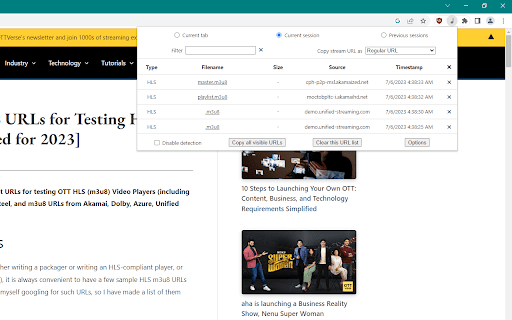
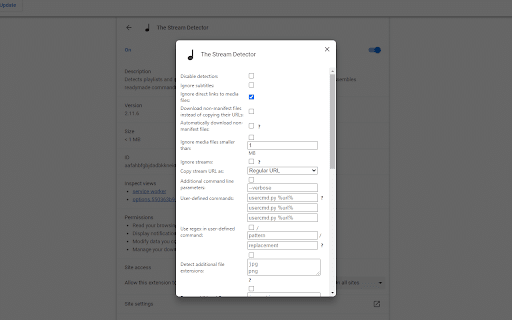
Detects playlists and subtitles used by streams, incl. custom file extensions and headers. Assembles readymade commands for tools. This is a Firefox addon ported to Chrome which provides an easy way to keep track of URLs to playlists and subtitles used by Apple HLS, Adobe HDS, MPEG-DASH, and Microsoft Smooth Streaming streams as well as download video/audio files directly and monitor any other file extensions and Content-Type headers. Copy URLs by clicking their filenames in the addon's popup menu (accessed by clicking on the toolbar icon). URLs can either be copied as they are or transformed into readymade yt-dlp (recommended), FFmpeg, Streamlink, hlsdl or N_m3u8DL-CLI commands, including the User-Agent, Cookie, and Referer headers. The chosen tool then downloads the stream into a single file until it is finished or stopped. Use the addon's options page to customize your experience and e.g. download media files directly. Note that websites such as YouTube, Vimeo, Facebook, etc. are very likely to use proprietary technologies which are not supported by this addon. When it comes to such "mainstream" services, it's better to use the tools (e.g. youtube-dl/yt-dlp) directly. Please keep in mind that the Chrome version lacks certain features in comparison to the Firefox version.

HLS Downloader
Download fragmented media files with HLS (HTTP Live Streaming) downloader. HLS Downloader lets you easily download fragmented media files (with .ts file extension) from the internet. HLS or HTTP Live Steam is a new media format developed by Apple Inc. It contains a master playlist with the ".m3u8" file extension. First, the extension downloads the master playlist, and then within the master, it finds playlist content. Each playlist has several fragmented items. All items are displayed in the UI with a download and a remove button. When you press the download button the extension downloads all fragmented media and merges them all to generate a single media file. Note 1: the interface for the extension can be opened in a new tab or a separate window. Please right-click on the toolbar button to choose the appropriate context. Within the UI, there is a toggle button to turn the addon ON or OFF. Moreover, to switch the interface theme to dark, please press the moon icon in the bottom toolbar. Note 2: HLS Downloader is NOT responsible for media content that you download with this add-on. We strongly recommend that you verify the related media copyright permissions on each website before downloading any media file(s). Note 3: to download the HLS stream you gave 3 options. (1) To add a stream URL manually, please enter the desired URL with the ".m3u8" file extension in the UI. (2) As you browse the internet, this extension monitors the webpages and captures all HLS media files, and if anything is found, automatically downloads the playlist and updates the badge number accordingly (only when the addon is turned ON). The 3rd option for downloading the HLS stream is via the context-menu item. Please right-click on ".m3u8" streams and then select - Download with HLS Downloader - from the context menu. If you have a feature request or found a bug to report, please fill out the bug report form on the add-on's homepage (https://mybrowseraddon.com/hls-downloader.html).

EME Call and Event Logger
Logs all Encrypted Media Extensions (EME) method calls and events. Logs Encrypted Media Extension (EME) events and calls to help investigate issues in premium media sites. The source code is available at https://github.com/google/eme_logger. By installing this item, you agree to the Google Terms of Service and Privacy Policy at https://www.google.com/intl/en/policies/.

FetchV - Video Downloader for m3u8 & hls
The video downloader for saving web videos and live streams. Features: 1. Supports HLS video (streaming video indexed by m3u8 file), integrating all media fragments into a single MP4 file. 2. Supports HLS live streaming. 3. Supports videos or live streams with a 'blob' prefix in the player's src address. For such media, when the actual media address cannot be detected, the "recording mode" can be used to convert the buffered data into an MP4 file. 4. Supports various static videos or audios that can be played on web pages, such as MP4, WEBM, etc. 5. Supports streaming MP4 (HLS v7, may add support for "MPEG-DASH" in the future). 6. Uses multi-thread downloading, which can significantly increase the download speed in good network conditions, very useful for downloading large files. 7. Supports switching resolutions, available when the HLS video's m3u8 file provides multiple resolutions. 8. Provides media preview, if multiple media are captured on a page, you can confirm your target through the preview. 9. Provides a feature-rich download interface, where you can know the download speed, progress, and perform operations like switching download threads, switching resolutions, and modifying file names. 10. All the work of this tool is done in your browser, without using any third-party servers to transmit or convert media data. Notes: 1. This tool is only applicable to videos that comply with technical standards, and it does not work for videos using non-standard playback technologies. It does not have special adaptations for specific websites. 2. It does not support encrypted videos, and we are not responsible for any media you download. It is recommended to check the copyright of the media before downloading. 3. Although this tool has been adapted to popular web videos, it cannot guarantee absolute success in the adapted scope. If it doesn't work for you, please try other tools as an alternative.

Get cookies.txt LOCALLY
Get cookies.txt, NEVER send information outside with open-source This extension exports cookies.txt in Netscape or JSON format. The Netscape cookies.txt format is compatible with wget, curl, MozillaCookieJar(Python3), and more. Rest assured that this extension never transmits your information externally. It features an open-source, unobfuscated source code that is readily available for inspection on GitHub or in the extension's installation directory. We are not related to the developer of the original “Get cookies.txt” which we have been told was malware in the past. This extension provides the equivalent features in a safe, open-source format. ## ⚠️ Caution If you are using `Google Chrome
