
hkbifmjmkohpemgdkknlbgmnpocooogp

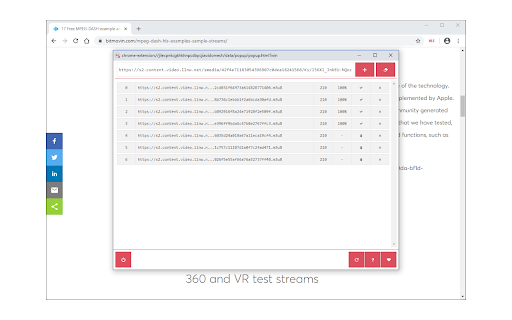

Download fragmented media files with HLS (HTTP Live Streaming) downloader. HLS Downloader lets you easily download fragmented media files (with .ts file extension) from the internet. HLS or HTTP Live Steam is a new media format developed by Apple Inc. It contains a master playlist with the ".m3u8" file extension. First, the extension downloads the master playlist, and then within the master, it finds playlist content. Each playlist has several fragmented items. All items are displayed in the UI with a download and a remove button. When you press the download button the extension downloads all fragmented media and merges them all to generate a single media file. Note 1: the interface for the extension can be opened in a new tab or a separate window. Please right-click on the toolbar button to choose the appropriate context. Within the UI, there is a toggle button to turn the addon ON or OFF. Moreover, to switch the interface theme to dark, please press the moon icon in the bottom toolbar. Note 2: HLS Downloader is NOT responsible for media content that you download with this add-on. We strongly recommend that you verify the related media copyright permissions on each website before downloading any media file(s). Note 3: to download the HLS stream you gave 3 options. (1) To add a stream URL manually, please enter the desired URL with the ".m3u8" file extension in the UI. (2) As you browse the internet, this extension monitors the webpages and captures all HLS media files, and if anything is found, automatically downloads the playlist and updates the badge number accordingly (only when the addon is turned ON). The 3rd option for downloading the HLS stream is via the context-menu item. Please right-click on ".m3u8" streams and then select - Download with HLS Downloader - from the context menu. If you have a feature request or found a bug to report, please fill out the bug report form on the add-on's homepage (https://mybrowseraddon.com/hls-downloader.html).

FetchV - Video Downloader for m3u8 & hls
The video downloader for saving web videos and live streams. Features: 1. Supports HLS video (streaming video indexed by m3u8 file), integrating all media fragments into a single MP4 file. 2. Supports HLS live streaming. 3. Supports videos or live streams with a 'blob' prefix in the player's src address. For such media, when the actual media address cannot be detected, the "recording mode" can be used to convert the buffered data into an MP4 file. 4. Supports various static videos or audios that can be played on web pages, such as MP4, WEBM, etc. 5. Supports streaming MP4 (HLS v7, may add support for "MPEG-DASH" in the future). 6. Uses multi-thread downloading, which can significantly increase the download speed in good network conditions, very useful for downloading large files. 7. Supports switching resolutions, available when the HLS video's m3u8 file provides multiple resolutions. 8. Provides media preview, if multiple media are captured on a page, you can confirm your target through the preview. 9. Provides a feature-rich download interface, where you can know the download speed, progress, and perform operations like switching download threads, switching resolutions, and modifying file names. 10. All the work of this tool is done in your browser, without using any third-party servers to transmit or convert media data. Notes: 1. This tool is only applicable to videos that comply with technical standards, and it does not work for videos using non-standard playback technologies. It does not have special adaptations for specific websites. 2. It does not support encrypted videos, and we are not responsible for any media you download. It is recommended to check the copyright of the media before downloading. 3. Although this tool has been adapted to popular web videos, it cannot guarantee absolute success in the adapted scope. If it doesn't work for you, please try other tools as an alternative.

MAX Video Downloader – download HLS, DASH, MP4/WEBM, LIVE streams
FREE video downloader for HLS (.m3u8), MPEG-DASH (.mpd), Direct media (.mp4, .webm). Record LIVE streams. Extract audio and subs. No accounts. No ads. No paywalls. No analytics. MAX is a free video downloader that works directly in Chrome, with optional desktop app for heavier jobs. ⚠️ YouTube and DRM-protected content are NOT supported. MAX is the downloader you need: – Download HLS streams (.m3u8) – Download MPEG-DASH streams (.mpd) – Download direct video and audio files (.mp4, .webm, .mp3, and more) – Record live streams – Save video in original quality without re-encoding – Extract audio and subs from video – Download subtitles (.srt, .vtt) – Merge video, audio, and subtitles into one file – Fine-tune filenames with Smart Naming rules – Customize detection, downloads, progress labels, language, and interface behavior Simple flow: 1. Open a page with media 2. Click MAX 3. Download the file to your device No extra pages. No account prompts. No fake “continue” buttons. No manual copying of links. You see detected media, choose what you need, and save it. You’ll love it. Built for real websites, not only simple MP4 files: – Media is analyzed before download – Thumbnails are generated from actual media file – Format, quality, duration, size, audio, subtitle, and track information shown where available – Support for complex streaming pages with separate video, audio, and subtitle tracks – Same straightforward flow across all supported websites and media types – Thousands of users already use MAX for real-world media downloads Power without complexity: MAX gives you deep control when you need it, but keeps the main download flow simple. You can pause detection on specific websites, stop detection globally, enable Extensive Detection for harder pages, choose from 48 interface languages, customize progress labels with speed, downloaded size, total size, ETA, segment count, and processing time, and many, many more features, completely free of charge. Smart Naming: Create filename rules for different websites and workflows. Use page data, media data, URL parts, templates, text replacements, regex substitutions, and case transformations to keep downloaded files organized automatically. Optional open-source Desktop App (CoApp): MAX works directly in Chrome by default. The desktop CoApp is completely optional and open-source on GitHub. Use CoApp when you want: – Custom download folders – Native FFmpeg execution (faster) – More stable very long downloads – Jobs that do not depend on the browser lifecycle – Higher request concurrency for heavy HLS/DASH media – Local file operations outside normal browser limits Use browser mode when you want: – No installation – Browser VPN, proxy, Secure DNS, and session behavior – Better access to media that already plays in your browser – Downloads on legacy OS, low-end devices, Chromebook, and Android environments Useful for: – Saving online courses and tutorials for offline playback – Recording lectures, webinars, and live streams – Downloading public videos in original quality – Extracting audio from video files – Downloading subtitles for anime, foreign videos, courses, and multi-language media – Saving video with subtitles instead of getting only raw audio or video – Keeping time-limited media you are allowed to save Feedback: MAX is built by a solo developer and actively maintained. I read reports daily and often ship fixes or new website support the next day, when reports include enough details. If something does not work, send a report from the extension instead of leaving a bad review. Reports help me fix real problems, and we both benefit from it; bad reviews help you relieve frustration but usually do not include enough data to debug anything... Use MAX responsibly and only download content you have the right to save.

Stream Recorder - HLS & m3u8 Video Downloader
You can download and save live streaming video in HLS / m3u8 format. The most popular downloader for streaming videos. With this extension, you can easily save live and archived videos that are delivered in a typical HLS(HTTP Live Streaming) format, such as ts/m3u8. Even more, you can record videos directly using the unique video capture function. Downloaded audio and video data is converted to mp4 as it is with the same quality without re-encoding. This conversion is done inside the extension, without the use of an external server. Please be aware that we accept no liability for your recording of any media. We recommend ensuring the copyright and permissions of the media before recording. Be sure to use the latest version of your browser; we cannot promise availability on the Canary version. You can check the privacy policy and terms of use on the following page.

Live Stream Downloader
Detect and Download M3U8 HLS Streams (HTTP Live Stream) in multiple threads to your local disk This extension detects M3U8 streaming formats on the active tab and offers to download these segmented streams as a single file to the user's local disk. This extension detects all possible video qualities and uses direct disk writing to store segments. So there is no need to have a recovery plan from a possible crash. Your data is written instantly to the local file and is ready to use. It also merges all segments automatically when the file is fetched. To improve download capability, the extension also sets the referrer header of the original page. This extension uses multiple threads to download the HLS stream to increase the downloading speed and stability. Also, it supports resuming the download process when there is a network failure (Thanks to the TDM.JS engine). How to use it: 1. Go to a streaming website like https://videojs.com/ 2. Wait until the toolbar color changes 3. Click on the toolbar button once to select a quality 4. Wait until the download is over. You can see the progress as a badge text. Features: 1. Download HSL Streams 2. Detect any audio, video, or media streams on the active tab 3. Uses multi-threading to increase download speed 4. Write directly to the disk 5. Supports detecting many audio and video formats 6. Retries several times to fetch each segment even if downloading is broken or you get disconnected from the internet for a short period. 7. Keep awake while downloading a file (this feature is optional; use Ctrl + P or Command + P when the interface is open to enable it) 8. Download any arbitrary file with multiple threads and network failure protection (copy the link and use Ctrl + V or Command + V to add it as a new job to the interface) 9. Unlimited retires. The extension uses multiple threads to fetch the data as fast as possible. If a thread breaks, the extension retries several times to reconnect to the server. Even after multiple tries, the extension pauses the downloading process and displays a prompt to resume when the network issue is fixed. 10. Suitable to download very large files for two reasons: 1) It is the fastest downloader because of multiple thread fetching. 2) it writes directly to the disk, so there is no need to move the file from the internal storage to the local disk later. Use Cases: 1. You want to store a multi-segmented stream to your local disk for later use. 2. On an unstable network, you can use this extension to fetch a video file and start watching it with your media player even when it is not yet fully downloaded. Extra Features: 1. You can download any file with this tool. Just drag and drop the link to the interface. Since it uses multiple simultaneous threads to fetch data, you can get the file a lot faster. Also, the downloader is protecting you against network failures and resumes interrupted downloads. 2. This downloader writes directly to the disk and can handle a download speed of about 300 MBytes / seconds. This is the best you can get even with native download managers. Content Creators: If for any reason, you want this extension to ignore your website, please open a bug report on the GitHub repository.
