
iakjgojjngekfcgbjjiikkhfcgnejjoa
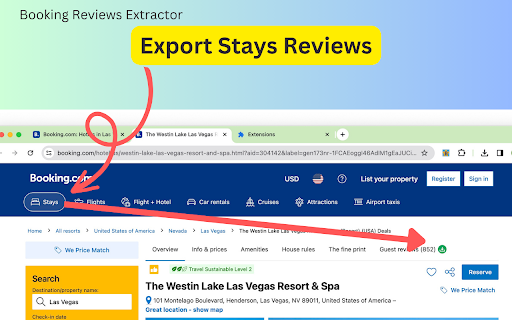
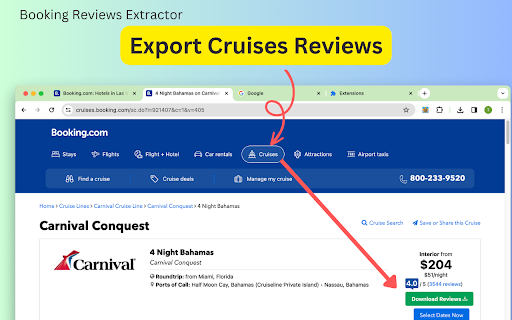
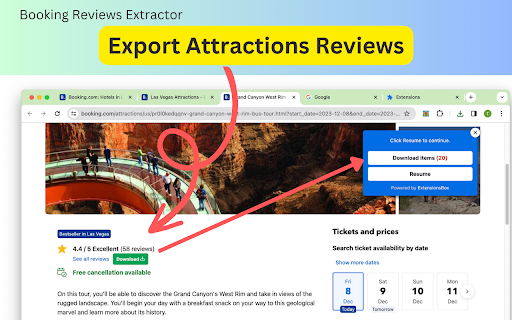
Scrapes authentic guest reviews from Booking for hotels, cruises, attractions, exporting key details as a spreadsheet for analysis Booking Reviews Extractor is a Google Chrome extension that allows you to scrape easily and export reviews from Booking.com across various categories including hotels, cruises, and attractions. what is Booking This is a travel reference platform similar to tripadvisor.com. Booking focuses on hotel bookings and transactions, while TripAdvisor concentrates more on the travel research and planning experience via reviews, forums, and destination information. They complement each other in the travel ecosystem. With this extension, you can extract key details reviews and export them for your own analysis. The exported fields vary slightly by category: This extension makes it easy to scrape reviews - simply click the "Downloads" button on any hotel, cruise, or attraction detail page and all reviews will be automatically extracted in one click. Then click "Download items" to export them as a CSV spreadsheet file for further analysis. This extension empowers you to make more informed decisions by accessing authentic reviews from other travelers. It also enables you to further analyze Booking.com review data for your research. The scraping process starts instantly when you make a request. Duration varies depending on the volume of data. We prioritize keeping your data secure - no information is stored or sent to external servers. Everything stays on your device. Disclaimer This extension is an independently developed product by ExtensionsBox and has no association with Booking.com.

Data Scraper for Airbnb
Easily Scrape Airbnb rooms reviews with one click and save them in a CSV file. Export includes comments, ratings, and etc. Added support for custom date/time format when exporting data Optimized the user interface - Extract comments from rooms, including content, ratings, and etc. - Filter and sort using keywords, with advanced filtering and export support. - Support all countries' websites, including China. - Support all languages' websites, including Chinese. - Easily export the list of reviews to a CSV file with just one click. - Open any rooms page. - Click on this Chrome extension app. - Click the "Download Reviews" button located next to the review count to initiate the retrieval of reviews. - Allow the process to finish, and the data will be automatically downloaded in a CSV file. Indeed, Data Scraper for Airbnb is available for free. You can access the basic features and choose to upgrade for more functionalities. All data processing occurs locally on your computer, and it never traverses our servers. Airbnb™ is a trademark owned by Airbnb™, Inc. Data Scraper for Airbnb has no affiliation, endorsement, sponsorship, or direct relation to Airbnb™, Inc., its affiliates, or subsidiaries.

Tripadvisor® Reviews Scraper - scraper.plus
Extract and export TripAdvisor reviews with ease - no coding required. The TripAdvisor Reviews Scraper is a extension on Chrome that extracts reviews from TripAdvisor.com quickly and easily. It's perfect for anyone who needs to collect feedback, ratings, and comments from travelers. Whether you're looking to analyze trends, gauge customer sentiment, or gather data for research, this tool simplifies the process by providing structured data ready for analysis. 🟥 Advantages of the tool: - 👏 Efficient and Fast: Scrape hundreds of reviews in minutes. - 👏 Data-Rich: Export comprehensive datasets including user details, ratings, reviews, photos, and more. - 👏 Multiple Formats: Supports JSON, CSV, and XLSX formats for easy sorting and filtering. - 👏 User-Friendly: Simply install the extension and click "Start" to collect reviews. 🟥 How do I extract TripAdvisor reviews? Just follow these two simple steps: 1. Install our browser extension: Get started by adding our extension to your browser. 2. Click "Start" on the desired page: Navigate to the TripAdvisor page containing the reviews you want to extract, then simply click the "Start" button on our extension. 🟥 Data Privacy Your data is kept on your device and is not stored or transmitted to our servers. We prioritize ensuring the security and confidentiality of your information. TripAdvisor® is a registered trademark of TripAdvisor, Inc. and its affiliates in the U.S. and/or other countries/regions. This independent project is not affiliated with the company.

Review Scraper for TripAdvisor®
Effortlessly scrape and analyze TripAdvisor reviews with AI, exporting in CSV, JSON, or Excel formats. Review Scraper for TripAdvisor is a powerful browser extension that allows users to scrape and export reviews from various sections of TripAdvisor. With the ability to export data to convenient CSV, JSON, or XLSX (Excel) files, users can easily analyze and utilize the data for their needs. New AI-Powered Features Our latest version has integrated advanced AI capabilities to enhance your experience. Our AI can analyze and summarize user reviews, helping you make more informed decisions when choosing products or services. This feature saves you time and provides valuable insights at a glance. No need to read through numerous reviews yourself - the ChatGPT does the heavy lifting by quickly distilling the key points to inform your decisions. Whether researching products, services, hotels, or more, let the GPT assistant efficiently extract the essence of customer feedback for you, saving valuable time. What Types of Reviews Can Be Scraped? You can scrape reviews for: - Hotels - Attractions - Cruises - Things to Do - Restaurants - Airlines - Vacation Rentals ## What Information Does It Scrape? The extension captures the following details: - Display Name - User Name - User Profile - Rating - Review Title - Review - Date How to Extract Reviews? Scraping reviews is simple and requires no coding skills. Just follow these steps: 1. Open TripAdvisor.com and navigate to the hotel, attraction, restaurant, airline, or vacation rental from which you want to extract reviews. 2. Click the "Download Reviews" button beside the review number. 3. Wait for the process to complete, and then click "Download Reviews" on the pop-up window to save the data in CSV, JSON, or XLSX (Excel) format. 4. If you need AI analyze and summarize user reviews. Click the "AI Review Summary" button below for a detailed analysis. How Quickly Will I Receive the Results? The data extraction process starts immediately after you make a request. The duration depends on the volume of information you need to retrieve. Data Privacy Your customer data is 100% secure, as it never leaves your local machine. We prioritize user privacy by eliminating any user data transmission to our servers. In-App Purchases Our Extension is a freemium product with a nominal subscription fee. With a paid subscription, you can export up to 5,000 items at a time and receive premium support. The exact cost is displayed in the extension's interface, ensuring transparency and ease of understanding. Disclaimer This extension is an independently developed product by ExtensionsBox and has no association with TripAdvisor, Inc.

Costco Images Downloader
Scrape and download high-resolution images of Costco product listings in bulk or one by one from any listing with just a click. Costco Images Downloader is the perfect tool for anyone looking to obtain high-resolution images from product listings with minimal effort. Whether you're a casual shopper, a power user, or a business owner needing product images for various purposes, this extension is tailored to meet your needs. Features: - One-Click Downloads: Easily download all the images associated with a product listing on Costco with just a single click. - Bulk Download Options: Download images individually or in a zip file for convenient bulk downloading. - User-Friendly: No technical or coding knowledge is required to use this extension. It's designed to be straightforward and accessible to all users. - Versatile Use Cases: Use the downloaded images for design projects, printing, archiving, or any other need that arises from having high-quality product images. - Data Privacy Assurance: Your data privacy is of utmost importance. All images are downloaded directly to your local machine without passing through any external servers. How It Works: 1. Navigate to a product page on Costco.com. 2. Locate the “download icon” situated at the top left of the product listing images. 3. Click the icon, and a popup window will appear, displaying all the product images. 4. Select whether to download images individually or as a zip file for multiple images. Benefits: - Save Time: Quickly gather all the product images you need without the hassle of manual downloads. - High Quality: Access high-resolution images that are ideal for a variety of uses. - Convenience: Streamline collecting images from Costco, making it a breeze to get the visuals you want. Simple Yet Powerful: The Extension may be simple to use, but it's a powerful tool that can significantly improve your productivity and efficiency when dealing with Costco product images. Get Started: Bring the power to your browser today and experience the ease of downloading product images with just one click. Download the extension now and enjoy a more efficient way to manage your image needs. Disclaimer This extension is an independently developed product by ExtensionsBox and has no association with Costco Inc.
