
comaljjeidciacfaagdeaodbadbikdam


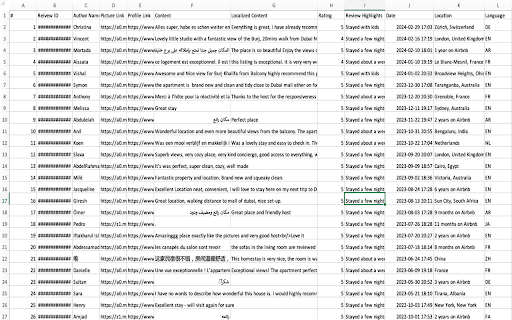
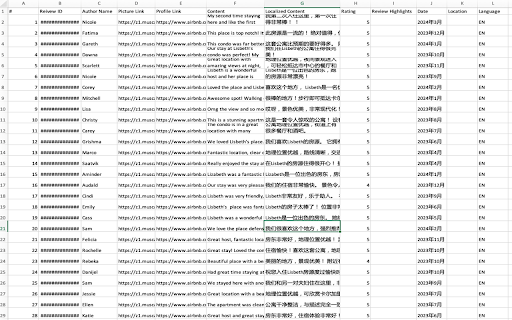
Easily Scrape Airbnb rooms reviews with one click and save them in a CSV file. Export includes comments, ratings, and etc. Added support for custom date/time format when exporting data Optimized the user interface - Extract comments from rooms, including content, ratings, and etc. - Filter and sort using keywords, with advanced filtering and export support. - Support all countries' websites, including China. - Support all languages' websites, including Chinese. - Easily export the list of reviews to a CSV file with just one click. - Open any rooms page. - Click on this Chrome extension app. - Click the "Download Reviews" button located next to the review count to initiate the retrieval of reviews. - Allow the process to finish, and the data will be automatically downloaded in a CSV file. Indeed, Data Scraper for Airbnb is available for free. You can access the basic features and choose to upgrade for more functionalities. All data processing occurs locally on your computer, and it never traverses our servers. Airbnb™ is a trademark owned by Airbnb™, Inc. Data Scraper for Airbnb has no affiliation, endorsement, sponsorship, or direct relation to Airbnb™, Inc., its affiliates, or subsidiaries.

Amazon Reviews Extractor & AI Summary
Extract Amazon reviews in one click. Analyse with AI, save as CSV/Excel/JSON. No coding needed. ✓ Scrape and export reviews from any Amazon product or review page instantly. ✓ AI-powered summaries — pros, cons, themes & buyer insights in seconds. ✓ Max Mode — Get up to 500 reviews per cycle, covering all star ratings and sort orders for maximum data. ✓ Export to CSV, Excel (XLSX), and JSON — ready to drop into any workflow. ✓ Sort, filter, and search results before exporting. ✓ 100% local processing — your data never leaves your device. ✓ Extended limits, Max Mode & AI summaries available on premium plans. Automatically cycles through every star rating and sort order to pull the maximum unique reviews for any ASIN — up to 500 reviews per cycle. Where standard extraction gives you a slice, Max Mode gives you the full picture. Available on premium plans. Open any Amazon product or review page. Click the extension icon. Pick Current Filter or Max Mode. Hit "Start Extracting" — or click "Summarise Reviews" for an instant AI report. Export your data to CSV, XLSX, or JSON. ✦ BUILT FOR → Amazon & FBA Sellers — analyse competitor reviews and track buyer sentiment. → Market Researchers — build structured review datasets for sentiment analysis. → AI & ML Engineers — generate clean NLP training data from real customer feedback. → E-commerce Agencies — audit and collect reviews across multiple ASINs fast. → Product Teams — surface pain points and feature requests directly from buyers. ✦ YOUR DATA STAYS YOURS All extraction runs locally on your machine. Nothing is sent to external servers. AI summaries process text securely without storing your data. Independently developed by ThinkTrail Studio. Not affiliated with Amazon, Inc. Amazon is a trademark of Amazon, Inc. "500+ reviews" refers to maximum extractable reviews using Max Mode. Actual results vary based on Amazon's indexed reviews for each product. v2.2.0 — Added support for Max Mode on the free plan. v2.1.0 — Performance improvements, stability fixes, and smoother extraction experience. v2.0.0 — AI Review Summaries, cloud saves, Max Mode, new UI. v1.0.0 — Initial release: extract and export Amazon reviews to CSV, JSON, and Excel.

Reviews Extractor for Airbnb
Scrape and download Airbnb place reviews to CSV, JSON, XLSX. to inform data-driven strategy based on customer feedback. Airbnb Reviews Extractor: Your Gateway to Streamlined Customer Feedback Analysis The Airbnb Reviews Extractor is a valuable tool for market research analysts, e-commerce managers, data analysts, product developers, customer experience specialists, and competitive intelligence analysts. It streamlines the process of gathering and analyzing customer feedback, saving time and providing deep insights without the need for manual review. Users benefit from the flexibility of exporting data in various formats, enabling data-driven decisions while ensuring privacy, as the data remains on the local machine without server transmission. This extension is a boon for professionals seeking efficient customer feedback analysis to improve products and strategies. Installation and Operation: 1. Visit any place page on Airbnb.com. 2. Click the "Download Reviews" button beneath the place title. 3. A popup will allow you to choose the format for data export: CSV, JSON, or XLSX. (The extraction process starts immediately, with the duration contingent on the data volume.) Key Features: - User-Friendly: No coding expertise needed; operate with a simple click. - Customizable Data Export: Choose from CSV, JSON, or XLSX formats for your convenience. - Instant Data Retrieval: Quick data scraping for timely analysis. - Organized Data: Receive well-structured files with reviewer IDs, ratings, comments, and more. - Versatile Analysis: Ideal for competitive research, trend monitoring, place comparison, and opportunity identification. Data Privacy Assurance Your data remains exclusively on your local machine, ensuring privacy and security, as it never passes through our servers. Disclaimer This extension is an independently developed product by ExtensionsBox and has no association with Airbnb Inc.

BNB Toolbox Scraper for Airbnb
Extract & export Airbnb rental listings data with no code to a formatted CSV or Google Sheet. This extension extracts the most comprehensive data from Airbnb's listings with one click and no code. This extension is perfect for investors, Airbnb hosts and managers, data analysts, real estate agents. It helps provide information for market analysis, competitor analysis and more. You can download the data as a nicely formatted CSV file or Google Sheets file organized by price, beds, bedrooms, baths, fees, rating, number of ratings, city, latitude/longitude and more. It's a very simple extension that is easy to use and gets the job done. 🧪Core Features: ✔️Scrape unlimited Airbnb listings from the website - Search page results (https://airbnb.com/s/) - Individual listing pages (https://airbnb.com/rooms/) - Wishlists (https://www.airbnb.com/wishlists/...) ✔️Download data into a formatted CSV file or Google Sheets including: - Price - Occupancy rate data (calculated and raw data) - Rating - Number of reviews and review history - City - Latitude/Longitude - Name/title - # of beds, bedrooms, baths - Type of listing (ie entire home) - Listing URL - Search filter inputs (ie total nights, check-in/out dates, etc.) - Total charged based on search filter inputs - Early bird discounts - Discounted and original prices - "Superhost" status - "Rare find" status - Locale code - Listing ID - "About this space" description - Amenities list - Cleanliness, value, accuracy, communication, check-in, location sub-ratings - Host name, rating, number of reviews ✔️No coding or technical knowledge needed. It's super easy to use! NOTE: This extension only supports airbnb.com at this time. International versions of the website may not have full functionality. It also does not support extracting split stay listings. Please email support@proptierio.com for any feature requests. Heed help sending letters of intent in bulk to lead? Try Bulk LOI Sender for FREE: https://workspace.google.com/marketplace/app/bulk_loi_sender/313947552675 🔒Permissions: We understand there may be questions regarding the permissions needed to use the extension. We aim to be as transparent as possible hoping to inform you that we have absolutely no intent of using the access you grant to your browser maliciously. Follow the link below to read on: ⭐ How To Use: The extension popup has 3 buttons that control the entire functionality of the app. Each button is to scrape the webpage, clear the data to scrape from scratch, and download the CSV file or save to Google Sheets respectively. To extract data, follow these steps: 1. Go to Airbnb.com and choose your search inputs (ie location, dates, guests) 2. Open up the extension and click "Scrape". Don't close the app while it works. 3. Click "Download" when you're ready to download the data to CSV or Google Sheets 4. (Optional) Change settings for automation (i.e. automatically navigating the search results pages) For more info, please see the YouTube video above to learn how to use the extension. If there are any questions or other issues, please contact support@proptierio.com. Also, check the how-to page: https://proptierio.com/blog/bnb-toolbox-scraper-for-airbnb-chrome-extension or the support page: https://proptierio.com/blog/bnb-toolbox-scraper 🏷️Pricing: Upon installation of the extension, the user will be able to use the basic and free version of the extension indefinitely. This limits the scraped listings to the 50 listings per download (downloadable CSV file is available with the basic version). Upgrade to the premium version to enjoy scraping and downloading unlimited listings from Airbnb's website (and other awesome features). 📚Terms and Conditions: By using this extension, you agree to the terms here: https://proptierio.com/legal/bnb-toolbox-scraper-terms and https://proptierio.com/terms ✋Important: Read more about the extension and its usage here: https://proptierio.com/blog/bnb-toolbox-scraper-for-airbnb-chrome-extension 📘 Change log: 4/14/2026: Edge case bug fix and search results extraction 4/9/2026: Fix bugs, improve data extraction uiux with stop function 11/12/2025: Improve oauth flow, add exit survey, improve analytics 8/16/2025: Mitigate large extraction error 8/11/2025: Add host info and sub-rating extraction 8/7/2025: Fix search results extraction due to Airbnb website change 7/31/2025: Implement wishlist extraction 7/17/2025: Fix amenities extraction 7/10/2025: Update scraping function due to Airbnb website change 6/2/2025: Minor UIUX improvements 5/22/2025: Better handle download bug, improve error logging 5/19/2025: Fix minor search results extraction bug 5/12/2025: Better handle split stay results, improve UIUX, error logging 5/6/2025: Minor bug fix and update YouTube video 5/4/2025: Improve UIUX by introducing side panel 4/29/2025: Fix single page price extraction 4/25/2025: Improve purchase flow 4/21/2025: Improve extracting international formats, total nights, price 4/16/2025: Fix search results extraction for total price displays 4/11/2025: Fix search results extraction due to Airbnb website change 2/5/2025: Allow exporting of amenities list and occupancy rate raw data 1/30/2025: Fix price extraction from search results due to Airbnb website change 1/2/2025: Fix rating extraction from search results 11/20/2024: Add affiliate program link 11/07/2024: Update YouTube video 10/16/2024: Add ability to extract detailed listing description 9/16/2024: Fix data extraction bugs for various parameters, implement custom time delay functionality 2/22/2024: Fix scrape bug due to Airbnb change 1/10/2024: Save listings continuously as scrape is in progress. 12/15/2023: Improve pagination automation 10/22/2023: Fix minor scraping bug. 10/17/2023: Initial publish.

Etsy Reviews Extractor - Scrape Data to CSV
Effortlessly extract Etsy product reviews. Export data in CSV/JSON/Excel formats, and gain AI-powered insights. Etsy Reviews Extractor - your ultimate tool for effortlessly extracting and analyzing reviews from Etsy products. This user-friendly browser extension allows you to quickly gather reviews and export them in CSV, JSON, or XLSX (Excel) formats, making data organization and analysis a breeze. With the added AI Review Summary feature, you can gain deeper insights into customer feedback, including "Advantages," "Disadvantages," "Improvement," and "To Buy Or Not To Buy" recommendations. Key Features - Effortless Data Extraction: Extract reviews for any Etsy product with just one click. No more tedious copying and pasting. - Multiple Export Formats: Export your data in CSV, JSON, or XLSX (Excel) formats for easy use in Excel or other data analysis tools. - Comprehensive Data Scraping: Gather detailed information including User Name, User Avatar, User Profile, Rating, Description, Image, Posted Date, Purchased Item, Purchased Item Link, and Scraped Time. - AI Review Summary: Utilize AI to summarize reviews, providing insights into product advantages, disadvantages, areas for improvement, and purchase recommendations. How It Works 1. Open a Product Page: Navigate to any product on the Etsy.com website. 2. Start Scraping: Click the "Download Reviews" button next to the reviews count to begin scraping. 3. Download Data: Once the process is complete, click "Download Reviews" in the popup to save the data in your preferred format (CSV, JSON, or XLSX). 4. AI Analysis (Optional): Click the “AI Review Summary” button for an in-depth analysis of the reviews. Speed and Efficiency The data extraction process begins immediately after your request, with the duration varying based on the volume of information. This ensures you receive your results as quickly as possible. Data Privacy Your data remains secure and confined to your local machine, ensuring complete privacy and control over your information. Disclaimer This extension is an independently developed product by ExtensionsBox and has no association with Etsy.
