
iadjlpkamclhkahghijkkladabpmdadb

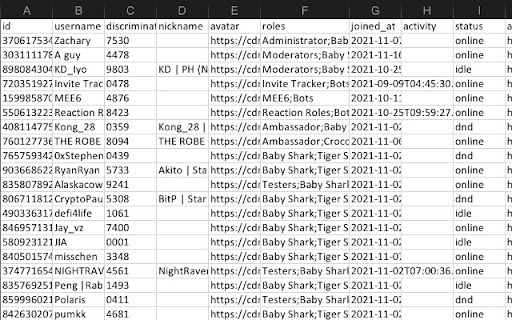
Discord User List Exporter | Discord User List to Xlsx | Tired of sorting out each member in your discord server one by one? One click to export list of discord members of discord server. # How it works? 1. Open a discord url 2. Click on the application icon in the upper right corner 3. Click the export button What columns you can export? -discord user id -discord username -discord user roles -discord user activity -discord user avatar -discord user status -discord user joined at time #IS IT FREE? Yes, Discord Export for Chrome is free to use. You can get basic functionality and upgrade to get more features. #Data privacy All the data is processed only on your local computer, it never passes through our web servers, no one knows what others export. #SUPPORT We sincerely want to solve any problem you may have.Please feel free to contact us via discord@savemydayapp.com.

Discord DM BOT
Send messages between multiple Discord channels or users efficiently and conveniently. # HOW TO USE 1. Open discord.com and login to the application 2. Paste your target User IDs 3. Use the template, or not 4. Edit your DM text message 5. Click "SEND" to begin your automated DMs # FEATURES ✓ Send bulk messages to Discord users. ✓ Predefine the content in the file and send them. ✓ Personalized messages with placeholders and spinx syntax template. ✓ Support Message Template, templates can be migrated between different computers ✓ The sending results are automatically saved and can be downloaded locally. ✓ Tasks can be paused. when restricted, pause for 10 minutes and then continue the task. # NOTICE Kindly do not use it for SPAMMING which is Discord™ strictly prohibited.

Discord Chat Exporter - Discord Export
A chrome extension made for people who want to export discord chat into xlsx or html Discord Chat Exporter | Export chat log to Xlsx | Export chat log to HTML A chrome extension made for people who want to export chat logs from discord channels or DM conversations in xlsx/html format - Export chat logs from discord channel or DM conversations. - Supports Export type Xlsx and html format. - Supports Date range selection. #How it works to Export Discord Chat Log? 1. Install the extension. 2. Open a discord channel. (Discord url example:https://discord.com/channels/xxx/xxx) 3. Click the extension icon on the top right corner,then click 'Export Chat'. #IS IT FREE? Yes, Discord Export for Chrome is free to use. You can get basic functionality and upgrade to get more features. #SUPPORT We sincerely want to solve any problem you may have.Please feel free to contact us via support@discordexport.com.

Discord Lookup
Enhance Your Discord Experience with the Discord Lookup Chrome Extension! Are you an avid Discord user? Do you find yourself constantly wanting to know more about your fellow server members, such as their roles, mutual servers, or even their online status? Look no further! The Discord Lookup Chrome Extension is here to take your Discord interactions to the next level. Instant User Info: With a single click, easily access detailed information about any user on the server, including their username, avatar, roles, and status. Mutual Servers: Curious about the shared communities you have with someone? This extension shows you all the mutual servers you and the selected user are a part of. Role Insights: Gain insights into a user's hierarchy on the server by seeing their role list and the positions of those roles. Effortless Setup: Installing and setting up the extension is a breeze. A few clicks, and you'll be ready to explore Discord like never before. Real-time Updates: Enjoy real-time information that updates as user statuses and server memberships change. Unlock a new dimension of Discord interaction and make your communication more insightful and engaging. Whether you're managing a server, moderating discussions, or simply wanting to get to know your fellow members better, the Discord Lookup Chrome Extension is your go-to tool. Ready to get started? Add the extension to your Chrome browser now and elevate your Discord experience today

DiscordSaver - Export Discord Chat Messages
A extension to export Discord chat messages to CSV/Excel/JSON/HTML, support both DM (private chat) and channel. ✓ Export chat logs from discord channel or direct messages (DM). ✓ Save and download chat messages in CSV/EXCEL/JSON/HTML format. ✓ Provide date range to quickly get the chat log you need. Visit any Discord channel or direct message, click the extension to select start date and end date, then click "Export". DISCORD TOOL FAMILY you can visit other tools on the tool menu. ✓ dSender - Send bulk DM for Discord ✓ dFriend - Bulk add friends ✓ dSaver - Export user list to CSV If you have any questions, please keep in touch via help@extensionsfox.com.
