
iaclcidolgjnpblhdalmildokfdmidlj


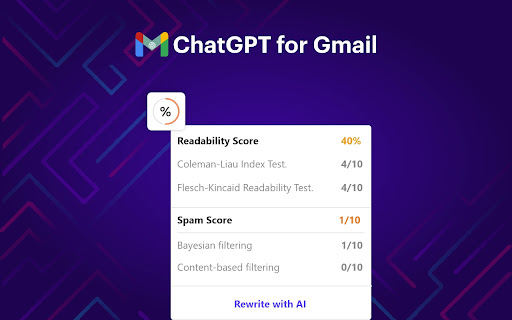
Leverage the power of ChatGPT within your Gmail inbox. With ChatGPT for Gmail you can transform your Gmail inbox into an AI-powered productivity machine. It's a free Chrome extension that utilizes the power of OpenAI's ChatGPT to improve the speed and quality of email writing within the Gmail inbox. 1. Generate subject lines based on email content 2. Generate multiple subject line variations 3. Generate email content based on subject line 4. Real-time readability and spam score checking 5. Rewrite entire emails for better readability 6. Unlimited custom prompts for creative emails and responses 7. Email thread summarization 8. Custom reply content within email thread With ChatGPT for Gmail, you'll write emails like a pro and save time while doing it. No need for a ChatGPT or OpenAI account – just install the extension and start writing smarter emails on your Gmail today. 1. What is ChatGPT? ChatGPT is a language model developed by OpenAI, it's a type of AI that is able to understand and generate human-like text. It's been trained on a vast amount of text data from the internet, so it has a good understanding of various topics and it can perform various natural language processing tasks such as language translation, text summarization, and text completion. Essentially, it's a computer program that can communicate with people in a way that feels natural and human-like. 2. What is ChatGPT for Gmail? ChatGPT for Gmail is a chrome extension that turns your Gmail inbox into an AI thinking box with the power of ChatGPT. Installing ChatGPT for Gmail chrome extension makes your email writing process faster, easier, and more effective. 3. Is ChatGPT for Gmail free to use? Yes, ChatGPT for Gmail chrome extension is free to use. 4. Is this extension built by the OpenAI team and is it associated with openai.com? No, ChatGPT for Gmail is not built from the OpenAI team or Gmail team. It’s built by the Salesgear.io team to bring the power of chatGPT to the world's largest emailing platform, Gmail. So it could help millions write emails better. 5. Do I need a ChatGPT/OpenAI account? No, you don’t need to have a ChatGPT account to use ChatGPT for Gmail chrome extension.

Addy AI - AI for Mortgage Pros
Close loans 10x faster with AI (Works with your favorite tools) Addy AI is an AI-powered platform that transforms the way mortgage professionals process loans. From reviewing files to searching guidelines, from pricing loans to answering questions in real time, Addy AI helps you work faster and smarter. With our Chrome extension, you also get a sidebar that connects to your LOS, CRM, and other websites you already use, making Addy AI available everywhere you work. Loan officers and processors spend hours on repetitive work — reviewing documents, checking guidelines, pricing loans, and chasing conditions. Addy AI automates these workflows so you can focus on closing loans. Our AI Loan Processing Checklist instantly reviews files, flags missing documents, and surfaces underwriting conditions. The Guideline Search lets you ask any loan program question and get fast, accurate answers. The Pricing Tool helps you quote rates and scenarios on the fly. And with the Addy AI Sidebar, you can ask questions or run workflows while inside your LOS or CRM. - AI Loan Processing Checklist: Review files automatically, track tasks, and clear conditions faster. - Guideline Search: Ask guideline questions and get instant, reliable answers. - Loan Pricing: Price loans and compare options directly in Addy AI. - Sidebar Assistant: Ask questions, run checklists, or price loans without leaving your LOS or CRM. - Seamless Connectors: Pull in documents and data from LOS, CRM, and other websites to enhance workflows. - Compliance Ready: Audit trails and accurate documentation for every file. - Upload a loan file or connect your LOS/CRM. - Addy AI runs the AI Loan Processing Checklist automatically. - Ask guideline questions or borrower-specific scenarios with AI-powered Q&A. - Price loans instantly and share results with borrowers or teammates. - Use the Addy AI Sidebar in Chrome to access features inside any website. - AI Loan Processing Checklist (automated task generation) - LOS and CRM integration connectors - Document recognition and classification - AUS findings extraction and mapping - Borrower doc request email generation - AI Guideline Search and Q&A - Loan Pricing Engine - Chrome Sidebar for in-workflow AI assistance - Customizable checklist tasks - Full audit trail for compliance - Real-time dashboard filters Your connected data is used only to power Addy AI workflows. We do not sell or share your data. Security and compliance are built into the platform. Let Addy AI be your: - AI Loan Processing Assistant - AI Guideline Researcher - AI Loan Pricing Tool - Always-on Sidebar Assistant Addy AI brings everything into one platform, so you spend less time clicking and more time closing loans.

ChatGPT for Google by cloudHQ
This extension gives you ChatGPT query responses alongside Google search engine results. This extension is easy to use and enhances your Google search experience. Features: ✅ OpenAI Responses alongside your Google search results ✅ A summary of search results ✅ Supplement responses with data after 2021 via search results ✅ OpenAI API and multiple version support ✅ Toggle on/off as desired ✅ Copy to clipboard ~~~How to use it~~~ 1. Get an OpenAI account here if you don't already have one: https://chat.openai.com/chat and create an account 2. Install this extension 3. Open Chrome and search for anything in Google Search 4. AI-generated responses alongside conventional search engine results will be displayed on the right side of your window 5. When in ChatGPT, simply type in your prompt, and the results will be ChatGPT's response, and will then provide you with a Google Search summary on the subject (very helpful for up to date information) ~~~FAQ~~~ 1. What is ChatGPT? ChatGPT is a computer program created by OpenAI that can generate human-like text. It's like a super-advanced version of autocorrect: it predicts and generates what it thinks should come next in a conversation or a piece of writing. This is useful for many things, such as writing emails, creating content, answering questions, and even tutoring in different subjects. It's important to note that it doesn't know any personal data unless you tell it during the conversation, and it doesn't know specifics about the documents it learned from. 2. What does this extension do? This browser extension is developed by cloudHQ LLC. The extension enhances search engine results with the power of artificial intelligence from OpenAI. The extension operates by displaying AI-generated responses alongside conventional Google search engine results, offering users an enhanced search result experience. 3. Is this extension free to use? Yes, the extension is free to use. 4. Is this extension integrated with other cloudHQ products? Yes. This extension is fully integrated with other cloudHQ products such as Save Emails to PDF by cloudHQ, Export Emails to Sheets by cloudHQ, and more. 5. Do I need an OpenAI (chat.openai.com) account? Yes, you need to have an OpenAI account to use this extension. Go to https://chat.openai.com/chat and create an account. If you choose to use an API, you need to have a developer account. You can create it here: https://platform.openai.com/ We hope you enjoy your new search result experience and find it helpful for your overall knowledge about anything you wish to know about. cloudHQ. Helping your productivity, 1 click at a time. cloudHQ website: https://www.cloudhq.net/ App website: https://www.chatgpt-for-google-search.com/ Pricing: https://www.chatgpt-for-google-search.com/pricing Support page: https://support.cloudhq.net/category/browser-extensions/chatgpt-for-google/ FAQ page: https://support.cloudhq.net/ Blog: https://blog.cloudhq.net

Gmail Tabs by cloudHQ
Which can be time-consuming when scrolling through your labels in order to find the one you want. Cut the time you spend sorting through Gmail labels with our newest (and free!) email productivity tool, Gmail Tabs! Gmail Tabs lets you customize Gmail to give you clear visibility (and easy access) to: - Your favorite Gmail Labels - Common Gmail search queries, like: receipts with attachments, or emails from your customers or boss Key features: ✅ Add any query as a tab in Gmail ✅ Add tab with all emails in a label ✅ Add tab with all emails in a label and sublabels ✅ Change font color of your tabs ✅ Change background color of your tabs ✅ Modify tabs descriptions and queries Try it today, and start working smarter to save more time. 1) Install the extension. 2) Select a label or enter a search query 3) If you selected the label, in label menu select "Add to tabs" or "Add to tabs (including sublabels)" 4) If you entered the query, click on the "Add to tabs" button cloudHQ. Helping your productivity, 1 click at a time. Website: https://www.gmailtabs.com/ Pricing: https://www.gmailtabs.com/pricing Support page: https://support.cloudhq.net/category/browser-extensions/gmail-tabs/ Blog: https://blog.cloudhq.net

Auto Gmail - ChatGPT AI for email inbox
Auto Gmail connects to your Gmail inbox and uses your data and ChatGPT to draft email responses to every inbound message Auto Gmail connects directly to your inbox, trains on all your past email data to learn how you write and who you are and drafts email responses automatically to every inbound message you receive. It is the best way of saving hours every day. Instead of improving your productivity with shortcuts or apps like Superhuman, simply let our AI learn about you and answer all your emails instead of you. You don't need to click or instruct the AI, it works on mobile and desktop and writes emails even when you're not in Gmail. Upon opening your inbox, you'll see the new drafts, ready to be sent. Your inbox contains everything you ever sent and therefore a big part of your knowledge. Stop repeating the same things and let Auto Gmail do the work. You stay in the driver seat of course and no email is ever sent without you actually hitting that "Send" button. Upon installation, drafts will appear even on the mobile app, allowing you to answer faster while on the go. You can instruct the AI and give it additional context such as links you'd like it to use (calendar links, tutorials, product pages and so on). Under the hood, Auto Gmail works by connecting to the Gmail API and uses ChatGPT (GPT 4) and Llama-3 to draft email answers. For context, the most similar emails are passed along to help ChatGPT draft the most relevant answers. Auto Gmail retrains every few days on your latest messages to stay up to date on new knowledge you sent per email. For people sending many emails, we have a Max plan at $47/mo
