
iabdallljpblefakghecaimjnfgcmmdg


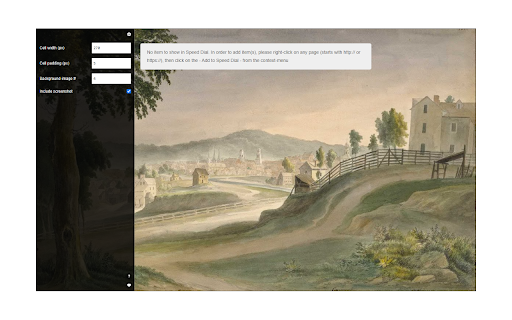
Easy access to your favorite websites via a stylish speed dial! Speed Dial is an extension to help you browse your favorite sites much faster. On any page, please right-click and then select Add to Speed Dial. You can also right-click on the toolbar button and then click on the add to speed dial from there. The website will be added to the speed dial page with a screenshot included. To open the speed dial, click on the toolbar icon. Within the speed dial UI, there is a settings sidebar that lets you adjust some aesthetic options. This extension includes several background images (open sidebar to change). Please note that all the options are auto-saved to the memory. Note 1: when you first install the extension, a few websites are added to the speed dial automatically from your history (most visited websites). These websites do not have any screenshots included. Note 2: all cells within the speed dial UI are drag-able. Simply drag and drop the cell to your desired location; all cells will be reordered automatically and saved to the memory. Note 3: The speed dial add-on, does NOT change the look of the new tab in your browser. It just adds a stand-alone page rendered with Speed Dial UI. Note 4: use the keyboard shortcut (Alt + Shift + A) to add desired pages to the speed dial. Note 5: use the toolbar button's context menu item to add the current tab or, all tabs, to the speed dial automatically. If you choose all tabs, the extension will ask for broad host permission. If you have a feature request or found a bug to report, please fill out the bug report form on the addon's homepage (https://mybrowseraddon.com/speed-dial.html).

Metro Speed Dial - Modern New Tab page
A modern, highly customizable speed dial that replaces the new tab page. Organize pages in groups, take notes and try new themes. Metro Speed Dial is a highly customizable extension that replaces the New Tab page and allows you to save and organize your favorite websites for quick and easy access. All the pages you love are just one click away! After installing Metro Speed Dial make sure to click the "Keep it" button on the "Change back to Google" notification to ensure Metro Speed Dial remains your default new tab. Features: • Easily customizable tiles • Tiles can be categorized and grouped • A wide selection of high quality 4K backgrounds & themes • Support for uploading your custom backgrounds • Notes and todos • Quick access to Chrome's history, downloads, bookmarks and extensions • Various search engines included in the Speed Dial • Support for importing & exporting your pages, notes & settings No data is collected while using this extension. No additional permissions are requested. To keep everything private and secure, the extension doesn't track your usage or your activity and it doesn't have access to any other tabs that you opened. Version 2.9.0 - New layout & design for the settings page - Added bookmarks import - Added options for search bar width & height, clock position & size, date format, tile safe zone - Added behavior options for opening pages & search results in new tab - Added multiple ways to switch or scroll through categories - Added an option to select the default category when opening a new tab - Modified search engine settings to use the browser's search engine Version 2.8.0 - Added efficient compression for custom backgrounds and for custom tile images - Added zoom & position sliders for custom tile images - Added custom colors for predefined tile thumbnails & frosted glass color override for each tile - Added 250 icons that can be used as thumbnails for tiles - Added new page thumbnails Version 2.7.1 - Added shortcut to easily hide page quick add button Version 2.7.0 - Added Frosted Glass Design - Added page quick add option - Added tooltips with explanations for all visual settings - Improved page management in settings - Added new backgrounds, themes & page thumbnails Version 2.6.0 - Added tile (page) categories - each category has its own section - Added custom search engine option - Added option to hide search bar - Added backup reminders - Improved tile custom image management - Added 200+ new predefined tile thumbnails Version 2.4.0 - Added page groups - Added drag & drop reordering for pages (in settings) - Added 12/24-hour clock toggle - Added dark mode - Added "about" page - Added status message for imports

yet another speed dial
a modern speed dial for chrome, edge, and firefox YASD replaces your new tab page with customizable thumbnails of your favorite sites. This extension makes it easier to access and organize all of your bookmarks. - Free and open source - Automatically generates high quality site thumbnails - Speed dials are based on bookmarks for easy backup and sync, even to other extensions - Supports folders, sorting, searching, and drag and drop - It's fast and minimalist Available for brave, chrome, firefox, and edge - Read and modify bookmarks: Speed dials are saved as bookmarks in your browser. This makes it easy to add new dials (just save a bookmark to your speed dial folder), export them (you aren't locked into this extension), and sync them between devices. - Access browser tabs and access data for all websites: When you add a new speed dial, an icon and thumbnail is captured from the site. YASD has a very clear privacy policy: no user information is collected or stored for any reason whatsoever.

Speed Dial New tab
Speed Dial is an easy-to-use extension that lets you save and organize your most visited websites and customize your new tab page. Level up your workspace with our unique tools designed to make you more productive. Transform and customize your new tab experience to your liking. 🏆 Acclaimed & featured as one of the "Best New Tab" extensions on multiple tech blogs! 📌 More than 10 years in the Chrome Web Store 👏 Trusted by +500,000 happy users around the world 💼 Used by professionals from leading tech companies 🥷🏼. Private and secure ✦✦ Key Features ✦✦ • Save unlimited number of your favorite websites and organize them into groups • Easy access to bookmarks and recently closed tabs • Beautiful themes and powerful customization • Dark and light theme support • Collaborate and share a group of bookmarks with your friends • Synchronization with other computers and mobile devices • Private and secure — we don’t share or sell your data • Clean and intuitive design • Available in 9 languages Note: For the best experience, after installing Speed Dial 2, click the ‘Keep it’ button on the ‘Change back to Google’ notification. This will show Speed Dial 2 every time your open a new tab. ✦✦ Privacy & Security ✦✦ The information we gather or process is used solely for the core functionality of Speed Dial 2 and to improve the quality of our service. We do not sell your information to any third parties. For more information on privacy and the security of your data visit https://www.speeddial2.com/privacy-policy ✦✦ What's new? ✦✦ Version 3.5.1 - 3.6.0 Improvements and bugfixes Version 3.5.0 Upgraded extension to Manifest V3 Version 3.3.8 We made it easier to use Speed Dial 2 with your keyboard. Press the "Tab" key to focus on bookmarks, and use arrow keys to navigate through your new tab page. Open the selected bookmark by hitting Enter or open it in a new tab with Ctrl/⌘ + Enter Access the search by pressing the forward-slash "/" and start typing. The search will show you the bookmark results as you type and offer to switch to a different group in the dropdown menu. Version 3.3.6 Fixed the issue preventing bookmarks from opening in the new tab Version 3.3.5 Added an option to display number of visits for each bookmark Version 3.3.3 Show time created and Group name in bookmark search results Version 3.3.2 Improved dialog for adding new bookmarks Version 3.3.1 Bugfix for bookmark ordering after the synchronization Version 3.2.9 Improvements to the backup and synchronization Version 3.2.6 - Allow to rename the Home group (bugfix) - Updated logos of most popular websites Version 3.2.5 Improved loading speed of bookmark thumbnails and minor bug fixes Version 3.2.4 Customize your new tab page with carefully selected fonts that look great in your browser! Version 3.2.3 Added changelog with the latest features Version 3.2.2 Allow to set the opacity of a background image Version 3.2.0 Add Alphabetical order for bookmarks and groups

Speed Dial [FVD] - New Tab Page, 3D, Sync...
New Tab Page Replacement with 3D Speed Dial and predefined images, sync and organize your bookmarks, groups, and most visited FVD Speed Dial – New Tab Page | Visual Bookmarks & Sync Turn your new tab into a fast, clean, and fully customizable dashboard with FVD Speed Dial — the ultimate visual bookmarks (speed dial) experience. Instantly access your favorite websites, organize them into groups, and sync everything across devices. ✔ Speed Dial (Visual Bookmarks) Create and manage visual bookmarks for quick access to your favorite websites every time you open a new tab. ⭐ Most Visited Automatically displays your most frequently visited sites for easy access. 📁 Groups Organize your bookmarks into custom groups like Work, Shopping, News, or Entertainment. 🔄 Sync Across Devices Securely sync your speed dials and settings across multiple devices. 🔍 Smart Search Quickly find your saved sites using built-in search within your speed dials. 🔍 Search Experience: FVD Speed Dial is designed to respect your browser’s existing search settings. The search bar uses your browser’s default search engine (e.g., Google) The extension does not modify your Chrome search settings Search behavior is being continuously improved for consistency and reliability You can disable the search feature anytime in Settings 🔧 Customization & Control Fully customizable layout and design Enable or disable features anytime Control optional content directly in Settings Simple onboarding with clear user choices 🔒 User Data & Privacy Your privacy matters: Browsing history is used locally to generate Most Visited tiles Sync data (bookmarks, settings) is processed only when enabled No personal data is sold or shared with third parties You can disable: Synchronization Search functionality Optional content 💡 Transparency FVD Speed Dial includes optional features to support development: Recommended or sponsored speed dial tiles (clearly labeled) Optional Premium features for advanced functionality All optional features are transparent and can be controlled or disabled at any time. 🔐 Permissions Explained We request only necessary permissions: Tabs & New Tab Override – display your custom new tab History – show Most Visited sites Storage – save preferences Context Menus – quick actions Management (optional) – apps panel & sync integration No data from other extensions is accessed, collected, or shared. 📄 Legal Privacy Policy: https://everhelper.pro/privacy.php Terms of Use: https://everhelper.pro/terms-and-contitions.php
