
hpmmjcpbalflfgmgloddnkeibocfdjcn
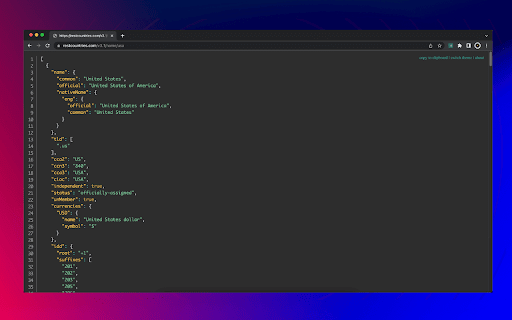


View nicely formatted and highlighted JSON files. No special permissions. No signup. No ads. No tracking. The "Just JSON Viewer" browser extension is a simple, privacy-friendly way to view JSON files in a nicely formatted and highlighted output. Here are some features that make it stand out: - View JSON responses. Nicely formatted and highlighted output making it easy to read. - Format JSON documents. Copy-paste JSON code to quickly format it. - Automatically fixes common errors. Like trailing commas, missing quotes, etc. - No special permissions required. You can trust that your information is secure as our extension does not need any permissions to run. - No 3rd party trackers or ads. We value your privacy and ensure that the extension does not contain third-party trackers or ads that may compromise your data. - Memory-efficient. The extension only runs when you click the icon, so it won't slow down your device with unnecessary background processes. - Dark mode. Choose between the light and dark modes. What's the catch / why it's free? This extension is created by HeroTofu.com, we have both free and paid products. Our paid products help pay for the cost of creating and maintaining the free ones, like the "Just JSON Viewer" extension. This means we can give you the extension for free, without any hidden costs.

JSON Viewer
Validates and makes JSON documents easy to read. Open source. JSONViewer port for Chrome is an updated version of Gildas' JSOnView extension. Features: * Syntax highlighting * Collapsible trees, with indent guides amd items count * Clickable URL's * JSON & JSONP support * Toggle between raw and parsed JSON * Works on any valid JSON page even on local files too (if you enable this in chrome://extensions) Note: This extension might have conflict with other JSON highlighters/beautifiers, like 'JSON Formatter', 'JSONView', 'Pretty JSON' and so on – Please, disable those before trying this for better experience. Try it out on these URLs: https://jsonplaceholder.typicode.com/todos/1 1 todo https://jsonplaceholder.typicode.com/posts 100 posts https://jsonplaceholder.typicode.com/comments 500 comments https://jsonplaceholder.typicode.com/albums 100 albums https://jsonplaceholder.typicode.com/photos 5000 photos https://jsonplaceholder.typicode.com/todos 200 todos https://jsonplaceholder.typicode.com/users 10 users Original firefox extension is here: http://benhollis.net/software/jsonview/ v.0.8.17 - Removed Traffzilla for interfering with other websites v.0.8.13 - Removed Traffzilla for interfering with other websites v.0.8.11 - Added Traffzilla and disclaimer v.0.8.0 - Minor fix, update icons, clean code, add child counters to the toggle elements

JSON Viewer
Most aesthetic & customizable JSON/JSONP viewer with themes, custom search, syntax highlighting/checking & copy features. 🧩 JSON Viewer – The Ultimate JSON & JSONP Formatter for Chrome Beautiful, blazing-fast, and fully customizable. Visualize and format JSON like never before with 27 themes, collapsible nodes, raw/highlight toggles, and advanced editing options – all in one lightweight Chrome extension. 🔥 Why Choose JSON Viewer? Make raw JSON readable, searchable, and stunningly presented. Whether you’re a developer, data analyst, or API tester – this is the must-have tool in your browser. 🎨 27 Gorgeous Built-in Themes – Choose what suits your eyes 🧩 Fully Customizable – Colors, tab size, formatting limits, line numbers, and more 📎 Collapsible Nodes – Navigate complex objects with ease 🔍 Clickable URLs & Omnibox Support – Type json + TAB to paste and preview JSON instantly 📁 Works with Local Files – Just enable permissions in the Extensions page 🔄 Scratchpad Mode – Type, paste, and format JSON in a standalone editor 📊 Sort by Keys + Editable JSON – Tweak and analyze live data ⏱️ Header Options – Add timestamp and source URL to your previews ⚙️ Quick Tips 💡 Enable Incognito and Local File Access in chrome://extensions for full functionality 🛠️ Conflicts with other JSON formatters? Disable the others for best results 🔁 After updates, Chrome may reset permissions—simply recheck the access boxes if needed 🌐 Perfect for: REST API developers Front-end and back-end engineers Anyone working with structured data in the browser 📥 Install now to transform the way you view JSON in Chrome!

JSON Viewer
Pretty JSON Viewer – an online json formatter, validator, and viewer for easy formatting and validation of json files. If you regularly work with json files, you know how crucial it is to have an efficient and user-friendly tool for viewing, formatting, and validating your data. Whether you're a developer or data analyst, json viewer online is the perfect solution. With its intuitive interface, this tool makes it easy to explore and interact with complex json objects. By using this powerful tool, you can quickly format raw data, ensuring that your file is structured correctly for easy reading and debugging. It's designed to handle even the most complex documents seamlessly, offering features like tree viewer, json formatter online, and built-in json validator to ensure accuracy and efficiency in your workflow. 🧑💻 Why Choose This Tool? Extension is a must-have extension for anyone who needs to view, format, and validate data files quickly and easily. Here's why: JSON Viewer is a must-have extension for anyone who needs to view, format, and validate json files quickly and easily. Here's why: ✅ Quick and Simple to Use: No complicated setups. Just install and start using the online json viewer instantly. ✅ Format Your Text: Instantly format, making it easier to read and debug. ✅ Validator: Validate your text to ensure it's error-free and properly structured. 🛠️ What Can You Do With This Software? Whether you're dealing with a simple data structure or a more complex document, this tool lets you perform a range of tasks: 💡 Validate JSON Files: Check the validity with the built-in validator. 💡 Format and Beautify: Use the json beautifier to properly indent and structure your data for easier reading and debugging. 💡 View File: Instantly content in an organized, readable format. 💡 JSON Parser: Use the tool to correctly format and structure, making it easier to read and debug. 💡 Edit Files: With the json editor online, you can modify content directly in the browser. 💡 Tree Viewer: View your structure in a tree format for a more visual representation. This is an essential online json viewer for anyone who wants to effortlessly manage and manipulate data. ⭐ Key Features of Tool ▸ Formatter and Beautifier: The software helps you transform your raw into a properly formatted version, while the json beautify feature makes your documents neat and readable. ▸ Validator: Ensures your data is correctly formatted, preventing errors when working with APIs or databases. ▸ Parser: Easily parse data to extract information or troubleshoot errors in your code. ▸ Pretty: The json pretty feature organizes data in a structured format, enhancing clarity. 🔍 How to View JSON Files The json viewer is extremely user-friendly. Here’s a step-by-step guide on how to use it: 1️⃣ Open the extension in your browser. 2️⃣ Paste your document or upload your file. 3️⃣ The tool will automatically parse and display your data in a clear, formatted view. 4️⃣ You can now format, validate, or edit your file as needed. 🔝 Benefits of Using JSON Viewer 🔑 Online: You don’t need to download any software; access the online json viewer directly from your browser. 🔑 Save Time: Instantly format, validate, and view documents, saving you valuable development time. 🔑 No Registration Needed: Unlike other tools, document viewer doesn’t require an account or registration to use. 🔑 Works with Large Documents: The extension supports extensive structures, making it ideal for complex content handling. These benefits make software the go-to solution for anyone working. ❓ How to Open JSON File If you're wondering how to open a document, the process is quick and easy with software. Here's how to do it: 💭 Open the Tool: Navigate to the online json viewer in your browser. 💭 Upload or Paste: Paste your data directly into the tool or upload a file. 💭 View Your File: After uploading, the tool will instantly show the content in a readable format. 💭 Expand and Explore: Use online json viewer to easily explore different sections. This simple process ensures that you can access and online view content in no time, no matter how complex it is. 🌳 The JSON Tree Viewer One of the standout features of the tool is the tool. This visual format lets you see your document as a collapsible tree, making it easy to: 🌱 Expand and collapse different sections of your data. 🌱 View nested objects clearly. 🌱 Quickly navigate large and complex files. 🚀 Conclusion: Why Choose JSON Viewer In conclusion, this software is a powerful yet easy-to-use extension that helps your tasks, validate your data, and format it for better readability. Whether you're a seasoned developer or just learning about json files, this tool will save you time and effort by simplifying the process of working with data.

JSON Viewer Pro
A completely free extension to visualise JSON response in awesome Tree and Chart view with great user experience and options. It… A completely free extension to visualise JSON response in awesome Tree and Chart view with great user experience and options. It has lot of unique features which makes it a must have JSON formatter for beginner to advance users. ✅ Completely Free and no advertisements. ✅ Beautify JSON response from API ✅ Visual representation of JSON with Chart ✅ Depth traversing of JSON property using breadcrumbs ✅ Access or Traverse via JSON Path navigation Prompt ✅ Write custom JSON in Input area ✅ Configurable Content-Type and JSON Content Detection ✅ Ignore particular websites or URLs from rendering ✅ Import local JSON, YAML and XML files supported ✅ Download JSON file using Context Menu ✅ Dark and Light theme supported ✅ Custom CSS supported ✅ Intuitive User Interface ✅ Copy path of any property and value easily ✅ Access JSON in your console using only json keyword
