
hpidcdiinbheimiomljodmgdjcmigdmo
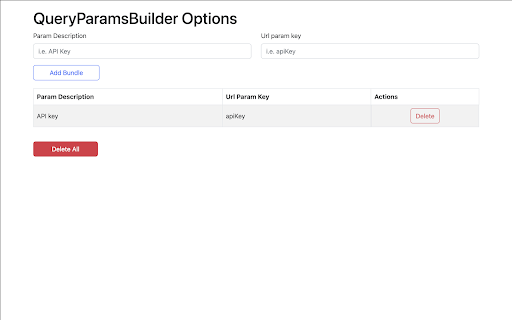


Define key/value pairs of query params that you can apply to the url for every single tab. Do you need to check a website providing different url params for testing purposes? Then, this Chrome Extension might come handy to you. QueryParamsBuilder will allow you to define key/value pairs of query params that you can apply to the url for every single browser tab. The extension consists of two parts. An options page where you will define params that will be available for all the tabs. You will set a description name and the key of the query string param. All fields are editable and changes are auto-saved once the field loses it's focus. A popup page will open once you click the extension's button on the browser extension's toolbar. For every single tab you will have by default all the options that you defined in the options page. For every single tab you can also add and delete specific params. Once you click the Apply Params button, the extension will apply those params that are checked from the popup page to the url and reload the page for you You can also delete everything from the options page. Note that if you edit or delete a param from the options page it will apply those changes to the popup too. In that case if you have those params applied to any of the tabs you will need to delete them manually.

Add Query String To URL
This easy and lightweight extension can be used to add a query string to the any url. Tired of adding query string to the url? This easy and lightweight extension helps you to add a query string to any url. All you need is to turn on the toggle.

Request Header/Query Param Override MV3
A chrome extension for overriding external http request headers and query parameters A chrome extension for overriding/adding external http (AJAX) request headers and query parameters. The extension allows the user to manage request headers/query params that will be injected into requests made when viewing a website in chrome, where each override contains the following properties: * Header/Query Param: Header key. * Header/Query Param Value: Value associated with the header key. * AJAX Request URL sub-string: The header name: value will only be applied to XHR/Fetch requests where the external request URL contains the provided substring. The headers are managed in the chrome extension popup (a simple react app), and saved to chrome local storage and are applied to upstream page requests using the chrome declarativeNetRequest request dynamic rules updateDynamicRules function. This is a free extension, and will always be free :) Source code for this extension can be found here: https://github.com/paulb896/request-header-override-chrome-extension.

Query Parameter Editor
Query Parameter Editor is a Chrome extension that simplifies editing and managing query parameters in URLs, streamlining your development experience and productivity.

ParamPilot: Automatic URL & Query Parameter Appender
Automatically append custom parameters or text to URLs based on user-defined rules. Simple, fast, and fully customizable. ParamPilot is a lightweight and powerful Chrome extension that lets you automatically append text or parameters to any URL based on flexible rules. Whether you're a developer, tester, or power user, ParamPilot gives you full control over URL behavior by letting you define pattern-based rules and apply changes in real time. 🔧 Key Features Automatically append query parameters or text to matching URLs Define multiple rules with AND/OR conditions Live URL updates without reloading pages Simple, clean, and intuitive UI Toggle extension functionality on/off instantly Case-insensitive matching supported 🛠️ Use Cases Add tracking parameters (e.g., ?utm_source=test) Simulate A/B tests or feature toggles QA/testing environments with dynamic URLs Debugging tools that require query flags ⚙️ Built With Chrome Manifest V3 Vanilla JavaScript 🔐 Privacy ParamPilot does not track, store, or transmit any user data. All operations happen locally in your browser.
