
hpgpbjglfnmbfbfgeknihofbfjahfcnl


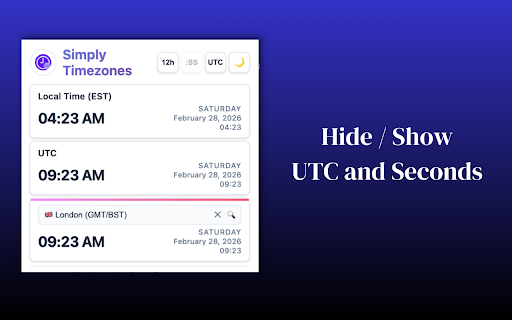
Track time across cities and remote teams. Instant search, device sync, dark mode. No account needed. Simply Timezones is built for remote workers and distributed teams who need to track time across the world without the clutter. Open it. See your cities. Close it. That's the whole workflow. What's included: • Instant city search — multi-word search (try "new york" or "los angeles") with keyboard navigation • Device sync — your timezones and preferences follow you across every Chrome device automatically • 12 and 24-hour formats — toggle instantly, both always visible • Dark and light mode — switches instantly, remembers your preference • Show/hide seconds and UTC offset — your call • Country flags and timezone abbreviations — so you always know exactly where you're looking • Auto-detects your local timezone on first install Privacy first No account required. No data collected. All settings stored locally in your browser. Works everywhere Chrome does Covers major cities across the Americas, Europe, Asia, Africa, and Oceania.

Time Zone Converter - Savvy Time
Time zone and local time converter. Compare and convert time between many locations at a time. Time zone and city time converter between multiple locations worldwide. Converter allows find, add and compare over 100,000 cities and about 300 time zones. Converts times instantly as you type, in both direction. To help us improve, we would love to hear your feedback and any suggestions for future updates.

Timezone Converter App — World Time Difference Calculator
Timezone Converter App is a simple and efficient Chrome extension that helps you instantly convert time across different time zones 🌍 Time Zone Converter – Instantly Convert Time Zones & Schedule with Ease! 🕒 This Chrome extension provides a simple way to check and convert time zones directly from your browser, making it easier to schedule calls, collaborate with remote teams, and plan international travel without the hassle of manual calculations. 🌟 Who Is This For? • Remote workers & digital nomads – Coordinate with teams worldwide effortlessly. • Project managers – Avoid confusion when planning international meetings. • Freelancers – Set deadlines and collaborate efficiently with global clients. • Recruiters & HR professionals – Schedule interviews with candidates across different time zones. • Event organizers – Plan online webinars, workshops, and global conferences with precision. • Frequent travelers – Know the local time instantly while on the go. • Anyone working with international contacts – No more back-and-forth calculations! 🔥 How It Works Using the Time Zone Converter Chrome extension is as easy as 1-2-3: 1️⃣ Install the Extension – Click "Add to Chrome" and pin it for easy access. 2️⃣ Select a Time Zone – Click the extension icon and choose the time zone you want to convert. 3️⃣ Get Instant Results – See the converted time instantly—no extra steps required! That’s it! No sign-ups, no complicated settings, just quick and accurate time conversion. 🚀 Why You Need This Time Zone Converter ✅ Instant Time Conversion – Select any time zone and get an accurate conversion instantly. No need to open another tab or search manually! ✅ One-Click Accessibility – Easily access the converter from your browser toolbar with just one click. ✅ Supports All Time Zones – Whether you need New York (EST), London (GMT), Tokyo (JST), or any other time zone, we’ve got you covered! ✅ User-Friendly & Intuitive – Designed for speed and ease of use, so you don’t waste time navigating a complicated interface. ✅ Lightweight & Fast – Won’t slow down your browser. Works seamlessly in the background. ✅ No Sign-Ups, No Ads – Completely hassle-free. Just install and start using it! ✅ Perfect for Remote Teams & Freelancers – Essential for professionals working with clients, teams, or partners across different time zones. ✅ Great for Travelers & Digital Nomads – Quickly check local time while planning flights, meetings, or online events. ✅ Sync & Plan Efficiently – Avoid scheduling mistakes and stay on top of your global commitments.

World Clock & Timezone New Tab – TimeGrid
World clock new tab showing multiple time zones instantly. Perfect for remote work, global teams, meetings & time conversion. TimeGrid is a world clock new tab extension that shows multiple time zones instantly. Designed for remote work, global teams, freelancers, and anyone working across countries. Open a new tab and see all your important time zones at a glance no more switching apps or searching “time in X”. ⏰ Multiple Time Zones, One Clean New Tab 🌐 Add multiple world clocks for any country or city 🕓 Supports UTC, GMT, IST, PST, EST, CST, and more 🔄 Real-time, accurate, and automatically synced Perfect for: 💻 Remote work 📅 International meetings 🌍 Global clients & distributed teams 🧑💻 Built for Remote Work & Global Teams If you work with people across different time zones, TimeGrid helps you: ❌ Avoid scheduling mistakes ⚖️ Instantly compare time differences 🕘 Plan meetings during business hours 🚀 Stay productive without mental math 🎯 Simple, Fast & Distraction-Free 🧭 Replaces your Chrome new tab with a beautiful world clock dashboard ✨ Clean design focused on clarity and speed ⚡ Lightweight and fast — no tracking, no clutter ⚙️ Fully Customizable 🏙️ Choose cities & time zones you care about 🔃 Reorder clocks based on priority 💾 Your setup is saved automatically 🚀 Who Is TimeGrid For? ✔ Remote workers ✔ Global teams ✔ Freelancers ✔ Founders & managers ✔ International businesses ✔ Anyone working across time zones 👉 Install TimeGrid and make time zones effortless.

Timebar: A world clock and meeting planner for your side panel
Convert time zones, plan meetings & create calendars events from the side panel. Works with Google, Apple, Outlook & more calendars. 🚀 Key Features: ✅ Instantly view current times in multiple cities (global timezones) ✅ Meeting Planner mode to easily find the best time across timezones ✅ Calendar Integration - Create events in Google Calendar, Outlook, Yahoo and more ✅ Time travel slider to preview times in the past or future (±12 hours) ✅ Live updates, with optional seconds display and 12/24-hour format ✅ Easily add, remove, or reorder cities (drag-and-drop interface) ✅ Clear indicators for day/night, working hours, and daylight saving time ✅ Always shows your current local time (customizable name) ✅ Compact mode - hide controls and footer for more city cards ✅ Settings synced across Chrome devices ✅ Clean, modern UI – built for Chrome's side panel 💼 Ideal for: ✅ Remote teams working across time zones ✅ Freelancers or digital nomads juggling global schedules ✅ Event planners scheduling international meetings ✅ Anyone needing a reliable Chrome clock extension or meeting time finder ✅ Travelers and international families checking time differences 🧰 Open the Timebar from the side panel to see current times in all your saved cities. Use the timezone slider to find the best time to connect - like checking when it’s 9 AM in New York and what that means in Tokyo or Sydney. You can also search and add cities quickly, just like you’d do in a typical world time buddy app. 🛡️ Privacy first: Timebar works offline, with no ads and no unnecessary permissions. Just a simple tool that makes global time coordination a breeze. ™️ Disclaimer: All product names, logos, and brands are property of their respective owners. This extension is not affiliated with, endorsed by, or sponsored by Google, Microsoft, Apple, or any other third party.
