
hojfdodhmkccbjhkohehbbmglmhigdac
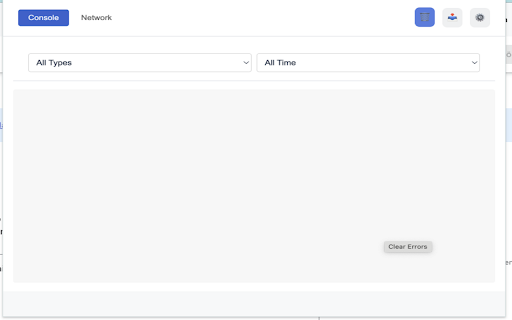
Track and report errors on web pages with detailed information and screenshots # Error Tracker Chrome Extension Error Tracker is designed to automatically detect and report web page errors, providing developers and QA teams with comprehensive error tracking capabilities. The extension captures JavaScript errors, network errors, and console errors, along with optional screenshots, to help identify and resolve issues efficiently. - **Automatic Error Detection** - JavaScript errors - Network errors (4xx, 5xx) - Console errors and warnings - UI/DOM errors - Unhandled promise rejections - **Visual Error Tracking** - Automatic screenshot capture on error (optional) - Visual context for debugging - Reduced screenshot size for better performance 1. Download from Chrome Web Store (link coming soon) 2. Click "Add to Chrome" 3. Configure domains and permissions as needed 1. **Initial Setup** - Click the extension icon - Configure allowed domains - Set up error tracking preferences 2. **Error Tracking** - Errors are automatically captured - View errors in the extension popup - Filter and sort as needed - Export error reports if required - Uses html2canvas for screenshots - Local storage for data persistence - MutationObserver for UI error tracking - Network request monitoring - Console override for error capture To modify or enhance the extension: 1. Clone the repository 2. Make changes to the source files 3. Load unpacked extension in Chrome 4. Test your changes 5. Submit pull request if contributing extension/ ├── manifest.json # Extension configuration ├── background.js # Background service worker ├── content.js # Content script for error tracking ├── popup.html # Extension popup interface ├── popup.js # Popup functionality └── lib/ # External libraries └── html2canvas.min.js ``` 1. Fork the repository 2. Create a feature branch 3. Commit your changes 4. Push to the branch 5. Create a Pull Request MIT License - feel free to use and modify as needed. For issues or feature requests: - Create an issue in the repository - Contact: [Your Email] - GitHub: [Your GitHub Repository] Essential for core extension functionality to: - Monitor and detect errors across web pages - Capture error details from different domains - Enable error tracking on user-specified websites Access is limited to error detection only and does not collect personal or sensitive data. Required for accurate error tracking: - Identify which tab generated an error - Associate errors with correct page contexts - Enable proper error reporting across multiple tabs Only collects minimal tab information necessary for error tracking functionality. Required to capture errors and take screenshots only when the user actively interacts with the extension. This permission is essential for: - Capturing error context in the active tab - Taking screenshots when errors occur (if enabled) - Accessing page content for error details The permission is only activated when users interact with the extension, ensuring minimal access to user data. The extension uses html2canvas.min.js, which is: - Bundled locally within the extension - Never loaded from external sources - Used only for capturing error screenshots - Runs entirely in the user's browser No external code is loaded or executed. Critical for network error detection: - Monitor HTTP error responses (4xx, 5xx) - Track failed network requests - Capture network error details Only activated during error situations and does not monitor successful requests. Necessary for maintaining extension functionality: - Store user preferences and settings - Cache error logs locally for 24 hours - Save domain whitelist configuration All data is stored locally on the user's device and is automatically deleted after 24 hours.

Distill Web Monitor
Monitor webpage or feed for changes. Get SMS and email alerts on change detection. Distill runs in your browser to check monitored pages for changes. Get instant alerts as soon as a change is detected. * An inbox style Watchlist to manage monitors. * Easy content selection from any webpage. * Highlighted changes. * Change history. * Supported actions: - Email - SMS - Sound - Pop-up - Push notification on phones - Slack and Discord Webhooks - Raw Webhooks * Condition for smart actions. * Powerful expression for content selection. Use Xpath, CSS or JavaScript to select content. Use regular expression to extract matches from the web page. * Sync Watchlist across devices in all plans * Open a webpage to be monitored. * Click Distill's drop icon in browser toolbar. * "Select parts of page" or "Monitor whole page" as needed for your case. In case of select parts, hover around the area on webpage that you want to watch and "click" to select the parts. * Save selections and done! Go to Watchlist by clicking the Distill icon to see list of watched webpages. You can also check out our help article for a quick start: https://distill.io/docs/web-monitor/distill-chrome-extension/ If you need any help, reach out to us at https://forums.distill.io/ or send an email to support@distill.io.

BrowserStack Bug Capture: Report & resolve bugs faster
Bug reporting tool with shareable screen recordings & screenshots for faster debugging. ➤ BrowserStack Bug capture makes the process of reporting bugs easy and straightforward, even for non-technical users. Create data-rich bug reports quickly, saving time & improving communication between developers and other stakeholders. Install now and unlock seamless bug reporting! 𝐄𝐟𝐟𝐨𝐫𝐭𝐥𝐞𝐬𝐬 𝐁𝐮𝐠 𝐑𝐞𝐩𝐨𝐫𝐭𝐢𝐧𝐠: Simplify bug reporting by capturing screen recordings and logs with a single click, making it easy for anyone to report issues even without technical knowledge. 𝐄𝐧𝐡𝐚𝐧𝐜𝐞𝐝 𝐃𝐞𝐛𝐮𝐠𝐠𝐢𝐧𝐠: Quickly identify and resolve bugs with comprehensive insights and logs, reducing the time spent on debugging and improving overall software quality. 𝐃𝐞𝐯𝐞𝐥𝐨𝐩𝐞𝐫 & 𝐭𝐞𝐬𝐭𝐞𝐫 𝐟𝐫𝐢𝐞𝐧𝐝𝐥𝐲: Tailored for everyone, our user-friendly extension simplifies bug reporting, reducing the learning curve and streamlining your workflow. 𝐕𝐢𝐝𝐞𝐨 & 𝐒𝐜𝐫𝐞𝐞𝐧𝐬𝐡𝐨𝐭 𝐂𝐚𝐩𝐭𝐮𝐫𝐞: Create bug reports by recording your screen & capturing screenshots, providing visual context for the bugs encountered. 𝐀𝐮𝐭𝐨𝐦𝐚𝐭𝐢𝐜 𝐃𝐚𝐭𝐚 𝐂𝐚𝐩𝐭𝐮𝐫𝐞: Automatically capture essential technical data, including console logs, network requests, and browser information, streamlining the debugging process. 𝐈𝐧𝐬𝐭𝐚𝐧𝐭 𝐫𝐞𝐩𝐥𝐚𝐲𝐬: Continuously record your interactions on the webpage in the background and watch the replay instantly as soon as a bug happens, allowing quicker resolution. 𝐈𝐧𝐭𝐞𝐠𝐫𝐚𝐭𝐢𝐨𝐧 𝐰𝐢𝐭𝐡 𝐏𝐫𝐨𝐣𝐞𝐜𝐭 𝐌𝐚𝐧𝐚𝐠𝐞𝐦𝐞𝐧𝐭 𝐓𝐨𝐨𝐥𝐬: The software integrates with platforms like JIRA, enabling users to create bug tickets directly from the reports, facilitating better workflow management & collaboration among teams. 𝐒𝐚𝐯𝐞 𝐓𝐢𝐦𝐞: Reduces the time spent on bug reporting by createing comprehensive bug reports in just 1-3 clicks. 𝐃𝐚𝐭𝐚-𝐑𝐢𝐜𝐡 𝐑𝐞𝐩𝐨𝐫𝐭𝐬: The wealth of information helps you to quickly diagnose and resolve issues without needing extensive back-and-forth communication. 𝐔𝐬𝐞𝐫-𝐅𝐫𝐢𝐞𝐧𝐝𝐥𝐲 𝐈𝐧𝐭𝐞𝐫𝐟𝐚𝐜𝐞: Enjoy an intuitive and easy-to-use interface that makes bug reporting accessible to all team members, regardless of their technical expertise. 𝐈𝐦𝐩𝐫𝐨𝐯𝐞𝐝 𝐂𝐨𝐥𝐥𝐚𝐛𝐨𝐫𝐚𝐭𝐢𝐨𝐧: With integrations, streamline workflow and improves communication between support and engineering teams.

Web Monitor
- Conveniently select the areas you are interested in on any web page. - Multiple notification methods (email/bark/discord/slack/telegram, etc). - Very intuitive difference comparison . - You can config filtering rules for the changes of the selected content. - You can config the monitoring time period. - You can contribute rules and add monitoring rules shared by others. - Monitoring tasks can be shared - Support import / export rules to facilitate sharing - Support Cloud monitoring - Support script preprocessing(Simulate operation and organize data) - Support android devices (With kiwi-browser) PS: If you have any questions or suggestions during use, please feel free to feedback via email(3579137434@qq.com ) CHANGELOG: √[fix]: Wechat link √[fix]: Compatible with empty title Bug √[perf]: silent mode √[fix]: Stop task √[feat]: Export & load all √[perf]:Optimize wechat & email content style √[fix]: Rss link √[feat]: Support cron scheduling √[factor]:Diff & filter √[feat]: Templates √[perf]: Iframe check √[perf]: Optimize diff algorithm && rss parse √[perf]: Force refresh √[feat]: Support Dom capture √[feat]: Download history records √[perf]: Optimize content comparison √[perf]: Optimize content filtering mechanism √[perf]: Styles compute √[fix]: Visualization preprocessing √[feat]: Support text color check √[perf]: Webhook message format √[fix]: Fix webhook changes bug √[feat]: Support for customized messages √[feat]: Support increase/decrease condition √[fix]: Fix bugs that cannot be saved in automatic mode √[feat]: Dark mode following system canceled √[feat]: Support dark mode √[fix]: Post request for cURL √[fix]: Fix number comparison √[perf]: Notification refactoring & fix email html content for multi-selectors √[fix]: Selector may disappear √[feat]: Add duplicate update ignore option √[perf]: Timeout notify & smart selector √[feat]: Visual preprocessing supports automatic scrolling √[feat]: Support automatically stop option when changes are detected √[fix]: Some page check failures √[feat]: Show update list in popup page √[fix]: Unread count √[fix]: Before notify preprocess √[perf]: Silent mode & audio √[BREAKING CHANGE]: Update to V3 √[perf]: Display link for Text compare && optimize feishu webhook display √[feat]: Support random check interval √[perf]: Diff algorithm refactoring, performance and display optimized √[feat]: Independent control of multiple devices √[fix]: Fix the bug of Telegram push √[fix]: Fix the bug of regexp match √[fix]: Performance mode √[perf]: Optimize stability of selector √[perf]: Optimize the selecting of nested iframe √[feat]: Support add/remove task by preprocess code √[fix]: Fix the bug that local audio not work after restart browser √[feat]: Support multiple account monitoring for one website √[feat]: Support screenshot/HTML/text/RSS automatic archiving √[feat]: Support local audio upload & custom history record count √ [fix]: Preprocess BUG √ [fix]: Timeout & task sync bug √ [perf]: Optimize the display of ding/WeChat/Telegram √ [perf]: Visualization preprocessing √ [fix]: Silence option sync failure √ [perf]: Remove text highlighting not change √ [feat]: Support custom push and contacts manage √ [fix]: Tab may not close for failure task √ [feat]: Support link for Ding&WeChat notification √ [feat]: Support api monitoring √ [feat]: Support link/image monitoring √ [feat]: Visual editing preprocessing code √ [feat]: Support run in background √ [fix]: Fix the bug of official subscription failure √ [perf]: Optimize the performance of storage √ [fix]: The task list may be cleared due to synchronization failure √ [feat]: Support script preprocessing after update √ [feat]: Support voice broadcast - [feat]: Support subscribe & force refresh & HiFlow - [feat]: Support context menus - [feat]: Support high performance mode - [feat] Support batch add/remove keyword - [fix] Task remove sync - [feat]: Support multi region selecting - [feat]: Support task sync & read all & error message not push - [feat]: batch start / stop tasks & support slack notification - [fix]: task list synchronization & tasks may not be stopped - [fix] Whole page monitor add failure - [pref]: Optimize highlighting keywords in all page - [feat]: Support highlighting keywords in all page - [feat]: Support highlighting new content in target page - [feat]: Support script preprocessing before content extraction - [feat]: Support RSS subscription and sharing - [fix]: May jump when clicking in automatic mode - [pref]: Remove error log & Optimize iframe nesting support - [feat]: Support iframe nesting - [feat]: Support schedule sending of daily reports through scripts - [fix] Task may stop bug & support record error logs - [fix] Compatible with QQ browser - [feat] Compatible with pages with automatic refresh - [feat] Support batch modification of email address & webhook - [feat] Support preprocess notify data by javascript - [feat] Support automatic identification of selecting areas - [feat] Support classify edit & fixed text summary bug - [feat]: Support customized background color for added, removed, keyword - [feat]: Support multiple selections for one page - [pref]: Optimize preview & recommend frequency - [pref]: Optimize interval display & fix timeout bug & display user type - [pref]: Optimize enterprise wechat notify (support diff screenshot) - [feat] Support number compare & add helper link - [feat] Support Feishu Notify - [feat] Notify api refactoring - [feat] Highlight keyword - [feat] Request Webhook from client - [fix] Clear unread counter after open the monitor page - [feat] Support classify labels - [pref] Diff & Filter refactoring - [pref] Webhook notify style & default config for filter - [fix] Always failure bug for some website - [pref]: Optimize content extraction timing and performance - [feat]: Shortcut for monitor entire page - [pref]: Email style & notify process & config inherit - [fix]: Time range bug(reopen) - [feat]: Support delay extract setting - [feat]: Support android devices (based on kiwibrowser) - [pref]: Share list notify only for enabled users - [fix]: Watchlist may not update after status changed - [fix]: Notify only once for local task - [feat]: Support global email/webhook configure - [fix]: Ruler status may not update - [fix]: Filter not working bug - [feat]: Notify for share list update - [feat]: Support import / export rules - [feat]: Support reset timer per-hour based on a base time - [feat]: Do not close the page after detection, reuse it for the next time - [pref] Tasks priority optimization - [fix] Local limit can not update - [feat] Classify watch list more refined - [fix] The watch list auto fold when there is updates - [feat] Support parallel request & custom audio configure - [feat] Support markdown for webhook - [feat] Add uninstall page & fix time ranges bug - [pref] Strategy & opportunity optimization - [fix] Title&content maybe mismatch - [fix] Notify for failure - [feat] Support en/fr/it/pl/ru - [feat] Cloud task configure - [docs] Support german - [feat] Support unshare - [feat] Optimize email title - [fix] Shortcut polyfill - [pref] Popup page optimization - [feat] Support ping/pong - [fix] Support older browser - [docs] Update description - [pref] Diff algorithm optimization - [feat] Support webhook notify - [feat] Support time range for monitor - [feat] Recommend every 6 hours - [feat] Mutual aid support - [feat] Email support display diff view - [pref] History list display optimize - [fix] Content text may include courier helper text - [fix] xpath exception - [fix] Watch history style exception - [fix] Watch history unfold exception - [perf] Style extraction optimization - [fix] Email notify - [fix] Style extraction optimization - [feat] Rename - [fix] Content text may include courier helper text - [feat] Mutual aid support - [feat] Disabled share feature default - [feat] Add helper & privacy pages - [feat] Sharing feature refactoring - [fix] Sharing list sort - [feat] Support rule sharing - [fix] Online/offline switch bug - [feat] Get the target by circle the section - [feat] Add helper/feedback entrance - [fix] Cancel on config page - [feat] Support japanese - [fix] Date format - [feat] Basic selecting - [feat] Basic Text/html diff display - [feat] Badge/desktop notify/voice/email notification

BugHerd: Visual Feedback & Bug Tracking Tool
BugHerd is a visual feedback and bug tracking tool for websites BugHerd makes it easy for clients to leave website feedback and report on bugs. Let clients simply point, click and comment - BugHerd grabs a screenshot, saves technical details and creates a task for your team to track. Goodbye endless emails! 📝 In-context Feedback Clients drop a pin to show feedback in context on a web page. No need for accounts or log-ins - send clients a link and let them comment away. Feedback stays pinned to the exact page element, so your team always knows exactly what to change. 🖥️ Automatic Screenshot Capture You get a screenshot and all the technical details. No more chasing down browser versions, screen resolutions, and device details. Every client comment comes with all the information you need, captured automatically. ✅ Task Tracking Turn every comment into a clear next step. Every comment becomes a trackable task on a Kanban board, so your team can prioritize and resolve feedback easier than ever. Already using a project management tool? Send tasks there with one click. BugHerd integrates with popular PM and collaboration platforms. BugHerd has been adopted by over 10,000 companies and over 350,000 users across 172 countries, helping teams streamline website feedback, improve client collaboration, and deliver projects faster. Click “Add to Chrome” and create your first project right away.
