
hojdjcoadaaponpolmfcphafomiihnlk
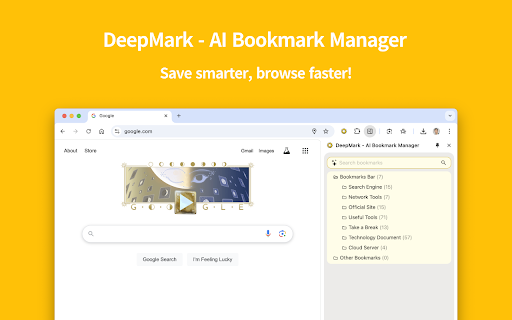


Your AI-powered bookmark manager with auto scene sorting & smart recommendations 🚀 Features: ✅ Easy to use – Minimalist design, intuitive experience 🌙 Dark mode – Protect your eyes, browse in style 🔒 Privacy first – All data stored locally, no tracking 🤖 AI-powered – Smart categorization & personalized recommendations 🔄 Continuous updates – More awesome AI features coming soon!

Abookmark - advanced bookmark manager
Advanced bookmark manager and tab organizer to enhance the native bookmarks and tabs - Cooperate with native bookmark system. - Labels/Tags. - Spread view & top bar. - Advanced search. - Recent bookmarks. - Link replacing. - Tab / session managements. - Tabs as bookmarks. - Side panel & vertical tab bar with tab groups. - Workspace. - Data view. Copy bookmark or tab information to the clipboard. - Data text editor. (edit bookmarks in your favorite text editor) - Extract links from web page. - Keyboard shortcuts. - Link hint. (vi-like keyboard) - Bookmark keywords - Add new bookmark at the top. - Export any bookmark folder. - Import selected bookmarks from a file. - Monthly backup. - Auto sync. Abookmark is a professional bookmark viewer and manager. It has a manager page similar to the native bookmark manager and a navigation page similar to the native bookmark bar. And it is also a tab and session manager at the same time. What does a typical tab manager look like? They save tabs in one place, and then close tabs. These saved tabs can be divided into groups, which are called workspaces. You can reopen these tabs later, or open the entire group. They also provides simple data management functions, such as deleting, renaming, and moving between groups. What is the essence of this saved data? It's just a list of web addresses. In fact they are bookmarks. The so-called workspace is in fact a bookmark folder, and the so-called tab manager is a simplified bookmark manager. So, why can't you just use the bookmark manager to manage tabs? This can have a number of benefits: 1. More flexible data structure. Bookmarked folders can be nested, you may call it sub-workspace if you want. 2. More comprehensive data management functions. 3. More secure data storage. 4. Automatic data synchronization. Browsers usually come with a synchronization feature for bookmark data, which can even be used on mobile phones. 5. Cooperation between tabs and bookmarks. Of course, some of the details of tab management are unique, which requires the bookmark manager to add corresponding support. In fact, some users already use the native bookmark management system to manage tabs manually, and there are also tab management plugins that are dedicated to saving tabs as bookmarks. Abookmark goes one step further by abstracting bookmarks and tabs into nodes. Bookmarks are sleeping tabs, while tabs are active bookmarks. Tabs can also be manipulated through the tab nodes, and tab groups are mapped to folders. Using tab nodes on the side panel is similar to the vertical tab bar of Edge, but with the ability to communicate with bookmarks. Abookmark offers a high degree of freedom, which is a double-edged sword. In addition, Abookmark also offers some advanced features. New users should familiarize themselves with the basic logic before gradually exploring more powerful features. All your bookmarks are stored in your browser system. Abookmark does not transfer them to anywhere else.

MarkMagic - Effortless Bookmark Manager
Introducing MarkMagic, the enchanting browser extension that transforms bookmark management into a seamless experience. Discover the magic of effortless link status checks, robust content compliance assurance, and intuitive sorting options based on addition or usage time. Beyond the basics of bookmark deletion and archiving, MarkMagic is continuously evolving. Stay tuned for upcoming features that will revolutionize your browsing experience, including the ability to detect duplicate links, identify empty folders, and significantly enhance scanning speed. MarkMagic is not just limited to conventional methods; future updates will harness the power of AI for advanced semantic content analysis, surpassing simple string matching. Unlock a new level of bookmark management with MarkMagic's upcoming upgrades, offering unparalleled data analysis, seamless categorization, dynamic tagging, intuitive association, and automated responses tailored to user actions. MarkMagic – where innovation meets enchantment for an elevated bookmark management journey.

Tab Organizer
Intelligent tab management with auto-grouping and powerful search 🎯 Stop Drowning in Tabs – Take Control with Tab Organizer! Are countless browser tabs overwhelming your workspace and slowing you down? Tab Organizer is your ultimate productivity companion, effortlessly grouping, sorting, and tidying your browser tabs—all in just a few clicks. Automatically organizes your tabs into intuitive groups based on content and usage. Stay laser-focused with a clean, structured workspace. Save and restore your entire browsing session, including multiple windows and tab layouts. Jump right back into your workflow without missing a beat. Instantly identify duplicate or rarely-used tabs and get actionable suggestions for keeping your browser fast and clutter-free. Easily merge, split, or move tabs between windows. Ideal for multi-screen setups and complex workflows. Keep tabs (literally!) on your browser health with an always-visible dynamic tab counter. Supports Arabic, Bengali, Chinese, Dutch, English, French, German, Hebrew, Hindi, Indonesian, Italian, Japanese, Korean, Punjabi, Portuguese, Russian, Spanish, Turkish, and Vietnamese. 👤 Ideal For: - Power users and developers managing multiple projects - Students and researchers organizing extensive sources - Anyone aiming to boost their productivity and workflow - Users craving a simplified, seamless browsing experience 💡 Why Choose Tab Organizer? - Sleek, user-friendly interface - Lightweight & optimized for peak performance - Privacy-focused – zero data collection - Regular updates & dedicated support - Pro-level efficiency with smart keyboard shortcuts 🚀 Download Tab Organizer today and reclaim control of your browser! Free • No Ads • Built for Maximum Productivity

MarkMind
Transform your chaotic bookmarks into organized bliss with AI We rebuilt MarkMind from the ground up. Version 2 brings a completely new interface, support for multiple AI providers, and bulk organization. Same mission: make your bookmarks actually useful again. WHAT'S NEW IN V2 - Support for 4 AI providers: Google Gemini, OpenAI (GPT), Anthropic (Claude), and OpenRouter - Completely redesigned interface built with React - Bulk organize: scan and sort hundreds of bookmarks at once - Smarter folder suggestions based on page content analysis HOW IT WORKS Visit any page, click MarkMind, and hit Organize. The AI reads the page content and suggests the best folder from your existing bookmark structure. You review, accept or decline. That's it. For bulk organization, head to the Organize tab, scan your bookmarks, select the ones you want sorted, and review all suggestions before applying. YOUR BOOKMARKS, YOUR RULES Every suggestion goes through you first. Nothing moves without your approval. MarkMind works with your existing folder structure — it doesn't try to reinvent how you organize things. CHOOSE YOUR AI Pick the provider you already use and trust: - Google Gemini (free tier works great for this) - OpenAI - Anthropic (Claude) - OpenRouter (access to dozens of models) Just bring your own API key and you're good to go. PRIVACY Your bookmarks never leave your browser. Only page titles and URLs are sent to your chosen AI provider for analysis. API keys are stored locally in Chrome. No analytics, no tracking, no accounts. The code is open source on GitHub if you want to verify.
