
hoekoogjfoffklkhomcmjhdkgmfgemeh
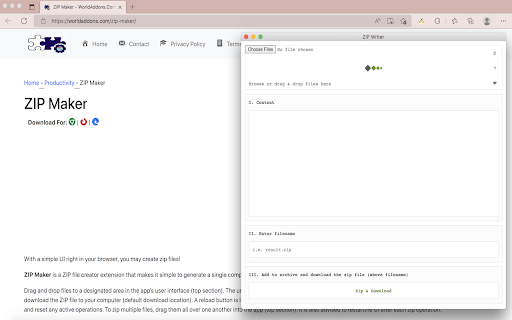
You may use an easy-to-use interface right in your browser to create zip files! The extension "ZIP Maker" converts your file(s) into a single compressed file (.zip) automatically. Drag & drop files to a designated area in the app's UI (top section) for uploading. The UI will display all of the uploaded items. You may now use the - Zip & Download - button to download the ZIP file to your computer (default download location). A reload symbol is located at the top-right corner of the app's UI. When you click on this symbol, the program is refreshed and all current operations are reset. To zip multiple files, simply drop them into one folder on your computer (top section). It is also suggested that you reload the application after each zipping operation. Note 1: This plugin isn't meant to work with multiple types of files. It's only designed to compress zip files. Note 2: This add-on uses an open-source JavaScript library for the zip operation. You may learn more about this library at https://github.com/gildas-lormeau/zip.js

Online math learning tool
A collection of world-famous mathematics libraries for JavaScript! An online math learning tool is an extension that allows users to perform complicated math operations such as symbolic computations, complex numbers, matrices, and other advanced mathematical topics. The Nitro Editor is compatible with all JavaScript instructions. Simply put, any Math or JavaScript command you want to use in the add-on's console and then click the - Execute - button at the top toolbar. Please note that each math engine has its own documentation. Finally, please read the add-on's documentation on the support page before using it. In the top toolbar of the add-on, you may use the - Sample - button to insert a sample math code in the console. Furthermore, you may import any code that you want into the add-on (txt format). Please click on the (+) button to open up the file input window. The file must be in a plain text format. You must be logged in to get the code on the add-on page and to download it. Please note that this add-on uses the Plotly library, so you'll need to use either the "Plotly.newPlot" function directly or the simplified "math.plot" function given. If you want to utilize - Plotly - mode, make sure you include "output-plot" as the first argument, which is the id for plot container in app UI. This id is used by "math.plot."

Easy Zip: Password Protect Zip File
Password protect your zip file with an easy to use zip utility application Easy zip was designed to simply the process of generating secure password protected zip files With Easy zip users can now more easily create a password protected zip file on Mac, Window, Linux and Chromebooks

Keyword Search
The toolbar popup allows you to search and highlight keywords on any webpage. This extension, which is known as "Keyword Search," allows you to find and highlight the keywords you're looking for in any website. Then go to a web page and open the toolbar popup UI, then enter your keyword in the designated space. Then click on the "Find" button or hit "Enter" on your keyboard to perform the search. All of the relevant terms within the web page will be highlighted in yellow. The highlighted words will be erased if you click on the Clear button. There are various options on the options page to change highlight features.

Easily Cache Cleaner
Use the toolbar button to quickly clear your browser's cache. "Easily Cache Cleaner" is a browser extension that lets you clean your custom browsing data via the toolbar pop-up. Currently, there are fourteen options to remove (depending on your browser): To use this add-on, go to the toolbar popup UI, select the item you want, and then click on the Clean option at the top left corner. While the add-on is cleaning your chosen items, a toolbar icon will flash. Furthermore, when the cleanup process is completed, a desktop alert will inform you what data has been deleted. It turns out that some disabled items might be found in the toolbar pop-up. This is due to a bug in your browser that prevents it from properly displaying such things using the clear-browsing-data API. These items may become available automatically when the API update occurs in the future.
