
feegolmjopkhabaiedegknjofkabmcph
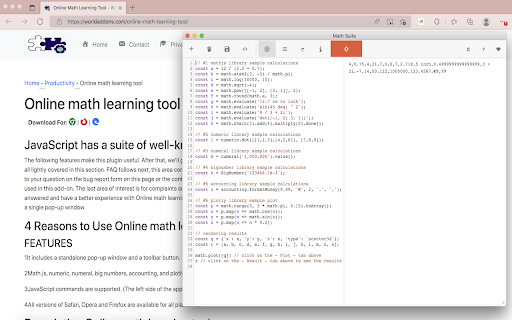
A collection of world-famous mathematics libraries for JavaScript! An online math learning tool is an extension that allows users to perform complicated math operations such as symbolic computations, complex numbers, matrices, and other advanced mathematical topics. The Nitro Editor is compatible with all JavaScript instructions. Simply put, any Math or JavaScript command you want to use in the add-on's console and then click the - Execute - button at the top toolbar. Please note that each math engine has its own documentation. Finally, please read the add-on's documentation on the support page before using it. In the top toolbar of the add-on, you may use the - Sample - button to insert a sample math code in the console. Furthermore, you may import any code that you want into the add-on (txt format). Please click on the (+) button to open up the file input window. The file must be in a plain text format. You must be logged in to get the code on the add-on page and to download it. Please note that this add-on uses the Plotly library, so you'll need to use either the "Plotly.newPlot" function directly or the simplified "math.plot" function given. If you want to utilize - Plotly - mode, make sure you include "output-plot" as the first argument, which is the id for plot container in app UI. This id is used by "math.plot."

Physics & Maths Tutor Marker
This extension will allows you to mark which past papers you have completed. Physics & Math Tutor Marker is a browser extension designed to enhance the exam preparation process for students. This tool empowers users to efficiently manage their past papers, providing a structured and organized approach to progress tracking. With its user-friendly interface and intuitive features, students can seamlessly monitor their performance and maximize their study efforts. - SMART CHECKBOXES: Physics & Math Tutor Marker offers a clear and systematic way to mark the status of each past paper. Users can utilize smart checkboxes to categorize papers as "completed," "in progress," or "pending," enabling them to maintain a comprehensive overview of their exam preparation progress. - SEAMLESS SYNCHRONIZATION: Physics & Math Tutor Marker ensures seamless synchronization of data across devices. This feature allows students to access their progress information from multiple platforms, ensuring continuous monitoring and study planning without any disruption. - DATA SECURITY AND PRIVACY: Upholding the highest standards of security and privacy, all user data remains confidential, and no personally identifiable information is collected during usage.

Code Beautifier Online
Free java script beautifier for your browser. A lightweight and free JavasScript, CSS, and HTML beautifier. "Code Beautifier Online" is an add-on that allows you to quickly beautify scripts in your browser. JavaScript, CSS, and HTML are among the input languages this extension supports. You may either browse files using the (+) button at the UI (top-left corner) or drop a file into the left textarea. Because code formatting is based on detected coding language, it's preferable to utilize the latter method since the input language can be determined automatically and the user interface will be updated accordingly (no need to modify the input language manually). With "Code Beautifier Online," you may use it offline. It makes use of an open source library called js-beauty. Furthermore, it utilizes the well-known CodeMirror (https://github.com/codemirror/CodeMirror) library to format input and output codes. The interface has a number of buttons in the top toolbar that are self-explanatory. There is also a list of preferences at the top with various options for the beautifier. Select any option and observe the effect straight away in the output field by changing any desired setting. To obtain a beautified result, please click the download button in the top toolbar.

Easily Cache Cleaner
Use the toolbar button to quickly clear your browser's cache. "Easily Cache Cleaner" is a browser extension that lets you clean your custom browsing data via the toolbar pop-up. Currently, there are fourteen options to remove (depending on your browser): To use this add-on, go to the toolbar popup UI, select the item you want, and then click on the Clean option at the top left corner. While the add-on is cleaning your chosen items, a toolbar icon will flash. Furthermore, when the cleanup process is completed, a desktop alert will inform you what data has been deleted. It turns out that some disabled items might be found in the toolbar pop-up. This is due to a bug in your browser that prevents it from properly displaying such things using the clear-browsing-data API. These items may become available automatically when the API update occurs in the future.

Class 10 Maths
NCERT Solution for Class 10 Maths in Hindi & English Medium Class 10 Maths NCERT Solutions in Hindi and English Medium updated for academic session 2023-24 CBSE, MP board, UP board, Rajasthan, Gujrat, Uttarakhand and all other boards who are using NCERT textbooks published for 2023-24 exams. Get here the solutions of the following 14 chapters of 10th Mathematics: Chapter 1. Real Numbers Chapter 2. Polynomials Chapter 3. Pair of Linear Equations Chapter 4. Quadratic Equations Chapter 5. Arithmetic Progression Chapter 6. Triangles Chapter 7. Coordinate Geometry Chapter 8. Introduction to Trigonometry Chapter 9. Applications of Trigonometry Chapter 10. Circles Chapter 11. Area Related to Circles Chapter 12. Surface Areas and Volumes Chapter 13. Statistics Chapter 14. Probability
