
hocoakkpjckombahpgmbhpilegeicdeh
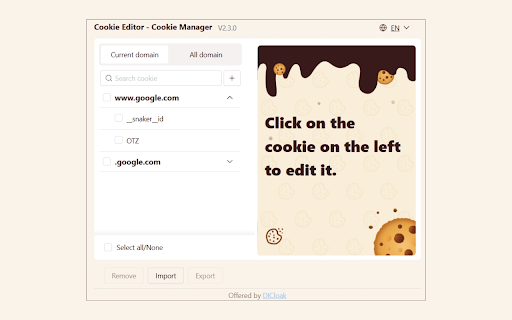

Simple tool to manage cookies! You can delete, import, export and edit cookies. A powerful and user-friendly cookie editor and manager tool designed to effortlessly manage browser cookies on any website. Download it free and experience seamless usability and enhanced security. Key Features: - View cookie: Easily view all cookies related to the current tab. - Clear cookies easily: Quickly delete cookies from the current tab and other domains with ease. - Selectively delete cookies: Delete any specific cookie you wish to remove. - Import and export cookies: Import and export cookies in both text and JSON file formats for convenience. - Edit and save cookie properties: Edit the properties of browser cookies to suit your needs and save changes instantly. Applicable Scenarios: - Web development and testing: Perfect for developers to quickly modify and test cookies during web development. - Privacy management: Take full control of your privacy by manually managing and deleting cookies. - Daily browsing: Optimize your browsing experience and enhance security by managing cookies effectively. For more related product information, please visit: https://dicloak.com If you need to report vulnerabilities, please use: https://dicloak.com/contact-us

Import Cookies
Export and import cookies on the active Google Chrome browser tab to share and transfer active sessions Import Cookies is a simple and powerful Chrome extension designed for quick cookie import and export actions directly from your active browser tab. Whether you are a developer, tester, or power user, this cookie importer and cookie exporter tool offers a fast and lightweight solution without unnecessary extras. 🚀 With this extension, you can easily import cookies to restore sessions, migrate authenticated browsing environments, or continue your testing workflow on another device. You can also export cookies in standard formats like cookies.txt, making session management effortless. This cookie editor extension is extremely helpful when working with login states, security tokens, and cross-environment testing. The ability to get token cookie or get cookies.txt allows flexible automation and seamless browser session handling. Use Import Cookies to: 1️⃣ import cookies from a text file 2️⃣ export cookies from the active tab 3️⃣ keep your authenticated sessions synced between systems 4️⃣ add cookies for API testing or automation scripts 5️⃣ delete cookies as needed No complex configuration, no confusing UI. Just a two-button cookie import and export cookies workflow. 💡 Why choose the extension? Instant actions on the active browser tab Works perfectly with developer tools and automation scripts Sometimes you need more control. Import Cookies can assist when you want to: ➤ edit browser cookies ➤ adjust token values with cookie edit ➤ modify cookie entries before import ➤ use a cookie editor or cookies editor tool together ➤ edit chrome cookies manually or use edit a cookie workflow Even though our main features are strictly export cookies and import cookies, you can combine this extension with any import-cookies utilities if needed. Perfect for professionals who rely on: • chrome export cookies txt for automation • Secure environment transfers • Cookie-based authentication sharing • Working with REST clients requiring session cookies • Saving session data before browser cleanup Key benefits: 1️⃣ No accounts required 2️⃣ Works entirely offline 3️⃣ Ultra-fast chrome export cookies 4️⃣ Lightweight footprint 5️⃣ Fully transparent actions right inside the browser How it helps developers: ▸ Move between staging, pre-prod, and prod environments ▸ Transfer logged-in sessions for debugging ▸ Reuse auth cookies for quick API token testing ▸ Manage cookies alongside other cookie editor extension tools ▸ Fast cookie import without spending time on manual login ✨ Security and Privacy We respect your privacy. Your cookies never leave your device. Import Cookies: ➤ does not upload, store, or process cookies on external servers ➤ handles all actions locally inside your own browser ➤ requests only the minimum necessary permissions to function Your data stays under your full control at all times. 🔒 Designed for: • QA engineers • Web developers • Automation specialists • Growth teams working with cookie-based auth • Tech-savvy users needing quick chrome import cookies If you’re tired of complicated tools, Import Cookies gives you exactly what you need: fast cookie import and chrome export cookies from the active tab without distractions. Simplify your workflow: 1️⃣ Open the tab 2️⃣ Click Import or Export 3️⃣ Done ✨ Enhance your productivity with a minimalistic cookie importer, reliable cookie exporter, and smooth cookies.txt support. This extension is the most practical tool for fast cookie handling. Take control of your sessions today with this extension and enjoy effortless cookie import, export cookies, edit browser cookies, and token-based testing support whenever you need it. 🎯

투더쿠키, 쿠키 추출 및 저장 도구
To-The-Cookie (투더쿠키) 쿠키 추출 및 안전한 저장 관리 도구 Cookie Extraction and Secure Storage Tool This extension is designed to help users safely extract and manage cookie data from websites. It prioritizes user privacy and securely stores cookie data locally. Key Features: - One-click secure extraction of all cookies from current website - Support for both JSON and TXT format cookie data storage - Special support for threads.net platform cookie format - Convenient automatic file download system - Intuitive and user-friendly interface - Secure local storage system How to Use: 1. Click the extension icon in browser toolbar 2. Click 'Save Cookies' button to start cookie extraction 3. Extracted cookie data will be automatically saved in both JSON and TXT formats 4. Check cookie information in the downloaded files ※ This tool is created for user privacy protection and secure cookie management.

MILK — Cookie Manager
MILK is a modern cookie manager that aims to streamline the way you interact with cookies. With a modern and easy to use interface, it is easy to manage your browser's cookies. This extension comes with the following features: 🍪 Realtime Cookie List (Updated Without Refreshing) 🍪 Dynamically Search For Cookies 🍪 Optionally Search Cookies With Regular Expressions 🍪 Create, Read, Update & Delete Cookies 🍪 Block Cookies 🍪 Protect Cookies 🍪 Import & Export Cookies 🍪 Open Source Software (MIT) 🍪 Modern UI/UX (Material Design) 🍪 Dark / Light Theme 🍪 Fullscreen Mode Lets You See Cookies Of Focused Tab If you would like to contribute to this project, please visit our Github repository at https://github.com/null93/chrome-milk.

Cookie Editor
Use Cookie Editor to edit a cookie, to delete and to clear cookies for the current url 🍪 **Introducing Your Ultimate Tool for Managing Browser Cookies** Are you tired of manually managing your browser cookies? Do you wish there was an easier way to remove, edit, or search for specific ones? Look no further than Cookie Editor, a powerful extension designed to give you complete control over your data and enhance your web browsing experience. It is a versatile app that allows you to: 🍪 Edit a cookie's properties, such as name, value, path, domain, and expiration date 🗑️ Delete one or multiple items for the current domain 🔍 Search for specific entries within the current domain 🧹 Clear all cookies for the current URL with just one click Our tool enhances your browsing experience by allowing you to modify cookie properties and adjust advanced settings such as httpOnly, secure, session, or hostOnly. With our editor, you have the power to fine-tune your browser's data management to suit your needs. Using this handy extension can significantly enhance your online experience and development efficiency by allowing you to: 1. Modify data to test different features and functionalities of web applications. 2. Ensure privacy by managing cookie settings and removing unwanted tracking data. 3. Debug issues related to cookie handling in web applications, saving you valuable time and effort. 4. Customize your browsing experience by controlling how websites interact with your browser through cookies. ▸ **Edit:** Easily modify the name, value, path, domain, and expiration of any entry stored within your current browsing domain. Fine-tune your data to match your preferences or test various scenarios. ▸ **Remove:** Delete unwanted entries with just a few clicks to maintain privacy and clear tracking data. Say goodbye to persistent cookies that you no longer need. ▸ **Search:** Quickly find specific items associated with the current domain using the search functionality. No more scrolling through endless lists of cookies to find the one you need. ▸ **Advanced Settings:** Set properties such as httpOnly, secure, session, and hostOnly to test web applications or enhance security. Gain full control over how cookies behave within your browser. **How to Use the Editor** Using Cookie Editor is straightforward and user-friendly: 1️⃣ Install the extension from the Chrome Web Store with just a few clicks. 2️⃣ Navigate to the website where you want to manage cookies. 3️⃣ Click the app's icon in your browser toolbar to open the extension. 4️⃣ Use the intuitive interface to edit, delete, or search your data with ease. Wondering how to delete cookies? With our app, removing them is a breeze: - Find the items you wish to remove in the list. - Click the 'Delete' button to remove them. - The chosen entries will be deleted from your current domain, freeing up space and enhancing privacy. Editing cookies is crucial for developers, testers, and curious users alike: - Choose the item you need to modify from the list. - Make the necessary changes to its properties, such as name, value, path, domain, or expiration date. - Save the changes, and the modified cookie will take effect immediately within your browser. If you're looking to clear cookies quickly and efficiently, our app provides the perfect solution: • Open the extension and navigate to the desired domain. • Select the 'Delete all cookies' option from the menu. • All items for the current domain will be removed, giving you a fresh start and ensuring a clean slate. Q: How do I delete entries for a specific site using the editor? A: Open the extension while browsing the specific site, and use the remove function to delete cookies associated with your current domain. It's that simple! Q: Can I set cookies to be secure or httpOnly using this app? A: Yes, our app allows you to configure entries as secure or httpOnly, enhancing your security and ensuring compliance with web standards. Take control of your data with ease. Q: Is this app suitable for non-technical users? A: Absolutely! While our app offers advanced features for developers and tech-savvy individuals, its intuitive interface and user-friendly design make it accessible for anyone interested in managing their cookies effectively. **Benefits of Using the Editor** - Improve your website testing and development processes by easily manipulating cookies. - Enhance your online privacy and security by removing unwanted tracking entries. - Gain full control over how cookies affect your browsing experience, customizing it to your preferences. - Save time and effort by quickly searching for specific items and making necessary modifications. **Get Started with our Editor Today!** Ready to take control of your browser data? Install Cookie Editor now and experience the ultimate in cookie management. Whether you're looking to enhance your privacy, improve your web development workflow, or simply explore more about how cookies work behind the scenes, this powerful extension is the perfect tool for the job. With our editor, you'll have the ability to edit, delete, and clear cookies with just a few clicks. Say goodbye to the hassle of manually managing items and hello to a streamlined, efficient browsing experience. Take charge of your cookies today and enjoy a cleaner, more secure online presence. Don't wait any longer – install Cookie Editor and unlock the full potential of your browser's data management capabilities. Your online experience will never be the same again!
