
hnjipbfndeondflbdhomiiohbmkjobfc

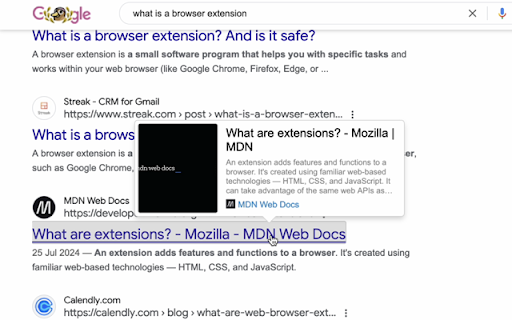
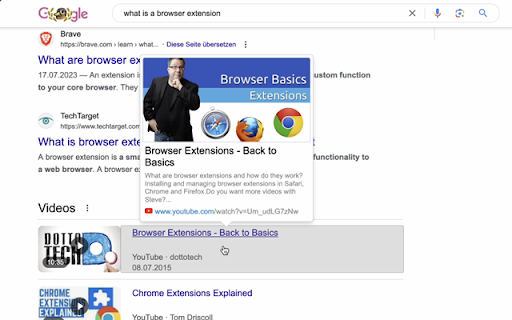
Shows info about the link on hover. Loads page title, thumbnail, description, URL and favicon Linkover loads the link in the background when you hover it, gets all info about it and shows a nice tooltip over the link. It contains page title, thumbnail and short description for many pages over the internet. It's a great approach to preview links before visiting them. Linkover was created as a solution to the problem when some sites truncate long titles of the link titles, putting the obnoxious "..." at the end. In some cases it can totally prevent you from understanding the content of the page without clicking it. It could become especially painful on websites like Google Search and YouTube. Linkover provides several options to prevent unwanted link loading, including domain blacklist, whitelist, and requirement of modifier key pressed (enabled by default). It can also load link info on long left click instead of on hover.

Link Preview Plus
Link Preview Plus enhances your browsing experience by allowing you to preview links without clicking on them. This powerful… Link Preview Plus enhances your browsing experience by allowing you to preview links without clicking on them. This powerful extension gives you a quick glimpse of what's behind a link before you decide to visit it, saving time and helping you avoid potentially unwanted or unsafe websites. Key Features: • Instant Link Previews: Hover over links to see a preview of the content without leaving your current page • Image Recognition: Automatically detects and displays images directly within the preview panel • Secure Browsing: Verify where links lead before clicking, adding an extra layer of security to your browsing • Customizable Display: Adjust preview size, position, and behavior to match your preferences • Multiple Trigger Options: Choose how you want to activate previews - hover, click, or drag gestures • Keyboard Shortcuts: Quickly preview links using convenient keyboard modifiers How It Works: Simply hover over a link (or use your preferred trigger method) to see a preview panel open on the side of your screen, showing the destination content. Move your mouse away to dismiss the preview or click through if you decide to visit the page. Fully Customizable: • Control where the preview appears (left, right, or automatic positioning) • Adjust preview size to your preference • Choose trigger types (hover, click, or drag) • Filter content by internal/external links • Set keyboard modifiers for precise control Privacy-Focused: Link Preview Plus operates entirely within your browser and doesn't collect any personal data. Your browsing habits remain private - we respect your privacy and security. Perfect for researchers, students, shoppers, and everyday browsing - Link Preview Plus helps you navigate the web more efficiently and safely. Try Link Preview Plus today and transform your browsing experience!

Link Previewer
Hover & Alt for a sneak peek! Preview links without clicking. Quick webpage preview tool for efficient browsing. See content before clicking - save time and boost productivity! Instant Link Preview: Hover + Alt to peek at any webpage 🔍 Custom Shortcuts: Personalize your preview activation key 🔑 Universal: Preview links on news sites, blogs, online shops, and more 🌍 Flexible Viewing: Resize and reposition the preview window 🖥️ Fast & Responsive: Optimized for smooth browsing experience 🔥 Privacy-Centric: No data collection or tracking 🔒 Readout Functionality: Listen to the content of the previewed page 🔊 Customizable Content: Adjust text and main article image size 🎨 Dark Mode: Switch between light and dark themes 🌗 Perfect for: 🔬 Researchers, 🛒 Online Shoppers, 📰 News Readers, and 💼 Professionals How to Use: Hover over a link Press Alt (or your custom key) View webpage content instantly 🆕 Latest Update (v1.1.0): ✨ Fresh new blue UI with modern design ✨ Dark Mode Added ✨ Customizable shortcuts 🚀 Performance improvements 🔊 New Readout Feature 🎥 Customizable Content Display 🐛 Fixed issue with Google links Upgrade your Chrome browsing! Install Link Previewer and start smart-peeking today. 🚀

Search & Link Preview
See previews of links and instantly performs searches on the same page using this previewer instead of opening new tabs This extension enables you to browse faster online in two ways: preview search results on same page and secondly preview any link from the search result page. How it works: * To perform a search in preview mode, simply select the text and the click on the "search" tooltip button that appears. * To preview a URL, hover over the URL and click on the "preview" tooltip that appears. Features: * !NEW! Automatic hover to preview any URL; choose the hover delay. * !NEW! Works on links that usually break previews including stackoverflow.com * It supports multiple search engines including Google, Bing, Yahoo, Yandex and Baidu * The preview window is resizable and the default size (width and height) of the preview window can be set in the settings pages. * Easily go from preview mode to a new tab page by clicking on the "Open in New Tab" control icon. * Ability to minimize the window or drag it to ensure it does not block important content. * Disable it for specific sites by right-clicking on the browser icon and selecting the "Disable" option while that page is active. The preview may not work on certain pages like Chrome Webstore pages, browser pages (e.g. New Tab), and certain websites managed by enterprise-policy. Report any issues or feature requests at the support hub here - https://chromewebstore.google.com/detail/mmmfofondapflhgbdidadejnechhjocm/support

MaxFocus: Link Preview & AI Assistant
Preview links directly from your current tab and maintain your concentration. MaxFocus is perfect for smoothly navigating through your social media and news feeds, watching videos without interruptions, and reading articles without cluttering your browser with multiple tabs. It's an ideal tool for students and professionals who must focus on their tasks. 1. Powerful link previews • Preview in popup: Instantly view any link in a dedicated popup window without leaving your current page • Move to sidebar: Easily transfer any preview from the popup to a sidebar for a convenient split-screen experience • Customizable options: — Choose how to open or close previews: drag, long click, hover, or with keyboard shortcuts — Customize your popup color themes (PRO Feature) — And many more! 2. AI Sidebar & assistant • Chat with AI: Get instant answers and summaries right on your viewing webpage. The AI understands the content and delivers relevant information • Auto Prompts: Receive helpful suggestions and prompts tailored to the page you're interacting with • YouTube AI summaries: Make summaries of your favorite videos. We'll transcribe all the videos for you 3. Stay focused and organized • Reader view: Convert any webpage to a clean, distraction-free format for easy reading. Dark Mode is available for a comfortable reading experience at night • Video focus mode: Watch videos without sidebars or click-away temptations. Just the video, nothing else • Spotlight: Press Alt+Z on any page to access your favorite links. Click a link to open it in a popup for easy viewing 4. Security • Scam detector: Browse with confidence — get alerts about potential threats like malware, phishing, or ransomware • UTM tags remover: Preview links without the hassle of UTM tags • Data privacy: Your privacy is our priority. We don’t collect any of your data. Frequently asked questions: • Is MaxFocus free to use? — MaxFocus provides a limited free plan. For unlimited access, consider upgrading to a PRO Plan • What features are exclusive to the PRO Plan? — PRO users enjoy benefits like AI-powered assistance, scam detection, advanced theme customization, and unlimited link previews • Do I need an OpenAI account for the AI features? — No, you don’t need an OpenAI account. Upgrade to a MaxFocus PRO plan to unlock the AI capabilities • Will it work on all websites? — MaxFocus is compatible with most websites, providing link previews, AI support, and more across various platforms Contact us: If you have any questions or suggestions, feel free to email us at hello@maxfoc.us No matter what you need — whether it's Notion link previews, link previews in Google search, an Arc alternative, student productivity tools, help to manage a ton of tabs or simply a better browsing experience — try MaxFocus today!
