
hngciknegjnckncfinjhlgibhiiahhfe
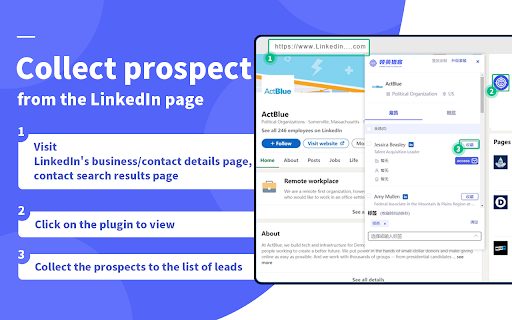
Linkedin prospect finder,collect prospect from the LinkedIn page. Visit LinkedIn's business or contact details page, contact search results page, click the LinkedIn Hunter by soujiyi.com icon on the right side of the screen, open the plug-in to get the target customer's contacts in different departments and ranks, click "save" to save the contact's company, job title, email, phone and other information. Together with the free EDM and CRM functions of Soujiyi, it provides a full process solution for cross-border trade from lead mining, email and social media marketing to customer management. Platform supports customer data export, private data you make the decision! ✅🔍 LinkedIn prospect collection One-click to capture company name, title, email, phone number and other information of LinkedIn prospects, saving a lot of time. ✅🤝KP Key Person Search On the company's LinkedIn detail page, you can accurately search the LinkedIn information of the customer's key contacts, and the key positions support customization. ✅📧 Mailbox Deep Mining Using big data technology, we can deeply mine the email and other contact information of the key person for purchasing from high-quality buyers. ✅👀 Data Duplication Checking It can help you avoid importing existing customer information, and avoid bothering customers you have cooperated with when you use mass email marketing. ✅📊LinkedIn Contacts Export Collected leads support batch export, which can meet your more personalized customer management needs. 👉Who is it suitable for? 👨Sales, marketers, job seekers, recruiters, soho, business owners, etc. 👉Thank you very much😚 Before usingLinkedin Hunter by soujiyi.com, please be sure to read and agree to search hundreds of millions of privacy policies https://manager.soujiyi.com/policy.html If you have any questions, you can leave us a message info@soujiyi.com ! https://www.soujiyi.com/en Overseas Business, Soujiyi Leads Look forward to cooperating with you!

Email Extractor
Find and locate foreign trade customer email in web pages. [How to use] 1. When the web page is loaded, click the extension icon to extract all the Emails in the web page. 2. Click the Email displayed in the extension to locate the Email location in the page. 3. Click the Copy button to copy the Email to the clipboard. [Update Note] Limit the search scope.

LI Prospect Finder
Find and collect verified leads from LinkedIn with a powerful Chrome extension. Fill your funnel with quality B2B contacts and boost sales using LI Prospect Finder, an intuitive and free LinkedIn email finder Chrome extension. Get started by installing and activating the extension to get email from LinkedIn for any prospect you’re targeting in seconds. Which LinkedIn pages can LI Prospect Finder extract leads from? You can use this extension to find emails on LinkedIn across profiles, search results, company pages, and attendee lists. Basically, everywhere you're already looking for prospects. What profile information will you gather with this LinkedIn email finder Chrome extension? Our LinkedIn email finder extension captures the following data points for every potential lead: First name Last name Full name Prospect’s social profile Job position Locality Company name Company URL Company’s social profile Company size Company locality Country State City Industry How can you save leads for your sales pipeline? Once you see a contact you’d like to get, simply activate LI Prospect Finder in your browser and save the email address along with other profile details straight into your chosen list. What do you get with our free LinkedIn email finder extension? ✓ Save hours by capturing complete prospect information from profiles, search pages, and attendee lists — individually or in bulk. ✓ Build accurate lead databases filled with verified, up-to-date email addresses. ✓ Keep contacts organized in the built-in CRM or export them to tools like HubSpot or Pipedrive in seconds. Before using our email finder extension for LinkedIn, please read and agree to the Privacy Policy: https://li-prospect-finder.com/privacy-policy LinkedIn email extension permissions 1."tabs" — is using the chrome.tabs API (getting bookmark links, creating new tabs with our link, reloading open pages of li-prospect-finder.com) 2."http://*/" — access to all sites to get page content (alternative to all_urls) 3."https://*/" — access to all sites to get page content (alternative to all_urls) 4."cookies" — session recovery via cookies from li-prospect-finder.com 5."notifications" — to show push notifications (completion of background tasks) 6."webRequest" — for automated information collection from web pages without direct opening of the pages by the user 7."contextMenus" — to create a new item 'Background tasks' in the context menu of the extension Sign up now for a free plan and get 50 credits every month! Hope you love LI Prospect Finder. Have feedback or found an issue? We are happy to hear from you—reach out via the website chat or email at help@lipf.store. Excited to see you on board with the best LinkedIn email finder extension 💜

跨境魔方领英助手
专为外贸员量身打造的外贸获客助手,一键解锁领英联系方式 跨境魔方领英助手,专为外贸员量身打造,旨在帮助您充分利用领英补充个人资料、拓展联系方式、深化人脉资源,实现精准营销,高效获客。 ✅精准获取联系方式,验证电话、邮箱有效性: 自动获取联系方式,深度挖掘并验证潜在客户的邮箱、电话有效性,确保信息的真实性与时效性 ✅深度挖掘领英用户资料 深挖客户关键信息,如工作经历、教育背景、专业技能等,同时拓展同事、校友等人脉资源, ✅洞悉公司内部员工信息,精准定位关键人物: 快速获取其员工列表、职位分布及联系方式,助您精准定位关键人物 ✅批量收藏、群发,一键触达客户: 获取到有价值的公司/联系人,支持一键收藏、群发,快速建立沟通渠道,提升营销效率

GladMail 外贸客户邮箱查找工具
简单好用的网页邮箱获取工具,在任何网站上挖掘邮箱。快速提取谷歌搜索到的目标客户网站。 GladMail是一款用来获取潜在客户线索、方便查找邮箱地址的工具。 ☞插件可以做什么? ✓找邮箱 可以在任何网站上查找邮箱地址。点击GladMail插件图标,GladMail开始分析并采集您正在访问的页面,网站基础信息、当前页面邮箱和深度挖掘邮箱,支持一键复制所有邮箱。 ✓找客户 提取google(谷歌)搜索结果列表页的所有网站域名。 在谷歌搜索结果列表页,点击GladMail插件图标来提取所有网站域名,并可以过滤掉广告、社媒、商城等网站,一键复制全部网站域名,也可以一键进入格兰德数据库,批量自动匹配包括企业信息、联系人、邮箱等信息。帮你提高搜索质量,节省搜集信息时间,高效开发客户。 ✓数据导出 一键批量复制插件获取结果,更便捷的使用体验。 ☞哪些人在使用? 业务员、销售、营销、采购、soho、老板等都在使用。 ☞更多工具 全球市场分析、找客户、找邮箱、邮箱有效性验证、全球节假日查询、全球企业信用报告等日常工作所需工具。 利用工具高效获取客户邮箱、开发客户,是很多专业人士的选择。 GladMail插件是免费客户开发客户工具,创建账号即可立即使用https://www.x315.cn/ 希望与您共进步!
