
hndlnhncbcihlpofblflckedkhdjieoe

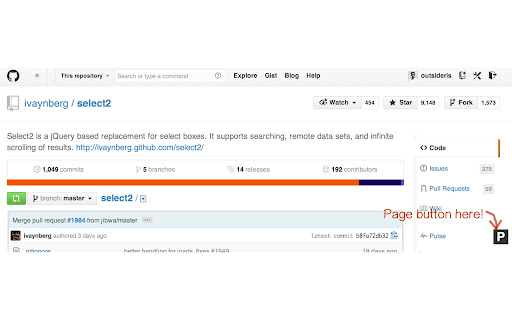
show one-touch button between github repository and github page Many projects on github provide their github page. some of them provide properly link to github page on repogitory site and vice versa, but some of them are not. so this extension add a link(right on bottom) to go to repogitory or page.(if exist)

Github Sidebar
Make shortcuts to repositories you frequently use on Github. Faster navigation and better control over your repositories. Do you often navigate between several repositories on GitHub? This Chrome Extension lets you bookmark repositories in a sidebar injected only on GitHub.com pages. The sidebar will let you navigate faster and give you better control over your most used repositories. - Easy to bookmark and navigate repositories - Overview over active Pull requests or Issues for your repos - Periodically checks for new or updated items - Optional to show badge in GitHub favicon if new items - Works across multiple tabs - Color coding of items based on status (Approved, Changes Requested) - Hide or show the panel whenever you like Simply navigate to any Github repository you would like to add a shortcut to and press the button for *Add current repository*. You can sort the order of repositories by simply drag&drop. For all features of this extension to work, you will need to provide an access token from Github. This is not a requirement, but it will make the extension load data about issues and pull requests from your repositories. Please create an access token here https://github.com/settings/tokens/new?scopes=repo&description=Github%20sidebar%20browser%20extension to allow this extension to fetch necessary data from Github. The necessary scopes for the token is already selected if you follow the link above. All you need is to press "Generate Token", and copy/paste the token into the extension. Note: The token is only saved to your browsers local *chrome.storage.local* and only used to communicate with Githubs API.

Github Open With
Open your Github repository with 3rd party web IDEs Chrome extension that helps you open Github repositories in a different 3rd party IDES. When navigating to any github repository, you can click on the green code button and see new options: - Open in Github Dev - Open in Github1s - Open in StackBlitz - Open in CodeSandbox

Contributors on Github
really wanted this myself, so made an extension for Github maintainers! Note: you need to supply a access token with the "public_repo" scope (data is cached with a refresh button) Permissions: - "https://github.com/*/*": to be able to inject data into github - "storage", to store the access token and cache user stats

CoderStats link for Github Coders
Display a link to the CoderStats page for the currently displayed GitHub user when browsing github.com. The CoderStats link for GitHub Chrome extension displays a link to the CoderStats page for the currently displayed user or organization profile page on GitHub.
