
hndfdmodlnjnpkihhmjaldminehkphbm
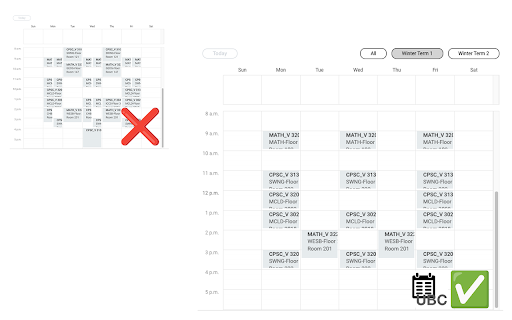
Enables the choice of only viewing your registered courses by Term 1 or Term 2 instead of the full year on the UBC Workday website.… Enables the choice of only viewing your registered courses by Term 1 or Term 2 instead of the full year on the UBC Workday website. Please report any issues on the GitHub!

Workday Schedule Exporter
Adds the functionality to export a course schedule from Workday Adds a button to the (WPI) Workday "View My Courses" page that enables you to download your schedule as a calendar (.ics format) which can then be easily imported into your calendar of choice. Meant for WPI's Workday but it may work with other schools' Workday as well. Usage: 1. Go to Workday (for WPI this is https://wd5.myworkday.com/wpi/) 2. Click "Academics" 3. Click "View My Courses" on the right sidebar under "Planning & Registration" 4. Click the "Download Schedule" button 5. Enjoy your downloaded schedule Steps to import your schedule into Google Calendar: https://support.google.com/calendar/answer/37118 Steps to import your schedule into Apple Calendar: https://support.apple.com/guide/calendar/import-or-export-calendars-icl1023/mac

UBC Workday Hero
A Chrome extension to fetch and display UBC course and professor statistics. A useful chrome extension that anyone can use to get a quick overview of the course they are viewing on UBC Workday, and ease the many Workday headaches. How to use it (easy as 1, 2, 3) : 1. Download the extension from the Chrome Webstore with the link above 2. Click on the extensions button on the top right and pin the extension 3. Click on the extension icon whenever you are on a course page to reveal the stats!

WeBWorKer
Add additional features to WeBWorK like real-time preview, parentheses checker, limited attempts warning, and more! Are you tired of struggling under the weight of countless WeBWorK assignments? WeBWorKer can help by doing the heavy lifting for you! - Real-time formatted preview: Shows a live mathematical preview of your answers as you type them. - Resizable input boxes: Easily expand answer boxes to see your complete expressions. - Parentheses checker: Visual feedback showing if/where you missed parentheses. No more wasted attempts on bracket mistakes! - Variable substitution: Define variables once (automatically from problem text or custom) and reuse them across multiple answer boxes. Press Ctrl+Enter to substitute before submitting. - Enhanced homework table: Automatically fetches and displays problem counts and scores directly in the Homework Sets page. - PDF viewer: Embeds PDF files directly in the page with a convenient "Open in New Tab" option. - Quick Piazza access: Opens Piazza with the question number automatically copied for quick searching. - Online resources: Uses keywords from the question to search the web for videos and learning materials. - Custom query button: Configure your own search URL to learn more about topics covered in a question. - Screenshot tool: Capture and save (or copy) question images for studying or reference. - Clear answers button: Quickly clear all answer boxes with one click and confirmation. - Duplicate submit button: Adds an extra submit button at the top for convenience. - Confirmation dialogue: Warns you before submitting answers when attempts are limited. - Fully customizable: Toggle any feature on/off through the extension settings.

Lean Library
Lean Library is a free end-to-end research tool that brings your library’s services and resources directly into your research workflow, no matter where you start your research. Whether you are discovering and accessing academic content or saving references, Lean Library puts your library right at the heart of every research journey. Instantly and legally unlock millions of academic articles, eBooks, and open access content, avoid paywalls, and receive customised guidance from your library. Save references, highlight and annotate content, get journal alerts, and build information literacy skills with article retraction alerts and trust ratings—all from within your browser. Install the extension, select your institution and begin researching! Even if you aren’t affiliated with an institution, you can still get quick and seamless redirection to open access materials absolutely free by downloading the extension and selecting Lean Library Open as your library. Please note, the Lean Library browser extension works together with Lean Library Workspace. Create an account at workspace.leanlibrary.com. Welcome! Lean Library now includes all your favourite Sciwheel features, plus much more. Install today to get started.
