
hmkomppiapoemokhemmokomenindibjc
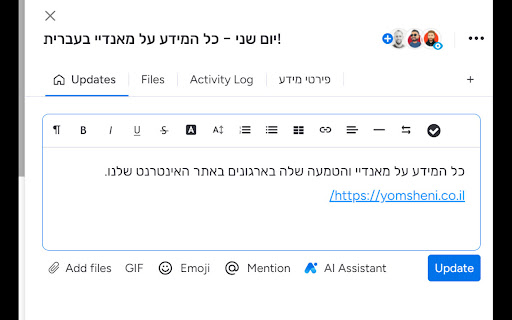
Unlock the potential of your monday.com account for right-to-left languages with the innovative solution offered by yomsheni.co.il.

JONI
Supertool For WhatsApp * Bulk Sender Send personal message to a list of contacts or groups. Use any data field from the list in your message to give it a personal touch * Scheduled Messages Schedule messages for chats with contacts or groups. You can set expiration, cancel on receive and repeat every hour / day / week / month / year * Reminders Schedule a message reminders for follow-ups * Calendar Events Create a calendar event from any message in any calendar (Google, Outlook, Office 365 and any Desktop mail app) * Extensions JONI supports other extensions to integrate with other systems - monday.com, Pipedrive and Salesforce * Quick Replies Increase you productivity by using quick replies and write you messages faster than ever * Notes Attach note for each chat for better chat follow up * Webhook Integrate your systems with JONI to send WhatsApp messages. * Chat By Mobile Start new chat by mobile number, even if it's not stored in your personal contacts * Export Contacts Export any contact, personal contacts and group participants into excel file JONI is an independent software developed by PYROGSS and does not have any business relations with WhatsApp nor monday.com nor Pipedrive nor Salesforce

ClickUp RTL
Transform your ClickUp experience with seamless Right-to-Left (RTL) language support. "Add RTL Support to ClickUp" is a tailor-made Chrome extension designed to enhance usability for RTL language users. This extension intelligently integrates with ClickUp, one of the leading project management tools, to provide a more accessible and user-friendly interface for speakers of Arabic, Hebrew, Persian, Urdu, and other RTL languages. Automatic RTL Adjustment: Automatically detects and adjusts text direction to RTL in ClickUp, ensuring optimal readability and ease of use. Seamless Integration: Works quietly in the background, integrating smoothly with ClickUp's interface without disrupting your workflow. User-Friendly Interface: Enjoy a natural and intuitive text alignment and direction, making your project management tasks more efficient and less stressful. Customized Experience: Tailor your ClickUp experience to suit your language preferences, boosting productivity and focus. Simple Activation: Just install the extension, and it does the rest – no complex settings or configurations needed. Whether you're managing complex projects, tracking tasks, or collaborating with a diverse team, "Add RTL Support to ClickUp" ensures that your language preferences are no longer a barrier. Experience ClickUp like never before – in a way that suits your language needs and preferences. Why Choose This Extension? Developed with a deep understanding of the challenges faced by RTL language users, this extension is more than just a tool – it's a solution to enhance your daily project management experience. With a focus on simplicity, efficiency, and user satisfaction, "Add RTL Support to ClickUp" stands out as an essential add-on for any RTL language professional using ClickUp. Elevate your ClickUp experience. Install "Add RTL Support to ClickUp" today and embrace a more inclusive, productive, and user-friendly project management environment.

Hebrew support for Slack. RTL
Right To Left support for Slack. Hebrew version. This Chrome extension provides full Hebrew language support for the Slack web interface. Designed specifically for users who communicate in Hebrew, it improves message alignment and readability without compromising security. Key Features: - Automatically sets message direction to right-to-left for messages containing Hebrew characters - Dynamically adjusts text direction during typing - Aligns UI elements (avatar, timestamp, actions) according to message direction - Supports formatted messages: lists, bold, links, quotes, code blocks, etc. - Lets users customize Hebrew font from 7 Google fonts - Allows font size customization for better readability Security & Privacy This extension is safe for corporate use. It does not transmit any data to external servers. All settings are stored locally in the browser’s storage. No analytics, no remote code, no data collection. License & Activation This is a one-time paid extension (no subscription). After installation, you can purchase an activation code directly on the welcome page — for the price of two coffees. Permission Justifications - Storage: Required to save user preferences such as selected font and font size. This data remains fully local. - Tabs: Needed to reload the Slack web page after entering the activation code to apply changes. - Host Permission (https://app.slack.com/): Required to apply enhancements and text direction fixes directly to the Slack web interface. Slack sometimes changes the source code of its application. So, in case your extension doesn't work, contact me by email. I will fix it as soon as possible.

MONI
MONI is a JONI extension that creates a bridge between monday.com web app and WhatsApp Web After you add JONI and MONI to chrome you can open WhatsApp chats, create item's and updates for them without leaving your monday.com tab *Click To Chat Open chat by clicking any phone field in your boards or by mobile number *Open Contact's Item Click chat's header to go to contact's item. If contact's item not found MONI will prompt you to create a new item for it *Create Updates Use 'Selection Mode' to create update with selected messages. If contact's item not found MONI will prompt you to create a new item for it MONI is an independent software developed by pYrogss Ltd and does not have any business relations with WhatsApp nor monday.com
