
hikbibjgneeklkchmeaffbeghcnbdcfl
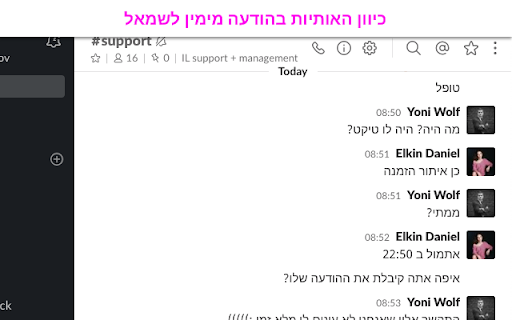
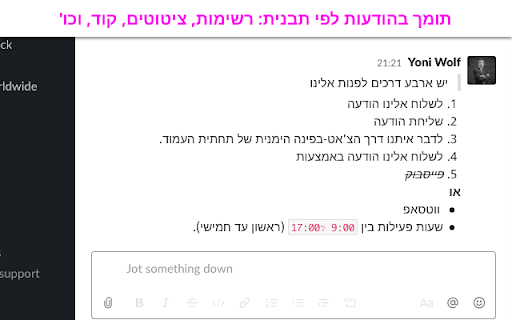
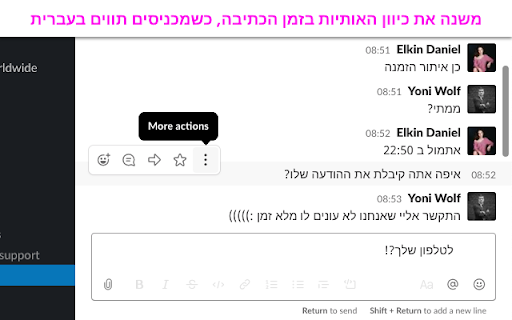
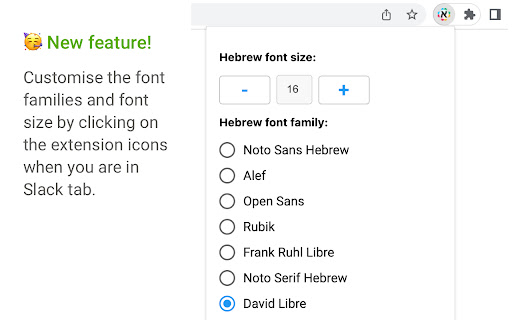
Right To Left support for Slack. Hebrew version. This Chrome extension provides full Hebrew language support for the Slack web interface. Designed specifically for users who communicate in Hebrew, it improves message alignment and readability without compromising security. Key Features: - Automatically sets message direction to right-to-left for messages containing Hebrew characters - Dynamically adjusts text direction during typing - Aligns UI elements (avatar, timestamp, actions) according to message direction - Supports formatted messages: lists, bold, links, quotes, code blocks, etc. - Lets users customize Hebrew font from 7 Google fonts - Allows font size customization for better readability Security & Privacy This extension is safe for corporate use. It does not transmit any data to external servers. All settings are stored locally in the browser’s storage. No analytics, no remote code, no data collection. License & Activation This is a one-time paid extension (no subscription). After installation, you can purchase an activation code directly on the welcome page — for the price of two coffees. Permission Justifications - Storage: Required to save user preferences such as selected font and font size. This data remains fully local. - Tabs: Needed to reload the Slack web page after entering the activation code to apply changes. - Host Permission (https://app.slack.com/): Required to apply enhancements and text direction fixes directly to the Slack web interface. Slack sometimes changes the source code of its application. So, in case your extension doesn't work, contact me by email. I will fix it as soon as possible.

Handz - price comparison made simple
Price history of realestate and vehicle on yad2 website היסטוריית מחירים של דירות למכירה ביד2

Changing text RTL in Google Translate pages
קורה לכם שאתם מתרגמים עמוד שלם בגוגל תרגום לעברית אבל כל הטקסט נשבר בגלל מילים באנגלית ואתם מתחילים לקרוא חצי שורה מהסוף ואז… קורה לכם שאתם מתרגמים עמוד שלם בגוגל תרגום לעברית אבל כל הטקסט נשבר בגלל מילים באנגלית ואתם מתחילים לקרוא חצי שורה מהסוף ואז חוזרים להתחלה ומנסים להבין את ההקשר.... אז זהו - זה נגמר תורידו את התוסף שהופך לכם את כל הטקסט שיהיה מימין לשמאל !!!! כן כן כמו שאתם אוהבים וואו איזה כיף המלצה שלי: תצמידו את התוסף וכל תרגום שאתם עושים עם התוסף של גוגל לחיצה קטנה על התוסף הזה ואתם מסודרים קורה שחוזרים לאנגלית ורוצים את העמוד משמאל לימין ... פשוט מאוד : עוד לחיצה קטנה והופ אתם שם ! יאללה תיהנו

max PayBack Reminder - מקס פייבק
max PayBack - כסף בחזרה על הקניות שלך באינטרנט שוב קנית באינטרנט ושכחת לעבור דרך max PayBack כדי לקבל החזר כספי? לא נורא! תוסף כרום זה יזכיר לך לפני כל קניה באתר הנתמך בשירות הוא יהבהב ויזכיר לך ללחוץ עליו ואנחנו כבר נספור לך את ההחזר הכספי לזכותך. כך שאף החזר כספי לא יתפספס לך! חשוב לזכור להיות תמיד מחוברים לשירות PayBack בדפדפן אחרת לא נדע לזהות אותך.

Gmail Mod
Adds an embedded audio and video player to Gmail for playing audio and video attachments. Gmail Mod adds extra functionality to the Gmail website. The current version has the following features: * Embedded video player for video attachments with file extension .mp4/.webm/.ogv/.mov * Embedded audio player for audio attachments with file extension .wav/mp3/ogg * A settings window where you can enable or disable Gmail Mod features. Note that some files may not play because of an incorrect file extension or unsupported codec by the web browser. THE FUTURE When you have a great idea for the Gmail Mod don't hesitate to leave a comment or send an email to codemeteor@gmail.com. SUPPORT When you need help using the Gmail Mod, leave a comment or send an email to codemeteor@gmail.com. You can also follow us on Twitter @codemeteor or visit https://codemeteor.com. If you want to support this project, please consider making a PayPal donation using the following url https://www.paypal.me/codemeteor You can also find the source code on GitLab https://gitlab.com/codemeteor/gmail-mod.
