
hmdebandhhfnogdbbjhmjkdjhhnephkk
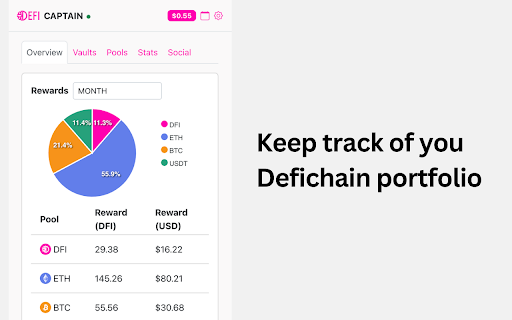

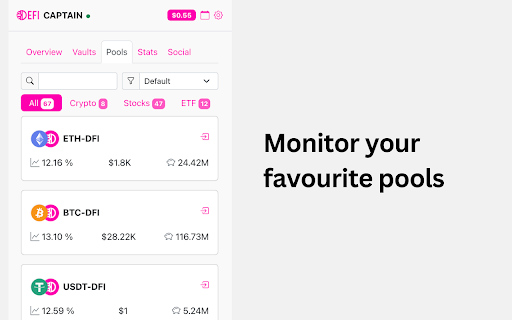

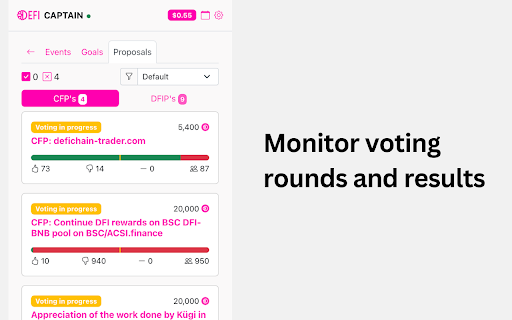
Viewer for DeFichain, showing rewards from liquidity pools, staking, price and much more. Keep track of your DeFi. DeFiChain Captain is All In One tool to allow you viewing and tracking your portfolio in one place. Easily access and view: - view DeFiChain pools (crypto, stocks, ETF) - view your rewards in multiple currencies - monitor your vaults - view DFI price - stay up to date with built in DeFiChain calendar of upcoming events - view your earnings and switch between minute/hour/day/month/year - stay up to date with latests podcast episodes DISCLAIMER: Calculations are estimates and does not represent 100% accuracy.

Satsback.com
Earn free bitcoin rewards when you shop online at more than 10K merchants worldwide. Satsback.com helps you earn bitcoin on your everyday online purchases at thousands of participating merchants worldwide. Simply install the extension, create (or log in to) your free Satsback.com account, and shop as usual. Whenever you visit a participating store, you’ll see a prompt to activate your bitcoin rewards. How it works: 1. Install and pin the Satsback.com extension in your Chrome browser. 2. Create an account or log in at Satsback.com. 3. Shop as usual—our extension will notify you when bitcoin rewards are available. 4. Earn a percentage of your purchase back in bitcoin, credited to your Satsback.com dashboard. Key benefits: • Automatic alerts for eligible stores. • Fast and flexible bitcoin Lightning withdrawals. • Access to thousands of global merchants across many categories. Why Use Satsback.com? • Turn routine shopping into an opportunity to accumulate bitcoin over time. • Support a global network of merchants offering real value-back rewards. • Enjoy a transparent earning process with no hidden fees or gimmicks. Note: Satsback.com does not provide financial advice, nor do we guarantee any specific outcome. Reward rates may vary by merchant and are subject to change. Install the Satsback.com extension now and start earning bitcoin on your next online purchase!

Sports Social Feed
This extension makes your web browsing much easier and comfortable by helping you simply read sports social feeds in your city. By clicking “ADD TO CHROME”, you accept and agree to install the Sports Social Feeds Chrome Extension, set the Chrome™ New Tab search to Yahoo, and to the Terms of Use, and Privacy Policy. The extension requests the following permission: - Can read and change your data on sites: http://sports-newz.com/ Terms of Use: http://sports-newz.com/pages/terms-of-use.html Privacy Policy: https://sports-newz.com/pages/privacy-policy.html About us: https://sports-newz.com/pages/about-us.html Contact us: https://sports-newz.com/pages/contact.html Get the latest sports social feed and updates right at your homepage! Enjoy an easy-to-use sports-oriented homepage that keeps you connected and up to date with access to top sports social feeds from all over the world right from your browser homepage. Stay up to date with sports news while enjoying a rich search experience and social networks shortcuts. For easy access, we recommend pinning the extension to your browser toolbar. You may uninstall the extension at any time. To remove our extension from Google Chrome: 1) Click on the three vertical dots icon in the upper right-hand corner of your Chrome browser. 2) Go to "Settings.” 3) In the left menu that appears, click on "Extensions.” 4) From the list of installed Extensions, locate the extension you would like to uninstall.

Blockchair
Block explorer and anonymous crypto portfolio tracker for Bitcoin, Ethereum, and others in your browser Blockchair extension provides you the fastest way to search among data stored on 17 blockchains and lets you anonymously monitor your crypto portfolio and respond fast to price changes. Blockchain Search Embed the most private search engine for 17 blockchains, including Bitcoin, Ethereum, Ripple, Bitcoin Cash, Litecoin, and 12 others. It allows you to search for transactions, addresses, blocks, and even the embedded text data. Discover all blockchains we support via link: https://blockchair.com/about On-click Blockchain Explorer The extension sets Blockchair as the default block explorer. This feature highlights the transactions and addresses on any page you visit. Simply click on the blue highlighted phrase to access the page on Blockchair showing you the transaction/address details. You can disable the feature via the second toggle in the extension window. Crypto Price Tracker Track prices and the 24h price change for the most popular cryptocurrencies. Select the coin in the extension icon to see their value in USD in Chrome’s top bar. The prices are showing the value of crypto in USD. Portfolio Tracker Blockchair allows you to anonymously and privately track the price changes of your crypto assets in one place. If your coins are scattered around different wallets and exchanges, the Portfolio tracker feature is perfect for you. It allows you to monitor the overall performance and quickly react to 24h price changes. Add, remove, and manage your assets by clicking on the > button. Download the extension today for the easiest access to blockchain data and your portfolio changes. — About privacy — For the purpose of providing you with the search and access to specific blockchain data, crypto prices, and 24h price changes, the extension needs to be granted the following permissions: tabs - permission to open new tabs in your browser when you search for specific blockchain information; activeTab - permission that allows the analysis and identification of the address and transaction hashes for the On-click Blockchain Explorer feature. We do not store, analyze, nor send this information either to our or third-party servers. contextMenus - we add items to the context menu of the browser. You can select any phrase or a text and search for it directly in Blockchair explorer. storage - for the local data storage of your portfolio. We do not store, analyze, nor send this information either to our or third-party servers. For more information regarding our data collection, please review our general privacy policy before you install our add-on, available here: https://blockchair.com/privacy

DeFi Saver Gas Prices Extension
Ethereum gas prices extension with dark and light modes and 7-day historical data. Ethereum gas prices extension with EIP-1559 support, dark and light modes, historical average gas prices chart and custom notifications. The default price shown on the extension badge is the base fee, as introduced with EIP-1559, though users can still switch to the legacy (Type 0) view. Features include: - EIP-1559 support with current base fee and priority fee (miner tip) suggestions - Refreshes every minute automatically or continuously while opened - Chart of average gas prices in the last 24 hours, 7 days or month - Dark (default) and light modes - No user tracking or data collection - Configurable gas price notifications Suggestions and all feedback is always welcome - please don't hesitate to reach out to us.
