
hmcafagfodljgndoicfhobgnlampagmk
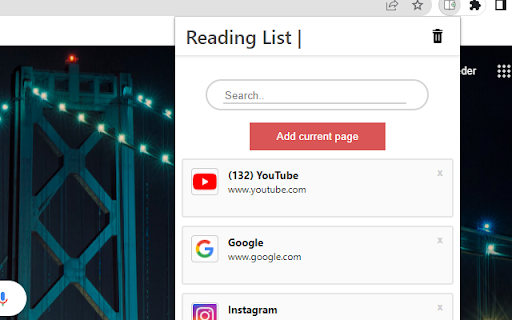

The Expanded Reading list helps you to store links to wepsites for a later use This exstention saves links to pages for a later use. This readinglist and bookmark exstention is simple and easy to use. You can easily find the link you are looking for by using the search functionality, which helps keep your tab count down. By turning on chrome synchronization your saved links from one device will be automaticly be shown to you on all your devices. How to use the exstention: 1. Go to the page youn want to save for later 2. Open the exstention by clicking on the icon in the top right of your browser. 3. Click the add current page button. 4. When you want to open a page, click the reading item you want to read. (If you cannot find it, you can use the search bar) 5. When you are done with a page, just click the - X - in the right cornor of the reading item

Chrome Reading List 2 ❤
Google Chrome Extension to keep track of your readinglist. Add pages or links to your readinglist for later reading. Review your readinglist from the extension popup in the top right corner of your screen. When signed in, the readinglist can be synced to your account, so you can use it on other devices as well. Read an item by clicking on the item in the popup. This will remove the item from the list, reducing the length of the readinglist with each click. Find a readinglist item by filtering or sorting, or just pick a random readinglist item by clicking the 'random' button. If you have any questions or suggestions, please don't hesitate to contact me. You can contact me through the support section of this plugin in the Chrome web store. NOTE: this extension is free of charge and does not contain any ads. Permission needed for: - bookmarks: we store all reading list items in a separate bookmarks folder. This will also enable auto syncing when signing into Chrome - tabs: when adding a reading list item, we need to read the url and the title of the active tab - storage: remember filters, so next time you open the extension, it looks exactly like you left it previously

Save for Later - The Bookmarking Tool
Save for Later - The Bookmarking Tool Save for Later is your personal web curator, a Chrome extension designed to transform the way… Save for Later - The Bookmarking Tool Save for Later is your personal web curator, a Chrome extension designed to transform the way you save and manage online content. Gone are the days of cluttered bookmarks and forgotten web pages. With Save for Later, you can effortlessly tag and save interesting articles, must-watch videos, and any online resources you stumble upon, all with the convenience of a single click! Why Choose Save for Later? 📌 Simple & Intuitive: Save web pages with custom tags that make organization a breeze. 📖 Automatic Title Capture: No more guessing games – each saved link comes with its page title for easy identification. 🏷️ Custom Tags: Assign tags to your saved links for efficient management and retrieval. 🗑️ Selective Delete: Finished with an article? Remove it from your list without affecting the rest, or clear everything if you're starting anew. 🔍 At-a-Glance Viewing: Quickly access your saved pages, complete with titles and tags, all within a clean, user-friendly interface. For the Curious Minds and Avid Readers Whether you're researching a topic for work, gathering resources for study, or simply saving articles for your evening read, Save for Later provides a hassle-free way to keep your content organized and accessible. We believe in user privacy. That's why Save for Later runs locally on your browser without the need for an account or cloud syncing. Your data, your rules.

Read It Later
Save pages to read later and quickly open your list. Save articles, videos, and webpages in one click to revisit later. Read It Later sits in the omnibox and keeps keeps your reading list organized and accessible—right from your Chrome toolbar. One-click save — capture the current tab instantly Quick access — open your list from the toolbar or via keyboard shortcuts Stay organized — keep track of what you want to read or watch later Export your reading list -- Export your saved articles as a CSV file. Customizable — choose your theme, shortcut keys, and display options Whether you’re collecting research, saving recipes, or bookmarking long reads, Read It Later helps you stay focused now and come back when you’re ready.

Read Later Tab
Read Later Tab helps to make progress with your read later bookmarks Do you have a habit of saving bookmarks for later reading but never get around to them? Do you wish you could organize your bookmarks better and access them faster? If so, Read Later Tab is the perfect extension for you. Read Later Tab is a new tab extension that helps you take control of your bookmarks. It automatically displays your “read later” folder on every new tab, so you can easily see what you have saved and open them with one click. You can also quickly delete your bookmarks from the same page. With Read Later Tab, you will never lose track of your bookmarks again. You will be able to read more articles, learn new things, and enjoy your online browsing experience. Try it today and see the difference! Features: - Select a bookmark folder to show quick access links like email, community sites etc. - Select a bookmark folder where you keep the "Read Later" links and get reminded about it every time you open a new tab - Randomly open "Read Later" website if you don't know where to start
