
kdapifmgfmpofpeoehdelijjcdpmgdja

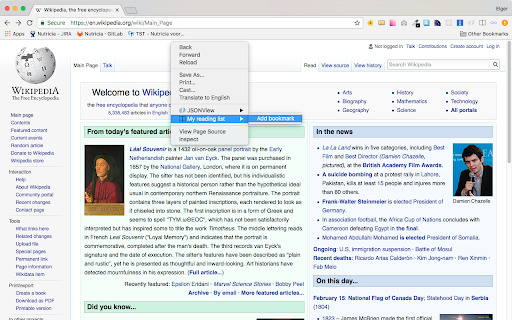
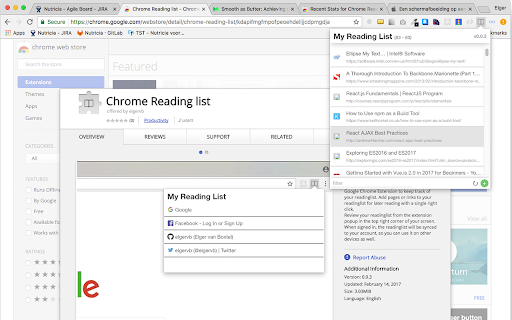
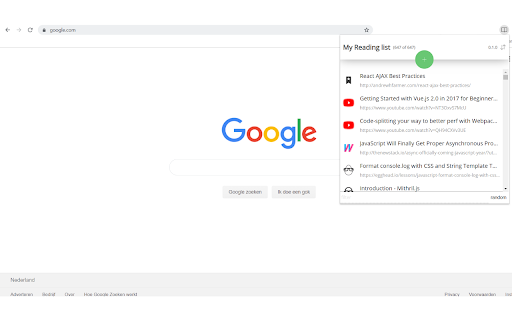
Google Chrome Extension to keep track of your readinglist. Add pages or links to your readinglist for later reading. Review your readinglist from the extension popup in the top right corner of your screen. When signed in, the readinglist can be synced to your account, so you can use it on other devices as well. Read an item by clicking on the item in the popup. This will remove the item from the list, reducing the length of the readinglist with each click. Find a readinglist item by filtering or sorting, or just pick a random readinglist item by clicking the 'random' button. If you have any questions or suggestions, please don't hesitate to contact me. You can contact me through the support section of this plugin in the Chrome web store. NOTE: this extension is free of charge and does not contain any ads. Permission needed for: - bookmarks: we store all reading list items in a separate bookmarks folder. This will also enable auto syncing when signing into Chrome - tabs: when adding a reading list item, we need to read the url and the title of the active tab - storage: remember filters, so next time you open the extension, it looks exactly like you left it previously

Bookmarks HotList
A Speed Dial in your toolbar, with easy set-up and keyboard shortcuts Set up your HotList in the Bookmark Manager, access it from the toolbar in a choice of layouts and colours. For keyboard access, the default shortcut to open the extension is Alt+B (or Command+B). To change the shortcut, paste this into the address bar: chrome://extensions/shortcuts When the extension is open, shortcut keys (1-9 and A-Z) are available for each bookmark. Hold down the Space Bar to reveal hints. Open multiple tabs: 1 click will open a bookmark in a background tab, but the Popup stays open. A 2nd click on that bookmark will close the Popup and activate the tab, or you can open other bookmarks instead. The only automated modification to your bookmarks will be the creation of a new folder to contain those displayed by this extension, and a bookmark to get you started. The Star icon is “Actions bookmark new list Icon” by Oxygen Team, available from Icon Archive under the GNU Lesser General Public License: http://www.iconarchive.com/show/oxygen-icons-by-oxygen-icons.org/Actions-bookmark-new-list-icon.html Icons used in promotional images are in the public domain and available from http://paomedia.github.io/small-n-flat/

Read Later
Store links to read later, organize tabs and windows # ReadLater: The Ultimate Tab Manager & Reading List Lost a tab in another window again? We've all been there. With multiple projects and endless interesting articles, your browser quickly becomes a maze of tabs spread across different windows. Important work gets buried, your computer slows down, and your "read later" pile just keeps growing. ReadLater is a powerful two-in-one solution to conquer browser chaos. It combines a simple, syncable reading list with a brand-new Tab Manager that gives you a complete overview of everything you have open right now. # ✨ Meet Your New Command Center: The Open Tab Manager This is the feature you've been waiting for. Our revolutionary new Tab Manager gives you a bird's-eye view of your entire browser session. Now you can: See Everything in One Place: Get a clean, organized list of every single tab you have open across all your Chrome windows. No more hunting! Find Tabs Instantly: Quickly search, sort, and filter your open tabs by title or URL to find the exact page you need in seconds. Save with Precision: Add individual tabs to your reading list, or save an entire window's worth of links with a single click. It's the ultimate tool for session management and research. And the Perfect Reading List for Later Once you've organized your active tabs, ReadLater excels as your temporary inbox for things you want to read soon. One-Click Saving: Instantly save any page to your reading list with a click of the icon or the handy keyboard shortcut (Ctrl+Shift+Y). Declutter Your Browser: Close tabs confidently. Your reading list is a dedicated, clutter-free space for content, separate from your permanent bookmarks. Syncs Everywhere: Your reading list is automatically synced across all your Chrome browsers. Pick up right where you left off, on any device. # Getting Started To get the full power of ReadLater, make sure you're logged into your Google account in Chrome and have extension syncing enabled. You can check your settings here: chrome://settings/syncSetup. This ensures your reading list and settings are always backed up and available. Stop just saving links for later—take control of what's open right now. Install ReadLater today for a faster, more organized browsing experience! # Change Log: 5.0.0 ----- Updated keyboard shortcut to "Ctrl + Shift + Y" Added an "Open Tabs" section to the options page that lists tabs from all windows. Features: search/filter, sortable columns (Title, URL, Window), per-tab "Add" button, "Add All Tabs" and "Refresh Tabs". Window names are derived from each window's active tab title for easier identification. UI/Files affected: src/tab.html, src/tab.js, src/tab.css. Removed persistent identity permission from the manifest; identity is now requested on-demand (via runtime request) or surfaced as a CTA to open Chrome People/Sync settings. Added a Permissions panel to the options page showing declared and granted permissions with short descriptions. Added background service worker (background.js) to handle the keyboard command for adding the current page. Changed suggested keyboard shortcut to Ctrl+Shift+Y (and platform equivalents) to avoid conflicts; remind users they can reassign under chrome://extensions/shortcuts. Manifest now includes the "tabs" permission required for the new Open Tabs UI. UI/Files affected: src/manifest.json, src/tab.html, src/tab.js, src/tab.css, src/background.js. Fixed a small syntax bug in download JSON generation (missing parenthesis) that prevented the options script from executing. Minor UX tweaks: "Clear saved links" button wired to the existing clear handler and the saved/tabs lists refresh after clearing. Files: src/tab.js, src/core.js, src/tab.html. 4.0.3 ----- Allow backward compatibility with URL's not having timestamp. 1. Add URLs using keyboard shortcut Ctrl+Shift+L 2. Cleaner API for managing storage. 3. Enhanced permissions. 4. Export URL's as JSON. Thanks to Alexander Kashev for contributions. 3.0.1 ------ Added badge to the icon to show total stored links. 2.0.1 ----- New Slick UI thanks to Johny Jose Icons and Shorter titles for links thanks FrelEsquif 1.0.1 -------- 1. Support adding more than 31 links, max limit 512 2. Duplicate links not allowed 3. Data structure for saving links changed. Each link is saved as key value pair in the sync storage as opposed to the earlier version where all links were stored in an array. 4. UI bug regarding Message box changed. ----------------------------------------------------------------- This is a google chrome extension for saving links for later reading. All the links are synced across all the google chrome browsers you are logged into. Download at: https://github.com/downloads/napsternxg/ReadLater/ReadLater.zip Source Code at: https://github.com/napsternxg/ReadLater FAQ at: http://smexyyweby.wordpress.com/readlater/

TempoGrid
TempoGrid: Open, Flat, Snappy. Clarity and perspective for your tabs. Shape your browsing to reflect your rhythm, with defined pane layouts and color themes that feel right. Set your tempo. Your tabs, in tune. CAUTION: In Chrome 145, updates to tab groups are not applied immediately. This issue is scheduled for a fix in Chrome 146, and there is no workaround available. Please wait until then. https://issues.chromium.org/issues/483537691 - Cross-Search all your resources: bookmarks, open tabs, history, and recently closed tabs. - Utilize window titles to simulate nested tab groups, providing superior hierarchical organization. - Instantly find the matching tab upon opening a bookmark, using URL prefix or domain matching. - Pin any window to the top or bottom of your screen. - Move a window to the latest position/order. - Multi-Select items via the main menu, long press item, or Ctrl+Shift shortcut. - Toggle between List and Icon views for all open tabs. - Bookmark flat-view: Flatten any folder to view all its nested bookmarks in a single, unified list. - Supports multi-line display and language-specific hyphenation. - Easily reorder and resize all resource panes. - Smart-wider the pane width simply by mousing over it (Optional). - Synchronize settings across all devices using Chrome Sync. - Customize your workspace with your favorite color themes. v0.27.4 (May 30, 2026) ================== Added “Add Tab” button and remove the “Add New Tab” option from the menu. Fixed a bug where the history was not updating during searches. v0.27.3 (May 19, 2026) ================== Added text settings for base size and contrast. v0.27.2 (May 4, 2026) ================== Refined the color scheme and appearance of bookmark folders in Flat View. v0.27.1 (Apr 30, 2026) ================== Fixed a bug where bookmark features did not work correctly when the settings page was open. Refined the appearance of the active tab in the dark theme. v0.27.0 (Apr 20, 2026) ================== Added a font family setting option. Fixed a bug where “Recent Tabs” was not displayed in pop-up mode. Fixed a bug where opening and closing “Tab Groups” was not reflected in pop-up mode. v0.25.1 (Apr 15, 2026) ================== We identified an environment‑specific issue in the latest release v.0.25 and have rolled back the update. v0.24.7 (Apr 4, 2026) ================== Fixed an issue where the display refreshed immediately after deleting the history items. v0.24.5.5 (Feb 6, 2026) ================== Fixed a bug where the number of lines for multi-line could not be set independently. v0.24.5.4 (Feb 2, 2026) ================== Fixed an issue where drag-and-dropping a window to a new window would cause the tab group to disappear on Linux (KDE). v0.24.5 (Jan 12, 2026) ================== - Added an option to limit text display to 2–4 lines or show it in full for long strings. - Added an option display language. - Improved to display tooltips for open tabs in icon view mode up to a maximum of 3 lines. v0.24.0 (Dec 19, 2025) ================== UI/UX improvements for bookmark management. - Added bookmarks flat-view. - Added a "New Folder" button with Drag & Drop functionality. - Introduced a Trash folder to prevent accidental bookmark deletion. - Enabled date and time placeholders (e.g., {yyyy}-{MM}) for automatic folder naming. v0.23.11 (Nov 21, 2025) ================== Fixed a bug with bulk deletion of history items when multiple items were selected. v0.23.10 (Nov 9, 2025) ================== Improved: - Restored focus to the previously focused window after closing the active window. - Prevented unnecessary screen refreshes when updating bookmark. v0.22.0 (March 7, 2025) ================== - Added window mode - Added a recent-tabs pane - Change app name and icon v0.21.14 (Nov 8, 2023) ================== Fixed a bug that the bookmark/folder menu display to cut off outside of screen. v0.21.13 (Mar 2, 2023) ================== Fixed a bug that broke the UI of new window button when window sort order was descending. Fixed a bug that the UI of new window button was broken when window sort order was descending. v0.21.11 (Feb 21, 2023) ================== - Fixed a bug that drag-and-drop from history to window of tabs did not work. - Fixed a bug in search that tabs are always searched for title and URL. v0.21.7 (Feb 4, 2023) ================== - Added a menu in main menu for bookmarking from link text. - Modified the bookmark button[☆] works as drag and drop for current tab. v0.21.5 (Jan 30, 2023) ================== Fixed a bug that the submenu display to cut off outside of screen. v0.21.4 (Jan 27, 2023) ================== Fixed a bug in v0.21.0 that caused drag & drop of multiple selections to fail after opening the main menu. v0.21.2 (Jan 24, 2023) ================== Fixed a bug in the tab highlighting function on bookmark mouse-over where URL prefix matching was not performed when the URL contained characters that require escaping in HTML, such as "&". v0.21.0 (Jan 22, 2023) ================== - Added recently closed tabs/windows in history. Up to 25 tabs/windows are displayed. Please accept "sessions" permissions. - Added pin a window to the top or bottom of open-tabs pane. - Added save your favorite color themes. It can be rotated with the main menu or F2+shift key. v0.20.0 (Dec 28, 2022) ================== - Added mouse over a bookmark to highlight the tabs with the matching URL and select them with mouse wheel. - Added search history. The value is stored when the popup is closed. To show, click on the search box or press the arrow down key. - Added display of number of searches in tabs. - Added a button to scroll the current tab and highlight it. v0.18.4 (Nov 11, 2022) ================== - Added bookmarks and folders panes are flippable. - Added pane to always resizable. v0.18.1 (Nov 3, 2022) ================== Allow incognito window/tab drag-and-drop to new window. v0.18.0 (Oct 28, 2022) ================== Added a button/drag-and-drop area to open a new window. It can also change the order of chrome windows. v0.17.0 (Sep 22, 2022) =================== - Added memorize last search words. - Migrated to Manifest V3 and now requires Chrome 105 or higher. v0.16.2 (Jun 9, 2022) =================== Added option to not exclusively open the bookmarks folder tree and to keep the state. v0.15.2 (May 24, 2022) =================== Added folder menu to open all bookmarks in the folder in a new window. v0.15.0 (May 22, 2022) =================== - NEW: Added a button to scroll to next/previous window in open tabs pane. - Added a margin to the right of the scrollbar when in Xen mode that does not released it. v0.9.0 (Apr 10, 2022) ================= - NEW: Drag & drop functions for tabs and history pane. - NEW: Color schema settings - Modified faster history search using cache. NEW: - History and open tabs panes. DISCONTINUED: - Chrome Extensions, Chrome Apps, and Google Bookmarks folders. - Window mode.

Save for later
Save for later is a simple web extension used to save all your tabs in a clean and organised manner to be used at any time later. Key features: ✔️ Save multiple tabs in a single save ✔️ Select tabs in open Window for more control ✔️ Saved sessions are available to be opened in single click ✔️ Edit Saves to have a memorable name ✔️ Delete used session when you’ve finished using them ✔️ Open individual links within a save View the source code and contribute to this open source project at: https://github.com/allen505/save-for-later
